ENGLISH
ENGLISH
Getting StartedConnectionsTroubleshootingSpecifications
Turning the power on
Operation
n
Setting the power to the standby mode:
Press [POWER].
Loading discs
n
To close the disc tray:
Press <2/5> again or press [5].
Setting the layer to be played with priority
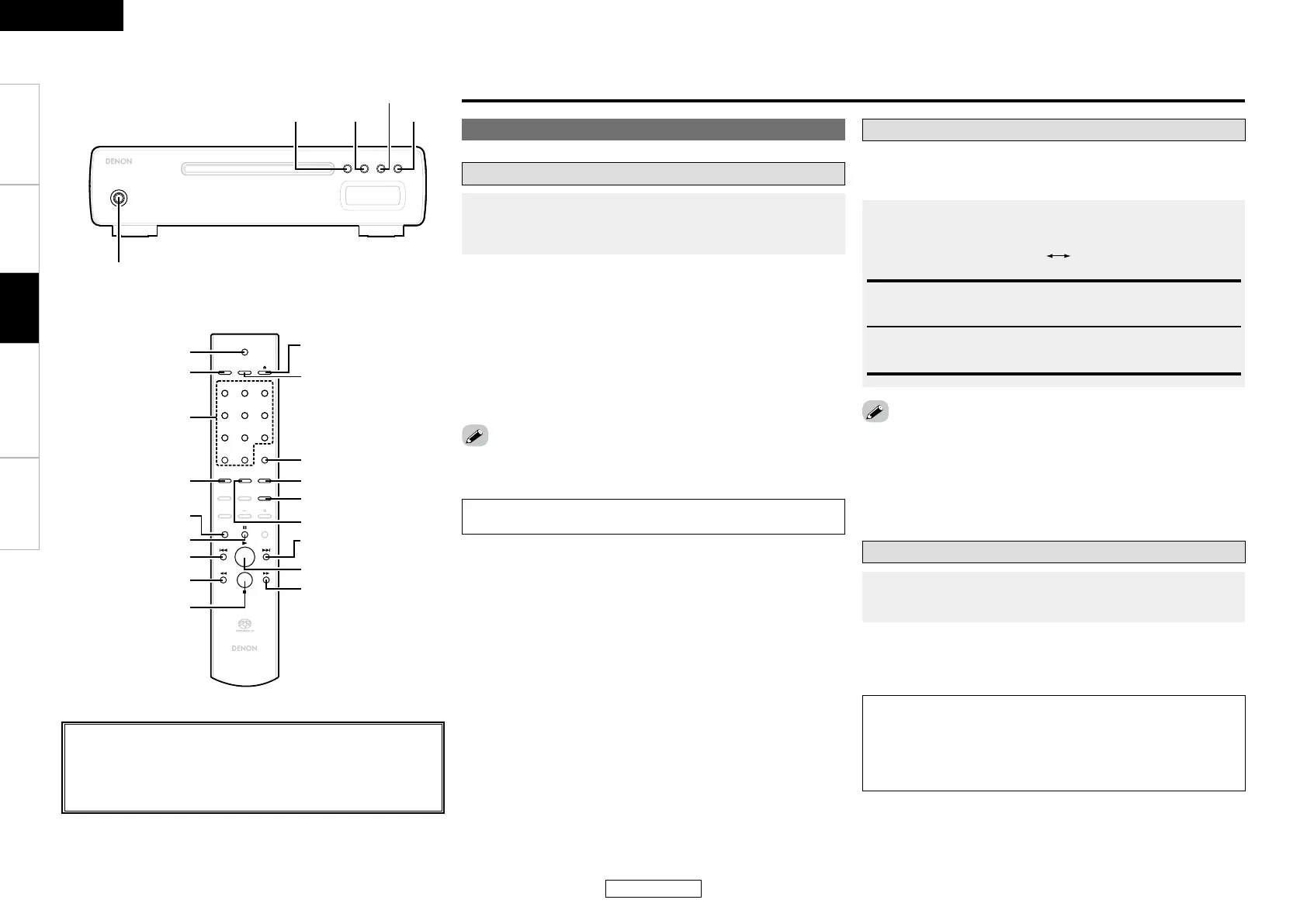
<ON/STANDBY / OFF>
<
2
/
5
>
<
1
/
3
>
8
9
POWER
3$
DIRECT
PROGRAM
CALL
CLEAR
1 2 3
4 5 6
7 8 9
+100
DIMMER
PURE
DIRECT
TIMEARTISTTITLE
FOLDER
MODE
FOLDER
RANDOM REPEAT
SUPER
AUDIO CD
SETUP
3$
RANDOM REPEAT
[NUMBER]
(0~9, +10)
[SUPER AUDIO
CD SETUP]
[CLEAR]
[PURE DIRECT]
[TIME]
[DIMMER]
[CALL]
[POWER]
[DIRECT/
PROGRAM]
[
5
]
[
1
]
[
2
]
9
[
7
]
8
[
6
]
[RANDOM]
[
3
]
n
Canceling the standby mode:
Press [POWER] again.
n
Turning the power off:
Press <ON/STANDBY / OFF>.
• Power indicator
Power on ∙∙∙∙∙∙∙∙∙∙∙∙∙∙∙∙∙∙∙∙∙∙∙∙∙ Red Standby ∙∙∙∙∙∙∙∙∙∙∙∙∙∙∙∙∙∙∙∙ Orange
• This setting is stored in the DCD-CX3’s memory and is not canceled
even when the disc tray is opened or closed or the power is turned
on or off. To change the setting, perform the above procedure
again.
• The priority layer cannot be set when a disc is loaded or when
“OPEN” is displayed.
Before playing
• The layer that is played with priority when the disc is loaded can be
set.
• Upon purchase, the priority layer is set to the “SA-CD”.
Operation
Press <ON/STANDBY / OFF>.
• When a disc is loaded, playback starts automatically.
• When no disc is loaded, “NO DISC” is displayed.
NOTE:
• Be sure to stop playback before turning the power off.
With “NO DISC” displayed, press [SUPER AUDIO CD
SETUP] to switch the layer.
SA-CD:
The SA-CD layer mode for Super Audio CDs
CD:
The CD layer mode for Super Audio CDs
In the stop mode, press <2/5> or [5] to open the disc
tray.
NOTE:
• The power must be on when opening and closing the disc tray.
• Do not push the disc tray in by hand when the power is off. Doing
so can damage it.
• Do not insert foreign objects into the disc tray. Doing so will
damage it.
About the button names in these explanations
< > : Buttons on the main unit
[ ] : Buttons on the remote control unit
Button name only:
Buttons on the main unit and remote control unit


 To Next Page