EasyManua.ls Logo

Denon DCM-340 - Disassembly

Denon DCM-340
38 pages
Print Icon
To Next Page IconTo Next Page
To Previous Page IconTo Previous Page
Loading...
DCM
-440/340
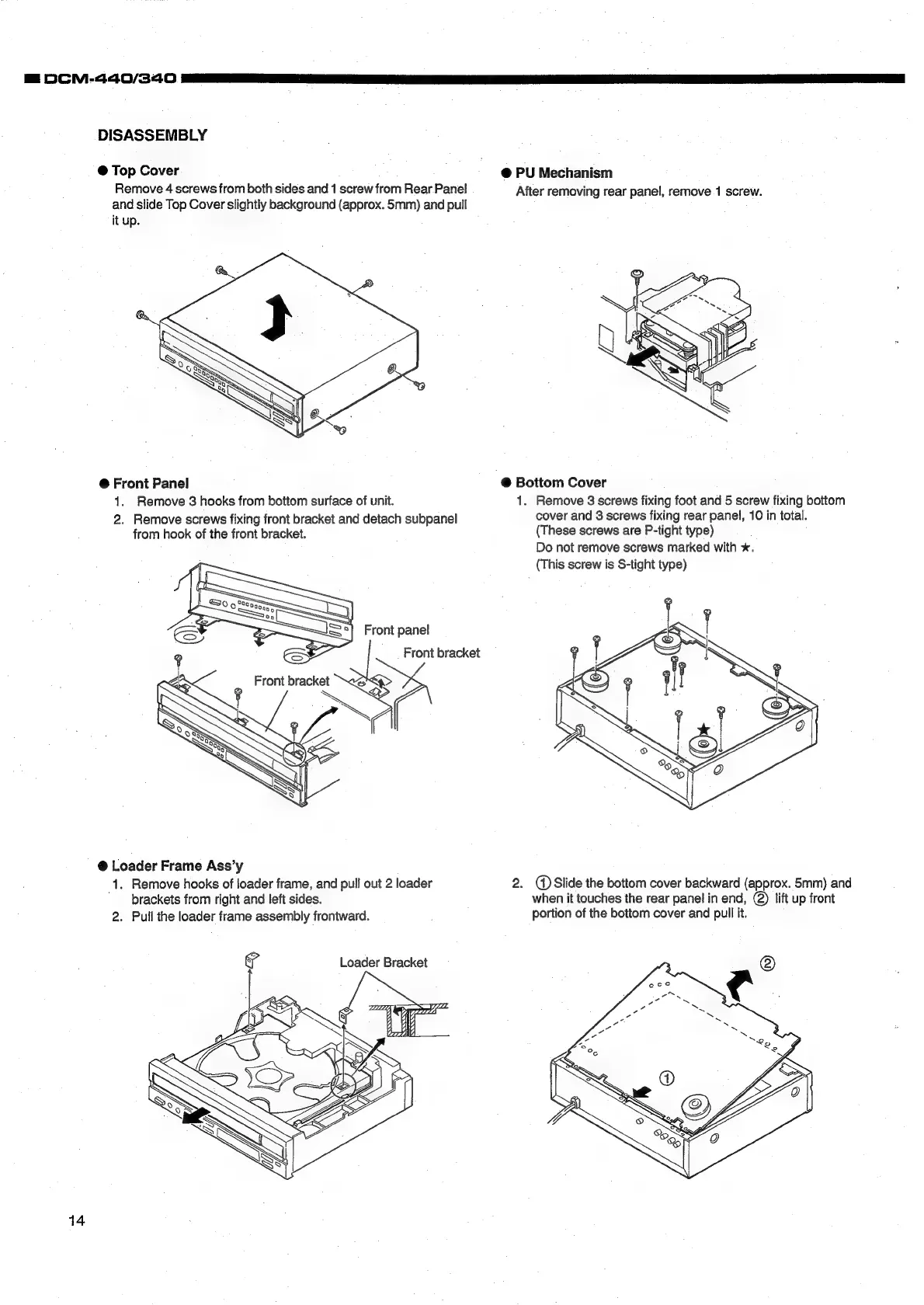
DISASSEMBLY
@
Top
Cover
_
@
PU
Mechanism
Remove
4
screws
from
both
sides
and
1
screw
from
Rear
Panel
After
removing
rear
panel,
remove
1
screw.
and
slide
Top
Cover
slightly
background
(approx.
5mm)
and
pull
it
up.
@
Front
Panel
@
Bottom
Cover
1.
Remove
3
hooks
from
bottom
surface
of
unit.
1.
Remove
3
screws
fixing
foot
and
5
screw
fixing
bottom
2.
Remove
screws
fixing
front
bracket
and
detach
subpanel
cover
and
3
screws
fixing
rear
panel,
10
in
total.
from
hook
of
the
front
bracket.
(These
screws
are
P-tight
type)
Do
not
remove
screws
marked
with
*.
(This
screw
is
S-tight
type)
Front
bracket
eS
@
Loader
Frame
Ass’y
1.
Remove
hooks
of
loader
frame,
and
pull
out
2
loader
2.
(Slide
the
bottom
cover
backward
(approx.
5mm)
and
brackets
from
right
and
left
sides.
when
it
touches
the
rear
panel
in
end,
@)
lift
up
front
2.
Pull
the
loader
frame
assembly
frontward.
portion
of
the
bottom
cover
and
pull
it.
Loader
Bracket
14

Related product manuals