EasyManua.ls Logo

Denon DCM-340 - Adjustment

Denon DCM-340
38 pages
Print Icon
To Next Page IconTo Next Page
To Previous Page IconTo Previous Page
Loading...
9
a
EIT
DCM
-440/340
@
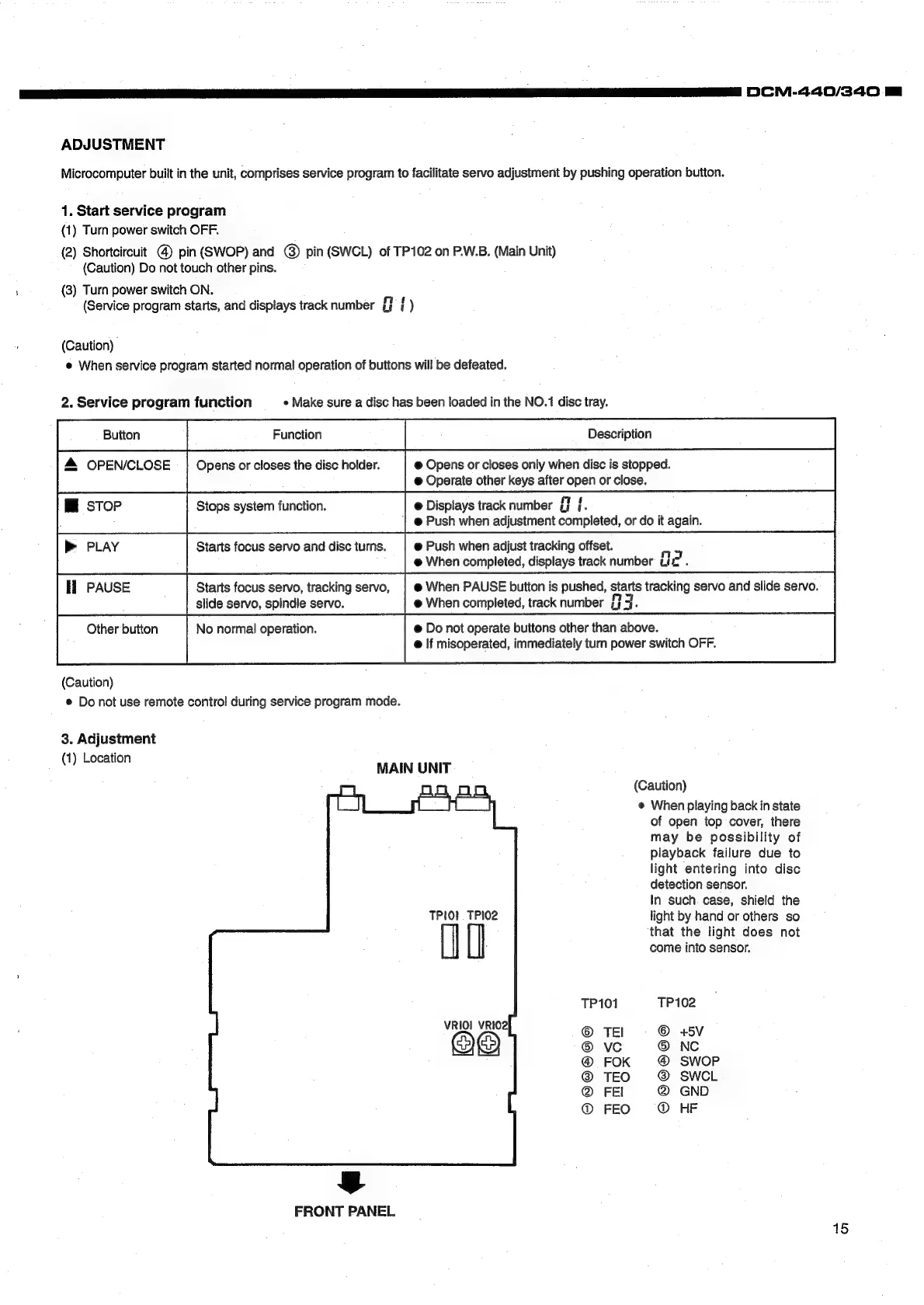
ADJUSTMENT
Microcomputer
built
in
the
unit,
comprises
service
program
to
facilitate
servo
adjustment
by
pushing
operation
button.
1.
Start
service
program
(1)
Turn
power
switch
OFF.
(2)
Shortcircuit
@
pin
(SWOP)
and
@)
pin
(SWCL)
of
TP102
on
P.W.B.
(Main
Unit)
(Caution)
Do
not
touch
other
pins.
(3)
Turn
power
switch
ON.
(Service
program
starts,
and
displays
track
number
ai
)
(Caution)
@
When
service
program
started
normal
operation
of
buttons
will
be
defeated.
2.
Service
program
function
«
Make
sure
a
disc
has
been
loaded
in
the
NO.1
disc
tray.
a
&
OPEN/CLOSE
Opens
or
closes
the
disc
holder.
@
Opens
or
closes
only
when
disc
is
stopped.
@
Operate
other
keys
after
open
or
close.
Mi
stop
Stops
system
function.
@
Displays
track
number
{f
{.
,
;
@
Push
when
adjustment
completed,
or
do
it
again.
>
PLAY
Starts
focus
servo
and
disc
turns.
@
Push
when
adjust
tracking
offset.
AS
@
When
completed,
displays
track
number
Lic
.
Il
PAUSE
Starts
focus
servo,
tracking
servo,
|
@
When
PAUSE
button
is
pushed,
starts
tracking
servo
and
slide
servo.
:
slide
servo,
spindle
servo.
@
When
completed,
track
number
{7
J.
Other
button
No
normal
operation.
@
Do
not
operate
buttons
other
than
above.
@
If
misoperated,
immediately
turn
power
switch
OFF.
(Caution)
©
Do
not
use
remote
control
during
service
program
mode.
3.
Adjustment
(1)
Location
MAIN
UNIT
(Caution)
@
When
playing
back
in
state
of
open
top
cover,
there
may
be
possibility
of
piayback
failure
due
to
light
entering
into
disc
detection
sensor.
In
such.
case,
shield
the
light
by
hand
or
others
so
that
the
light
does
not
come
into
sensor.
TPIO!
TPI02
UO
TP101
TP102
©
TEl
©
+5V
®
vc
®
NC
FOK
SWOP
@
TEO
SWCL
@
FEI
@
GND
@
FEO
@
HF
=@
FRONT
PANEL
15

Related product manuals