o
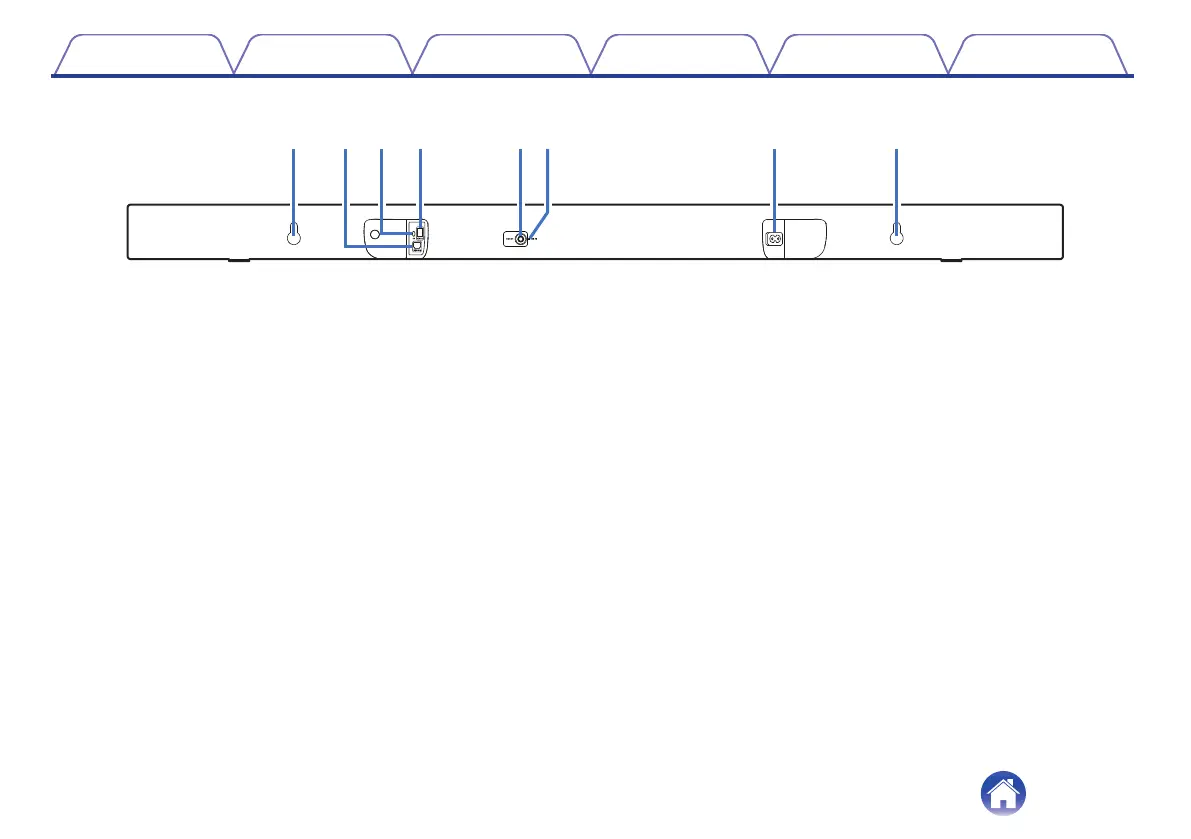
Rear panel
.
A
Wall hook hole
Used to mount the sound bar on a wall. (v p. 14)
B
HDMI connector (TV (ARC))
Use the included HDMI cable to connect an ARC function-compatible
TV. (v p. 17)
C
AUX audio input connector
Use a commercially available 3.5 mm stereo audio cable to connect an
audio device. (v p. 19)
D
Optical digital input connector (TV OPTICAL)
Use the included optical digital cable to connect a TV with an optical
digital terminal. (v p. 18)
E
RESET button
Used to reset to the default settings. (v p. 36)
F
Wi-Fi LED (WI-FI)
0
When the Wi-Fi connection is complete, the LED will turn solid.
0
Resetting the factory setting, the LED will blink 3 times.
G
AC inlet
Used to connect the power cord. (v p. 20)
Contents Connections Playback Settings Tips Appendix
9



 To Next Page