13
ENGLISH
2 1-folder all-track repeat
• Set the play mode to the single play mode. $2
1. In the stop mode, press the FOLDER button !1.
• The “FOLDER” indicator lights.
2. Turn the select knob !2 to select the folder you
want to listen to.
• The folder name scrolls on the display.
3. Set the REPEAT switch $1 to the “ON” position.
4. Press the play/pause (
13) button t.
• Playback starts from the first track in the
selected folder.
• Once the last track in the selected folder has
been played, playback resumes from the
beginning of the first track in the selected folder
and the tracks are repeated.
✽ When the TIME button !0 is pressed during
playback, the track number of elapsed track time
are displayed. (The “FOLDER” indicator do not
turns off.)
(4)
Repeat playback
2 All track repeat
• Set the play mode to the continuous play mode. $2
1. In the stop mode, press the TITLE button !0 to turn
on the “FILE” indicator.
2. Set the REPEAT switch $1 to the “ON” position.
3. Press the play/pause (
13) button t.
• The disc is played repeatedly.
• Once the last track on the disc is played,
playback continues from the beginning of the
first track.
8
THE COMPACT DISC
• Do not allow fingerprints, oil or dust on the surface
of the compact disc. If the signal surface is dirty,
wipe it off with a soft, dry cloth. Wipe in circular
motions from the center and out.
• Do not use water, benzene, thinner, record sprays,
electrostatic proof chemicals, or silicone-treated
cloth to clean discs.
• Always use care when handling discs to prevent
damaging the surface, in particular when removing
a disc from the case and returning it.
• Do not bend compact discs.
• Do not apply heat to compact discs.
• Do not enlarge the hole in the center of the disc.
• Do not write on the disc and do not attach any
labels.
• Condensation will from on the disc surface if it is
brought into a warm room from a cold area, such as
outdoors during winter. Wait until the condensation
disappears. Never dry discs with hair dryers, etc..
Precautions on handling compact
discs
• After playing a disc, always return it to its case.
• Keep discs in the cases when they are not to be
played. This will protect them from dust and dirt and
prolong their service life.
• Do not store discs in the following places :
1) Places exposed to direct sunlight for a
considerable time.
2) Places subject to accumulation of dust or high
humidity.
3) Places exposed to high temperatures, such as
close to heater outlets.
Precautions on storage
9
CASSETTE TAPES
• C-120 cassette tapes
C-120 cassette tapes are not recommended as they
use a very thin tape base which may become
tangled around the capstan or pinch roller.
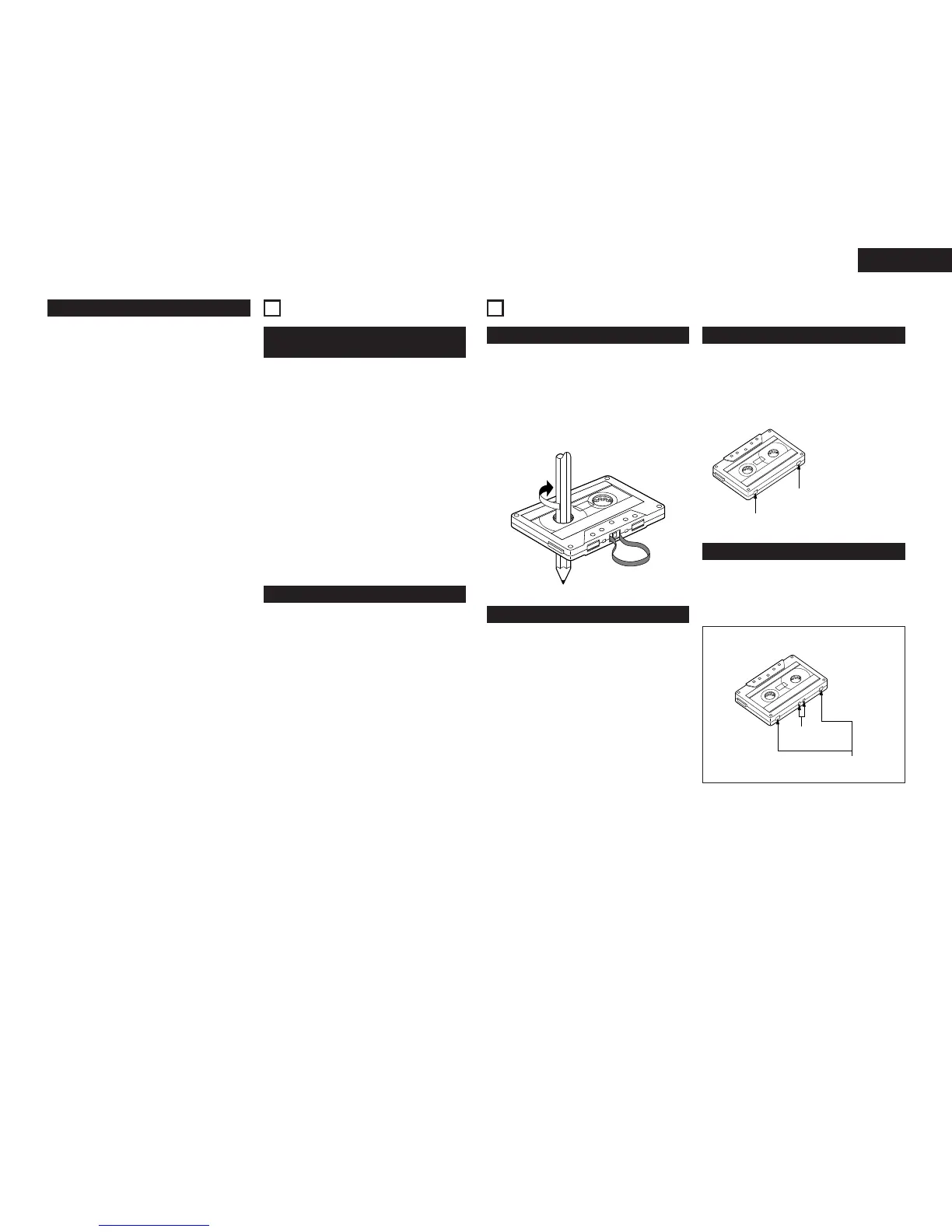
• Tape Slack
Before putting a tape into the deck, take up any
slack with a pencil or your finger tip. This precaution
prevents the tape from becoming entangled around
the capstan or pinch roller.
Handling precautions
• Do not store cassette tapes in a place where they
will be subject to :
1) Extremely high temperature or excessive
moisture
2) Excessive dust
3) Direct sunlight
4) Magnetic fields (near TV sets or speakers)
• To eliminate tape slack, store your cassettes in
cassette cases with hub stops.
Storage precautions
• All cassettes have erasure prevention tabs for each
side. To protect valuable recordings from accidental
or inadvertent erasure, remove the tab for the
appropriate side with a screwdriver or another tool.
• To record on a tape whose erasure prevention tabs
have been removed, cover the tab holes with
adhesive tape.
Accidental erasure prevention


 To Next Page