2 Installation precautions
• If the DN-T645/625 is placed near an amplifier, tuner or other components, noise (induced hum) or beat
interference may result (especially during AM or FM reception).
If this occurs, separate the DN-T645/625 from other components or reorient its position.
The CD player uses a microcomputer for controlling
internal electronic circuits. In the event that the player
is used while a near-by tuner or TV is turned on,
although unlikely, interference could occur either in the
sound from the tuner or the picture of the TV. To avoid
this, please take the following precautions.
• Keep the CD player as far away from the tuner or TV
set as possible.
• Keep the power cable and connecting cable of the
CD player separate from the antenna wires of the
tuner and TV.
• Interference is particular likely to occur when an
indoor antenna or a 300 Ω/ohms feeder cable is
used. Thus, use of an outdoor antenna and 75
Ω/ohms coaxial cable is strongly recommended.
NOTE :
• Use this unit in a horizontal orientation.
When the unit is used with the front panel facing upward (and the unit us in a vertical orientation) or when
the front panel is on an incline, the unit will not operate properly.
✽. This operation only works while the power is on.
1. Press the power operation switch q to turn on the power.
2. Press the OPEN/CLOSE button w.
4
OPENING AND CLOSING THE DISC HOLDER AND
LOADING A DISC
Opening and closing the disc holder
• Make sure the disc holder is completely open.
• Hold the disc by the edges and place it on the disc
tray. (Do not touch the signal surface, i.e., the
glossy side.)
• When using 12 cm. diameter discs, make sure the
outer edge matches the tray guide circumference
and when using CD signals (8 cm. diameter) match
the outer edge with the inner tray guide
circumference.
• Press the OPEN/CLOSE button w to close the disc
holder #2.
• When the disc holder is open and a disc is loaded,
you may also press the play/pause (
13) button t
to close the disc holder. (If the play/pause (
13)
button is pressed, playback will start immediately
upon the disc contents having been read.)
How to load a disc
CAUTIONS :
• If you finger should get caught in the disc
holder when it closes, press the OPEN/CLOSE
button.
• Do not place any foreign objects on the disc
tray, and do not place more than one disc on the
tray at a time. Otherwise malfunction may
occur.
• Do not push in the disc tray manually when the
power is off as this may cause malfunction and
damage the CD player.
• This player can play CD-R/RW discs, but only if
they are finalized. Note however that depending
on the recording quality, the player may not be
able to play some finalized CD-R/RW discs.
300 Ω/ohms feeder cable 75 Ω/ohms coaxial cable
Message Meaning
No Disc No disc inserted, disc unreadable or disc inserted upside down.
TOC Error The disc information has not been read properly.
Invalid CD The disc is a CD-ROM that does not contain MP3 files.
Tray Error The disc holder could not be opened or closed properly.
Messages
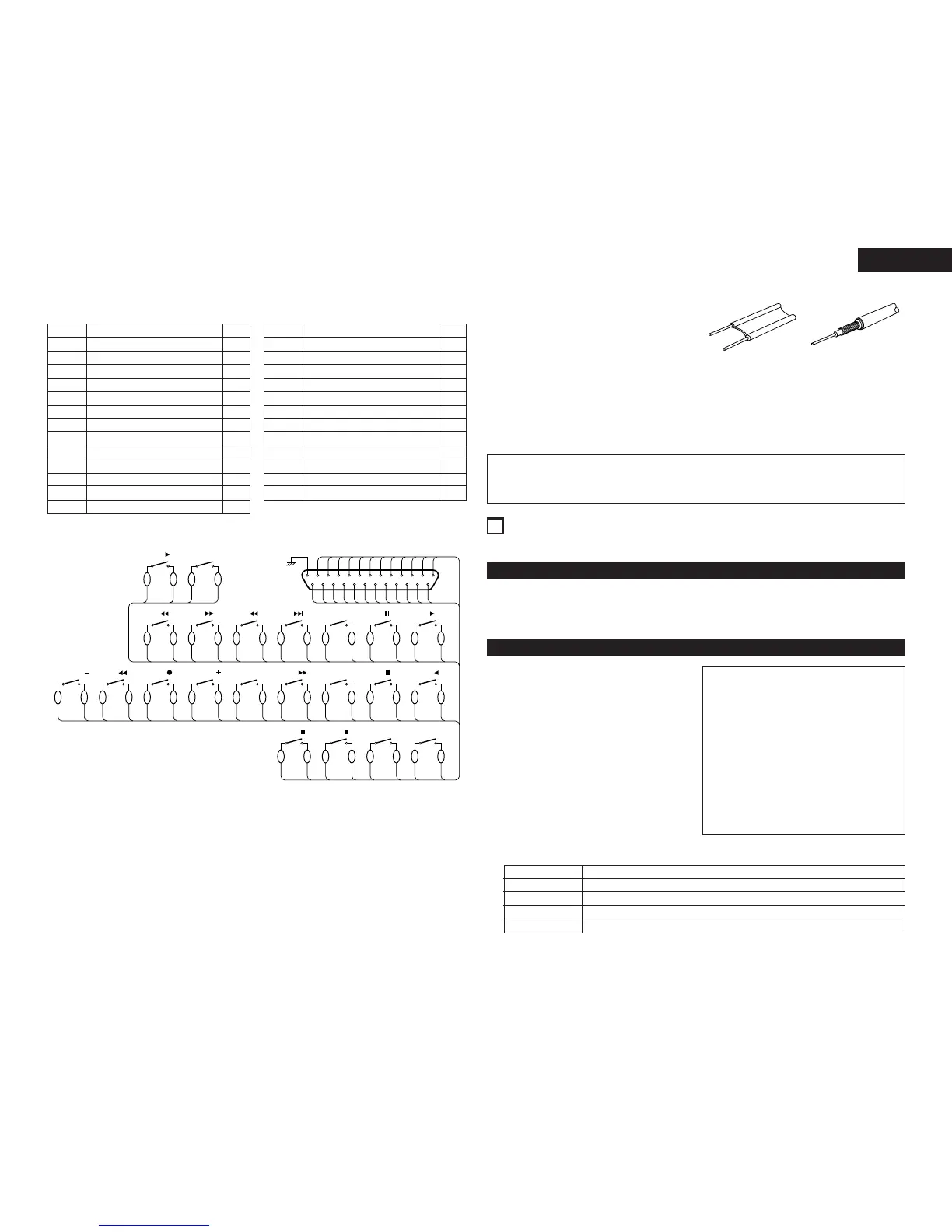
Pin No.
Signal Name
1
14 CD PITCH ON / OFF
FG
I / O
_
I
2
15 DECK FF
CD PLAY I
I
3
16 DECK COUNTER MEMO
CD PAUSE I
I
4
17 CD PITCH +
CD CUE I
I
5 CD
9 I
18 DECK REC I
6
19 DECK REWIND
CD
8 I
I
7 CD
7 I
Pin No.
Signal Name
20
8 CD
6
CD PITCH –
I / O
I
I
21
9 CD FADER START
CD SYNC. I
I
22
10 Command common
DECK COUNTER RESET I
_
23
11 DECK PLAY FORWARD
Command common
_
I
24 DECK STOP I
12 DECK PLAY REVERSE I
25
13 CD STOP
DECK PAUSE I
I
(2) PARALLEL (DN-T645 only)
NOTE : All input is active low.



 To Next Page