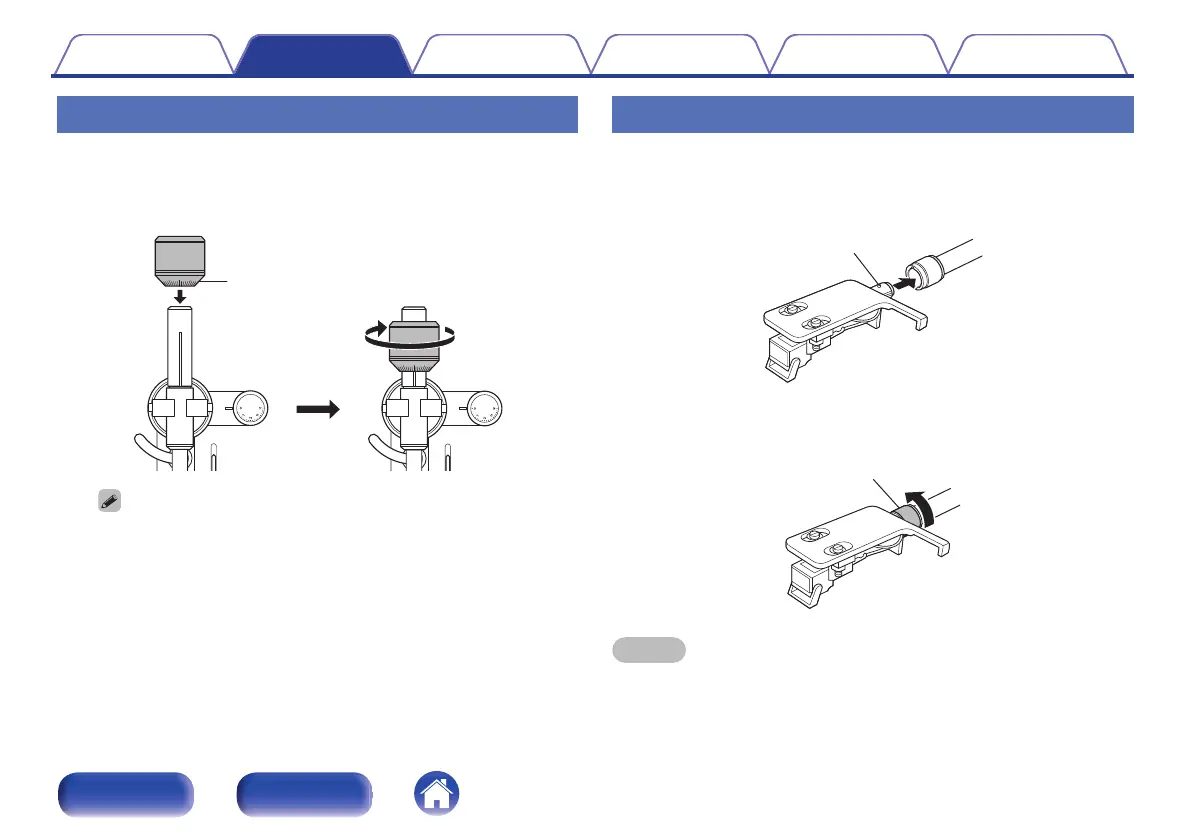
Mounting the counterweight
1
Insert the counterweight into the shaft on the back of
the tone arm, and turn it in the direction of the arrow
while gently pushing it.
.
0
3.5
3
0.5
1
0
3.5
3
0.5
1
Stylus pressure adjustment ring
0
Mount the counterweight so that its stylus pressure adjustment ring is facing
the front.
Mounting the head shell with cartridge
1
Insert the head shell into the tip of the tone arm.
0
Insert the head shell with its guide pin facing up and aligned with
the hole on the top of the tone arm.
.
2
Turn the lock nut in the direction of the arrow to secure
the head shell.
.
NOTE
0
Perform this operation with the stylus cover of the cartridge lowered to protect the
stylus tip.
Contents Preparations Connections
Playback and recording
Tips Appendix
12
Front panel Rear panel
'
=
-+
I
=
--v
-v-
v-
\
-
0



 To Next Page