EasyManua.ls Logo

Denon DRM-710 - Page 5

Denon DRM-710
58 pages
Print Icon
To Next Page IconTo Next Page
To Previous Page IconTo Previous Page
Loading...
ENGLISH
(B
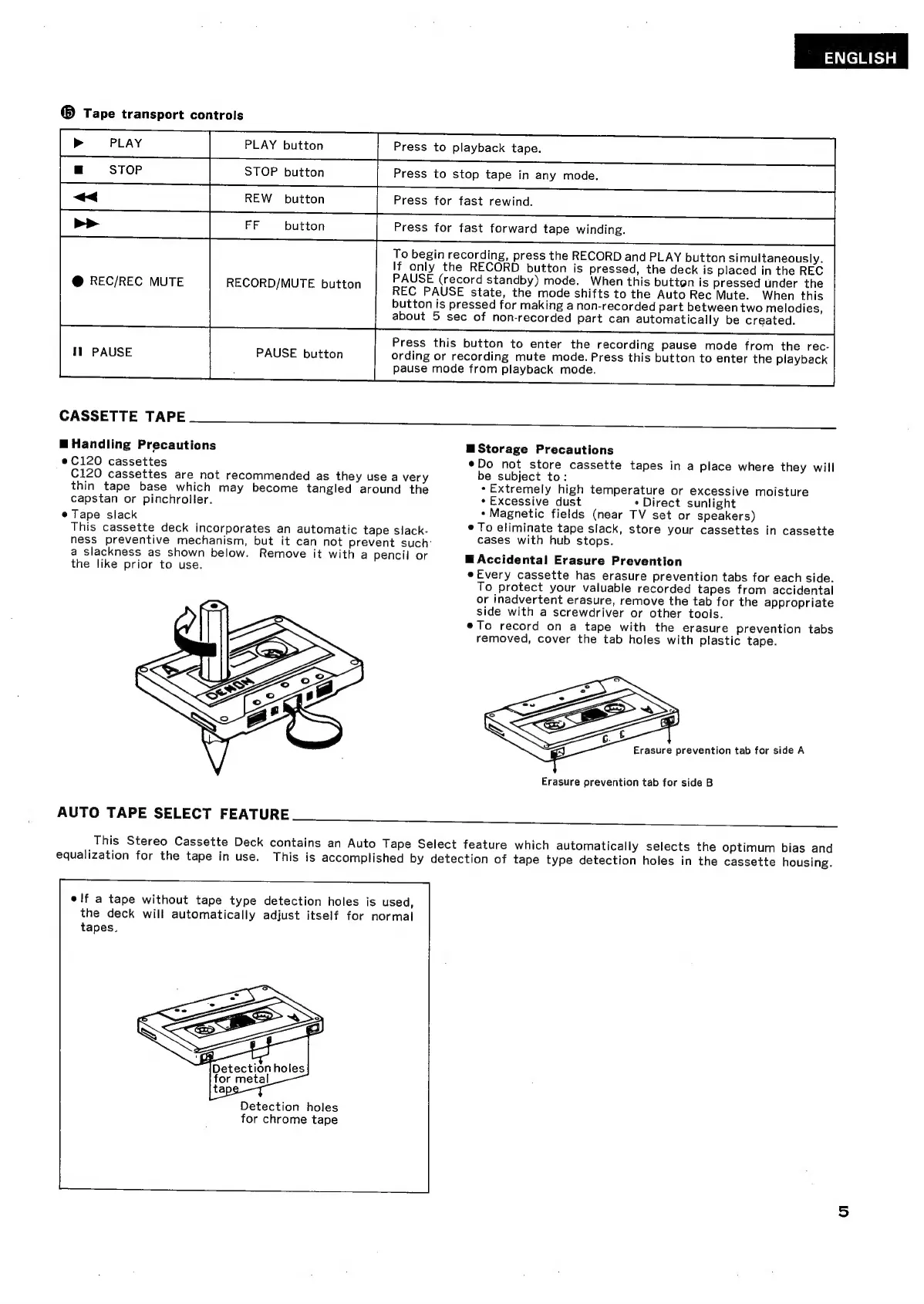
Tape
transport
controls
PLAY
button
Press
to
playback
tape.
STOP
button
Press
to
stop
tape
in
any
mode.
REW
button
Press
for
fast
rewind.
Press
for
fast
forward
tape
winding.
To
begin
recording,
press
the
RECORD
and
PLAY
button
simultaneously.
FF
button
If
only
the
RECORD
button
is
pressed,
the
deck
is
placed
in
the
REC
PAUSE
(record
standby)
mode.
When
this
button
is
pressed
under
the
REC
PAUSE
state,
the
mode
shifts
to
the
Auto
Rec
Mute.
When
this
button
is
pressed
for
making
a
non-recorded
part
between
two
melodies,
about
5
sec
of
non-recorded
part
can
automatically
be
created.
RECORD/MUTE
button
Press
this
button
to
enter
the
recording
pause
mode
from
the
rec-
PAUSE
button
ording
or
recording
mute
mode.
Press
this
button
to
enter
the
playback
pause
mode
from
playback
mode.
CASSETTE
TAPE____
>
S
B
Handling
Precautions
e
C120
cassettes
C120
cassettes
are
not
recommended
as
they
use
a
very
thin
tape
base
which
may
become
tangled
around
the
capstan
or
pinchroller.
e
Tape
slack
This
cassette
deck
incorporates
an
automatic
tape
slack-
ness
preventive
mechanism,
but
it
can
not
prevent
such:
a
slackness
as
shown
below.
Remove
it
with
a
pencil
or
the
like
prior
to
use.
AUTO
TAPE
SELECT
FEATURE
H
Storage
Precautions
eDo
not
store
cassette
tapes
in
a
place
where
they
will
be
subject
to:
*
Extremely
high
temperature
or
excessive
moisture
*
Excessive
dust
*
Direct
sunlight
+
Magnetic
fields
(near
TV
set
or
speakers)
*
To
eliminate
tape
slack,
store
your
cassettes
in
cassette
cases
with
hub
stops.
B
Accidental
Erasure
Prevention
e
Every
cassette
has
erasure
prevention
tabs
for
each
side.
To
protect
your
valuable
recorded
tapes
from
accidental
or
inadvertent
erasure,
remove
the
tab
for
the
appropriate
side
with
a
screwdriver
or
other
tools.
eTo
record
on
a
tape
with
the
erasure
prevention
tabs
removed,
cover
the
tab
holes
with
plastic
tape.
Erasure
prevention
tab
for
side
A
Erasure
prevention
tab
for
side
B
This
Stereo
Cassette
Deck
contains
an
Auto
Tape
Select
feature
which
automatically
selects
the
optimum
bias
and
equalization
for
the
tape
in
use.
This
is
accomplished
by
detection
of
tape type
detection
holes
in
the
cassette
housing.
elf
a
tape
without
tape
type
detection
holes
is
used,
the
deck
will
automatically
adjust
itself
for
normal
tapes.
Detection
holes
for
chrome
tape

Related product manuals