EasyManua.ls Logo

Denon DRM-710 - Page 6

Denon DRM-710
58 pages
Print Icon
To Next Page IconTo Next Page
To Previous Page IconTo Previous Page
Loading...
|
ENGLISH
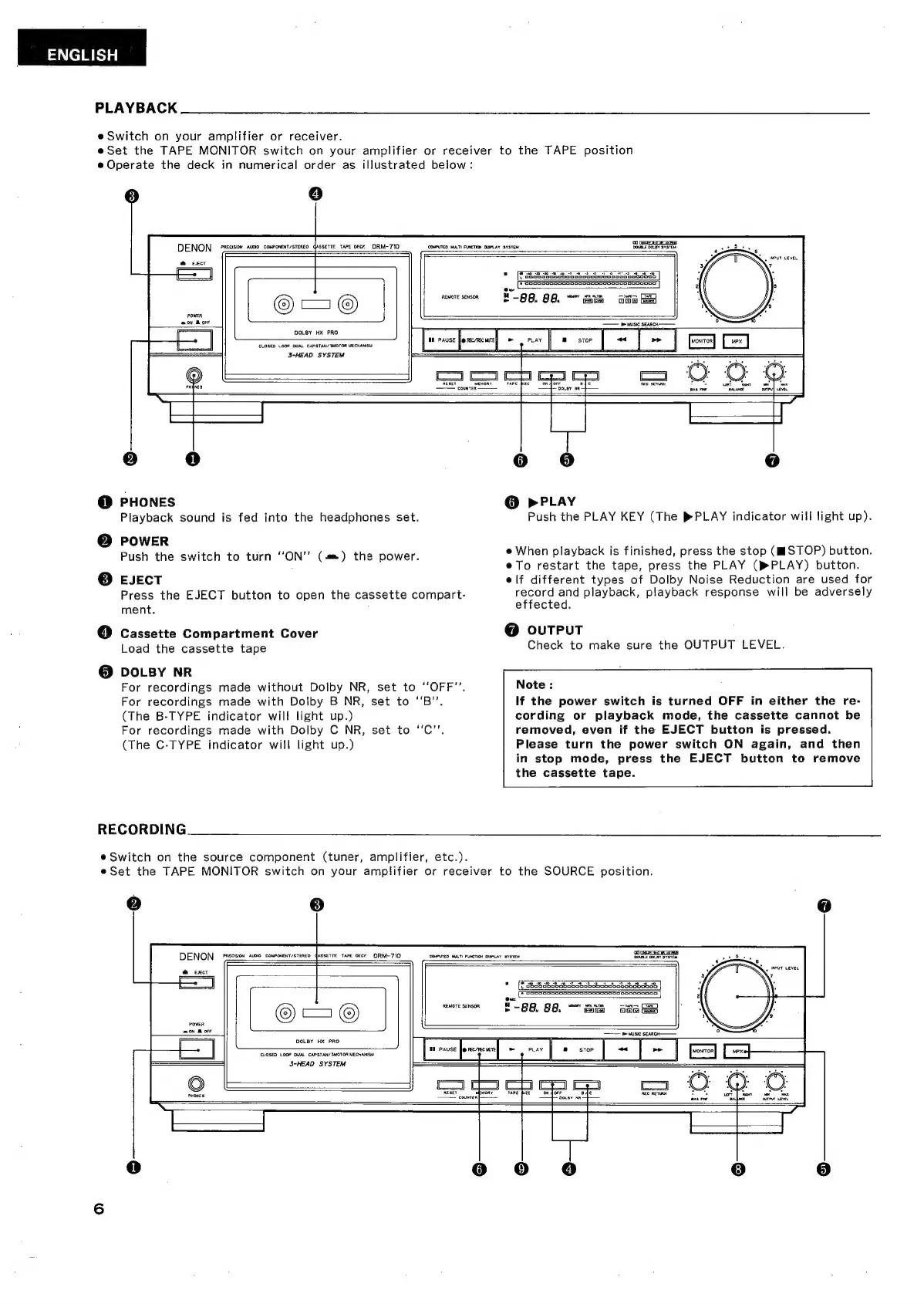
PLAYBACK
eSwitch
on
your
amplifier
or
receiver.
e
Set
the
TAPE
MONITOR
switch
on
your
amplifier
or
receiver
to
the
TAPE
position
e
Operate
the
deck
in
numerical
order
as
illustrated
below:
o
PRECISION
AUDIO
COMPORENT/STEREO
dASSETTF.
TAPE Geer
DRM-
710
COMPUTED
MULTI
FUNCTION
DISPLAY
SYSTEM
REMOTE
SENSOR
DOLBY
HX
PRO
CLOSED
LOOP DUAL
CAPSTAN/
3MOTOR
MECHANISM
d
3-HEAD
SYSTEM
=
WM
PAUSE
fe
rec/rec
une]
e
e
O
PHONES
Playback
sound
is
fed
into
the
headphones
set.
POWER
Push
the
switch
to
turn
"ON"
(am)
the
power.
O
EJECT
Press
the
EJECT
button
to
open
the
cassette
compart-
ment.
`
[4]
Cassette
Compartment
Cover
Load
the
cassette
tape
O
DOLBY
NR
For
recordings
made
without
Dolby
NR,
set
to
“OFF”.
For
recordings
made
with
Dolby
B
NR,
set
to
“B”.
(The
B-TYPE
indicator
will
light
up.)
For
recordings
made
with
Dolby
C
NR,
set
to
"C''.
(The
C-TYPE
indicator
will
light
up.)
RECORDING
e
Switch
on
the
source
component
(tuner,
amplifier,
etc.).
o
e
o
O
»PLAY
Push
the
PLAY
KEY
(The
PLAY
indicator
will
light
up).
e
When
playback
is
finished,
press
the
stop
(STOP)
button.
e
To
restart
the
tape,
press
the
PLAY
(PLAY)
button.
elf
different
types
of
Dolby
Noise
Reduction
are
used
for
record
and
playback,
playback
response
will
be
adversely
effected.
O
OUTPUT
Check
to
make
sure
the
OUTPUT
LEVEL.
Note
:
If
the
power
switch
is
turned
OFF
in
either
the
re-
cording
or
playback
mode,
the
cassette
cannot
be
removed,
even
if
the
EJECT
button
is
pressed.
Please
turn
the
power
switch
ON
again,
and
then
in
stop
mode,
press
the
EJECT
button
to
remove
the
cassette
tape.
eSet
the
TAPE
MONITOR
switch
on
your
amplifier
or
receiver
to
the
SOURCE
position.
O
e
PRECISION
AUDIO
COMPONENT/STEREO
dASSETTE
TAPE
oec
DRM-710
REMOTE
SENSOR
ESCHER?
EEN
Ehh
og
88.
as
oda
EB
DOLBY
HX
PRO
CLOSED
LOOP DUAL
CAPSTAN/
MOTOR
MECHANISM
3-HEAD
SYSTEM

Related product manuals