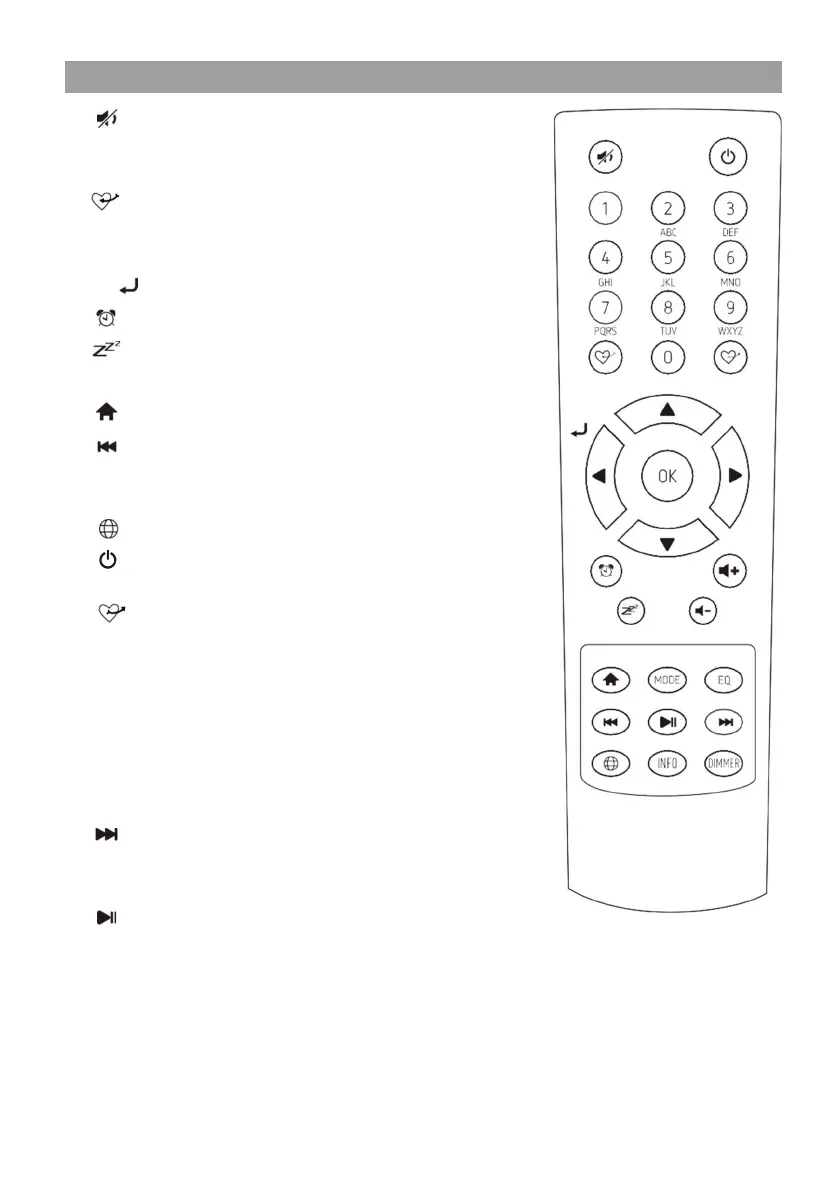
Remote control
- 5 -
1.
: Mute
2.
0-9: Input index number on the list / input
characters for WiFi security code
3.
: Preset the current playing station to
Favorite
4.
▲ : Cursor up
5.
◄/ : Cursor left / back to previous menu
6.
: Alarm button
7.
: Sleep Timer
8.
Mode: Switch between various radio modes
9.
: Home
10.
: Previous station on the list / previous
track on bluetooth / USB / Media Centre
Fine tune (FM only)
11.
: Access network info of the radio unit
12.
: Press to toggle between Standby and
Operation
13.
: Recall the favorite list
14.
OK: confirm button
15.
► : Cursor right
16.
▼ : Cursor down
17.
Vol+: Volume up
18.
Vol-: Volume down
19.
EQ: Equalizer
20.
: Next station on the list/next track on
bluetooth / Media Centre
Fine tune (FM only)
21.
: Play / pause for Bluetooth / Media
Centre
Play/stop for Internet radio
22.
Dimmer: Access the Dimmer menu to adjust
the brightness of the display
23.
Info: Toggle to cycle through the station's
info, the big clock display or return to
now playing screen


 To Next Page