- 07 -
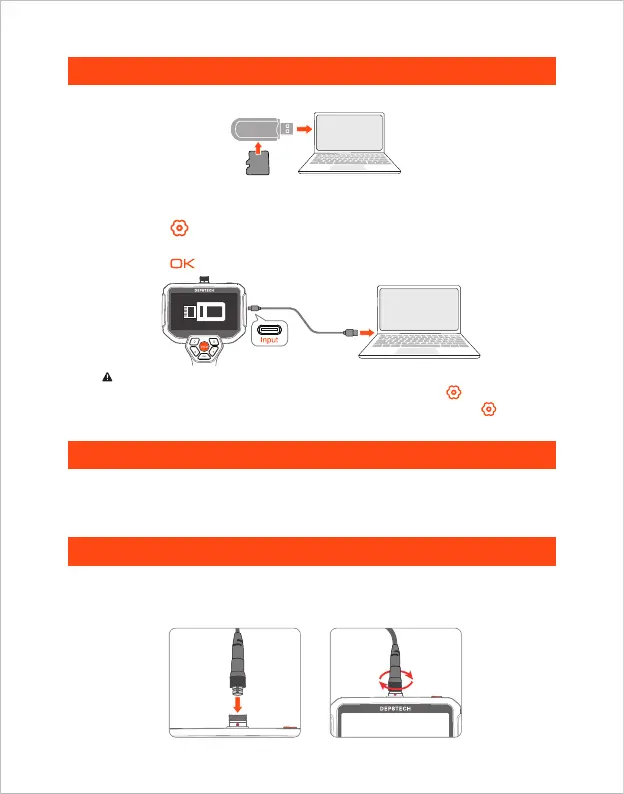
1. Please connect the product to your computer.
2. Press the button to enter the menu.
3. Select “Data transmission”.
4. Press the button to start copying to computer.
Copy Photo And Video Files To Computer
Guide For Accessories Installation
Charging Instructions
1. Use a TF card reader to copy data directly.
1. Connect the device to the DC 5V adapter for charging;
2. The red indicator light flashes when the device is charging, and is always on
when fully charged.
If the device is not connected with computer, click "Data transmission" on the setup
interface, then USB icon shows up on the display; Please press the button to exit.
It is normal for "NO SIGNAL" to appear on the screen when you press the button
to exit data transmission.
Card Reader
TF
Card
2. Use a Type-C cable to connect to computer for copying Setting path.
Please note that the positioning wire on the end of the connector needs to be
aligned with the red dot on the device connector in order to be inserted. Then turn
the aluminum ring clockwise to tighten it.



 To Next Page