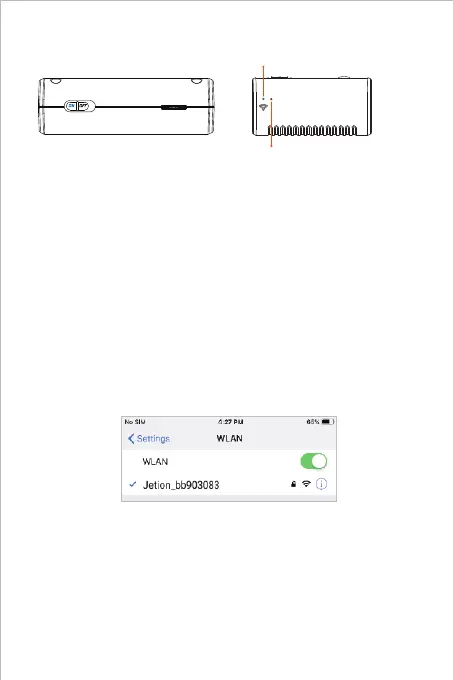
Step 2 - Power-on
Take out the endoscope and find the transmitter. Move the toggle switch to
"ON" to activate the WF010 endoscope.
Step 3 - Wi-Fi Connection
A. Turn on Wi-Fi of your mobile phone/ pad and search the endoscope Wi-Fi.
The default name is: Jetion_********
B. Select it and input the default Wi-Fi password: 12345678
Blue Wi-Fi LED Indicator light
Red Power LED Indicator light
Note:
Before using the product for the first time, please fully charge it.
1. Power LED indicators:
About 2 seconds after you power on.
Red LED stay on: Power system work normally.
Red LED flash: Low battery.
Green LED stay on: Charging status.
2. WIFI LED indicators:
About 5 seconds after you power on, the blue LED falsh that means ready
to pair.
Blue LED stay on: Connect successfully.
Please wait 10-15 seconds to search WIFI signal after powering on.
Note:
1. ******** is a set of random numbers and letters. It may take a few seconds
to search the Wi-Fi signal and successfully connect it.
2. If you phone prompts “The Internet is unavailable. Do you want to keep
connected or access to other networks such as the cellular data network?”,
please click “Keep Connected”.



 To Next Page