Shenzhen Dericam Technology Co., Ltd. User Manual V1.0.5
Email: support@dericam.com Website: www.dericam.com
36
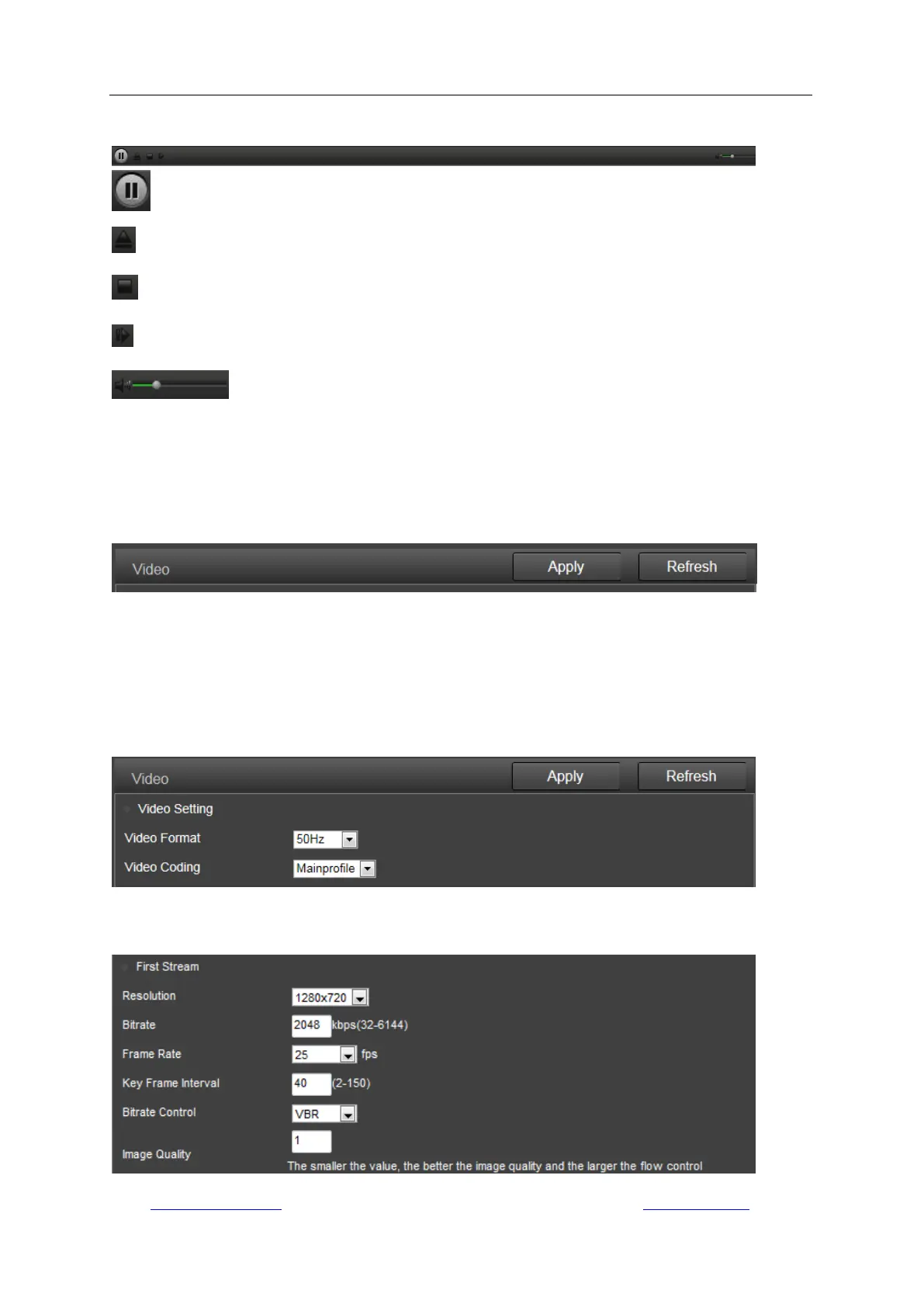
5.3.2 Tool bar
The tool bar on the bottom of playback page is for controlling the playback process.
: Play or Pause.
: Open a local file from the local storage of your computer.
: Stop.
: Play next frame.
: Drag to adjust the audio volume.
5.4 Configuration
On any configuration page, click the button “Apply” to save your settings, or click “Refresh” to
query or refresh the current configuration saved.
5.4.1 Media settings
1) Video
Here you can set the configurations for power frequency and the encoding profile for H.264
according to the frequency of local electric power. E.g., 50Hz for the regions like Europe and
China, 60HZ for USA and Canada.
The parameter options below for the first/second stream affect the image/video quality, such as
the resolution, bitrate, frame rate, key frame interval, bitrate control and the image quality level.



 To Next Page