4.1 95-86209
cAlibrAtion
The calibration process is automatic, with the exception
of gas delivery. LEDs on the gas detector and messages
on the UD20 faceplate guide the operator when to apply
and remove the calibration gas. See Tables 1 and 2.
NOTE
The UD20 allows the operator to adjust the
calibration gas concentration within the range of
30 to 90% full scale. The default value for all gas
sensors except oxygen is 50% full scale. Oxygen
sensors use a default value of 20.9%.
GENERAL CALIBRATION INFORMATION
All GT3000 and PIRECL Gas Detectors provide a two-
point calibration — zero and span.
The calibration process can be initiated using the
magnetic switch on the gas detector or using the
magnetic switches on the UD20 faceplate. All sensors,
including oxygen, should be in clean air (20.9% oxygen)
when the calibration sequence is initiated.
Once calibration is initiated, the process proceeds
automatically. The yellow LED on the gas detector and
the digital display on the UD20 are used to inform the
operator of the progress of the calibration procedure,
and also signal when to apply and when to remove the
calibration gas.
The calibration can be aborted after zero calibration by
activating the magnetic switch on the gas detector or
navigating the UD20 menu.
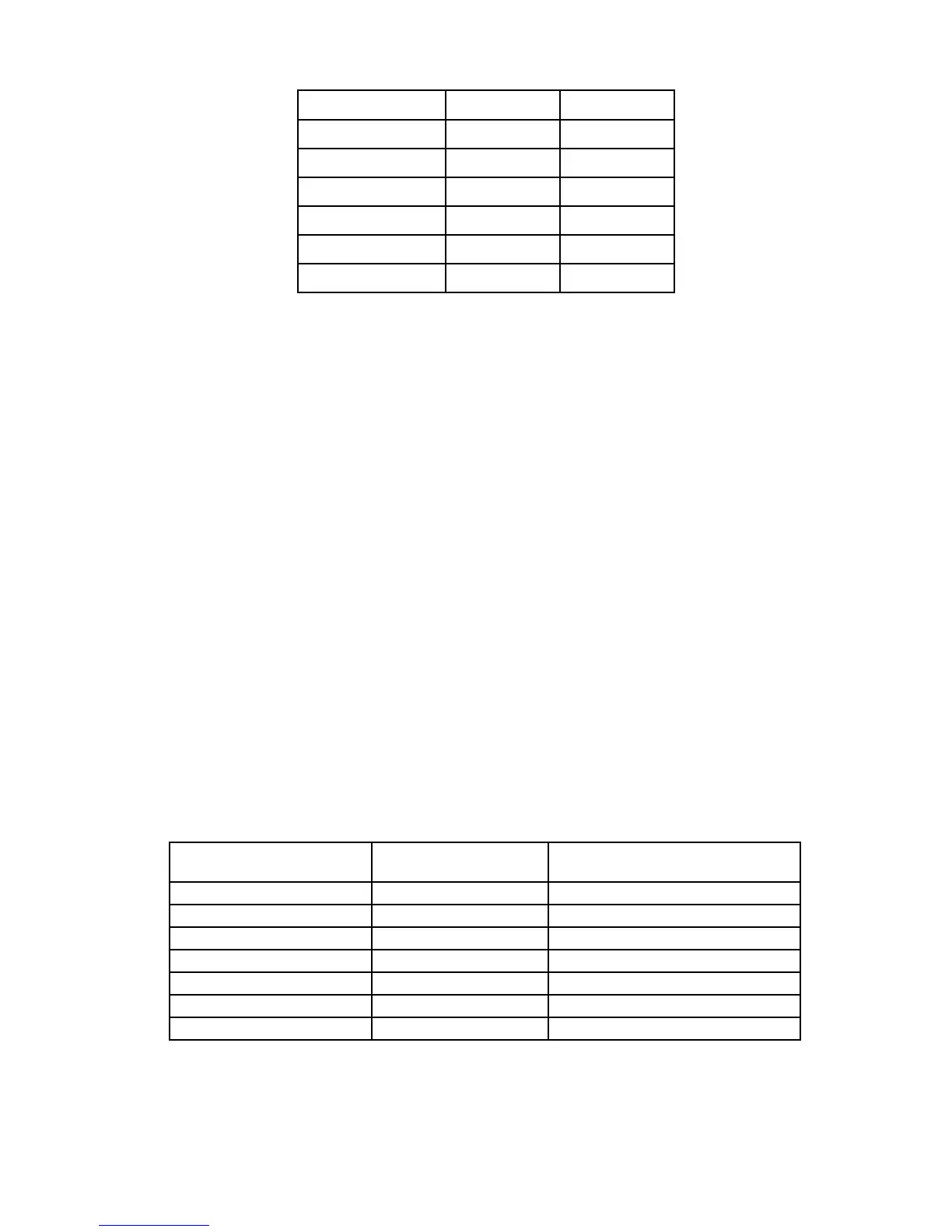
Device Status Green LED Yellow LED
Normal Steady On Off
Waiting for Zero Off Steady On
Waiting for Gas Off Blinking
Waiting for Span Off Blinking
Remove Cal Gas Off Off
Normal Steady On Off
Table 1— GT3000 LEDs During Calibration
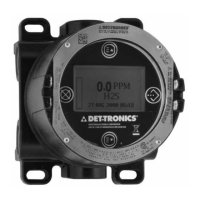
Table 2—PIRECL LEDs and Current Output Status During Normal Calibration Procedure
Description Indicating LED
(on-board/PIRTB)
Operator Action
Normal-ready to calibrate steady green/off Purge with clean air if required
Initiate Calibration steady red/on-steady Apply Magnet for 2 seconds min.
Zero Calibration complete flashing red/on-flashing Apply Calibration Gas to device
Span Calibration in progress flashing red/on-flashing Continue cal gas flow
Span Calibration complete off/on-steady Remove Calibration Gas
Output Returns to Normal steady green/off Calibration Completed
Normal Operation steady green/off None


 To Next Page