4.1 95-86202
MAGNETIC SWITCHES
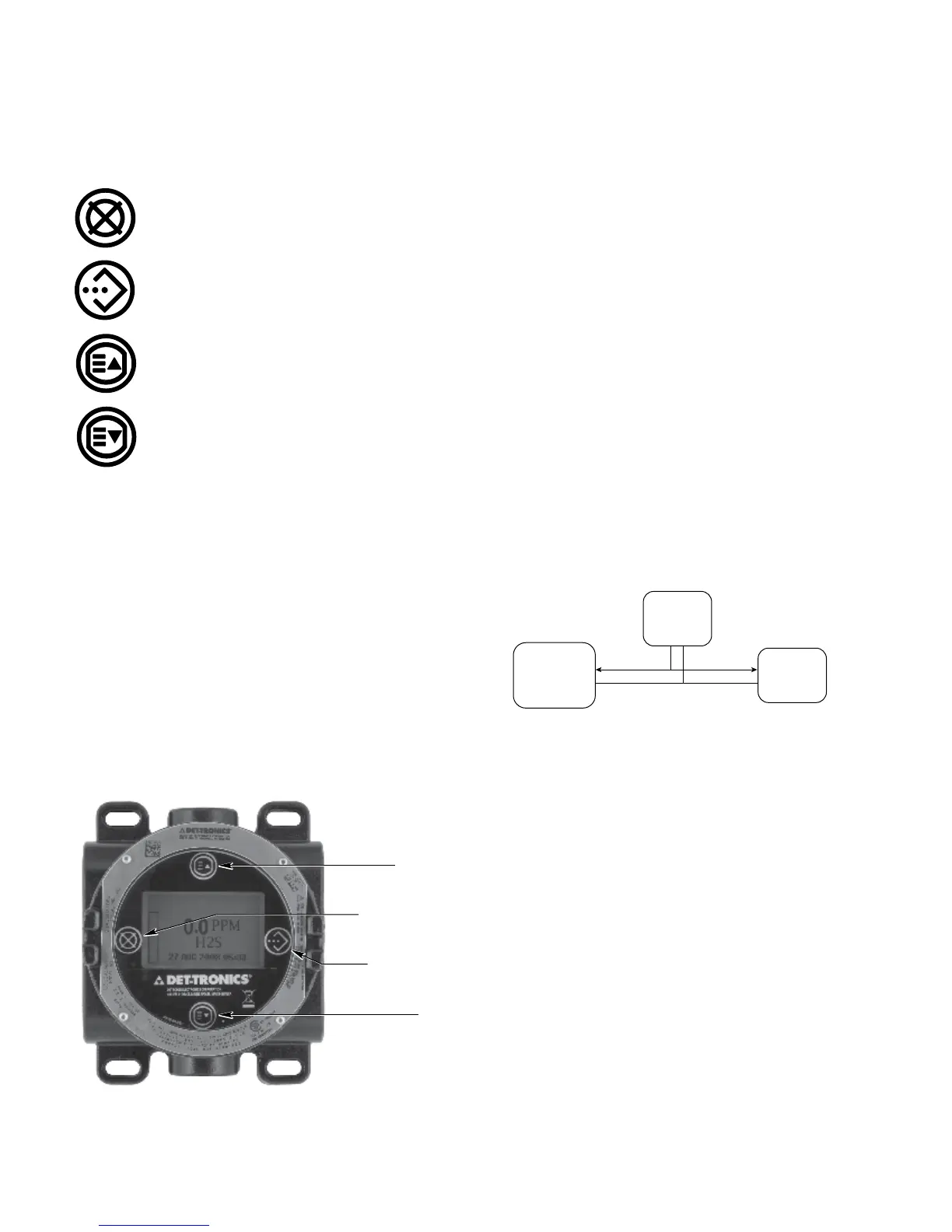
Four internal magnetic switches provide a non-intrusive
user interface that allows adjustment of configuration
parameters and calibration in the field without the use
of a HART handheld device. The switches are labeled
as follows:
Cancel, Escape
Enter, Select
Previous
Next
DEVICE ENCLOSURE
The housing for the UD20 consists of a multi-port
aluminum or stainless steel explosion-proof junction
box with a clear viewing window. Available conduit
entry sizes include 3/4” NPT and M25.
DEVICE DISPLAY
The UD20 is provided with a 160 x 100 dot matrix
LCD display. See Figure 1. During normal operation,
the UD20’s LCD display indicates the gas type and
units measured. The UD20 communicates with the
sensor and allows easy access to various operating
parameters. Refer to Appendix A or B for details.
GAS LEVEL INDICATION
The UD20 display shows “100+” to indicate an over-
range condition. For an under-range condition, the
gas level indication is 0%. Actual gas level can be
determined using the UD20 menu: “PROCESS VARS”
> ANALOG INPUT XX.XX mA.
SPECIAL STATES
Special states other than normal operation and warm-
up require user action for activation. These include
Calibration, Display / Sensor Configuration, Display /
Sensor Status, and Fault indication. Refer to Appendix
A (UD20 with GT3000) or Appendix B (UD20 with
PIRECL) for details regarding the HART menu structure.
WRITE PROTECT
The write protect function in the sensor can be accessed
by the UD20.
LOGGING
The UD20 has no logging capability of its own, but
reads the logs that are stored in the gas detector and
displays them on the LCD screen. If an AMS is used,
it communicates directly with the gas detector and not
with the UD20.
GT3000 or PIRECL
GAS
DETECTOR
UD20
CONTROL
SYSTEM
Operating and history logs that are stored in the gas
detector and displayed by the UD20 include:
•Calibration
•Sensorrunninghours
•Sensortemperature
•Events
OUTPUT TEST
The UD20 can start and stop a 4-20 mA Loop Test for
checking correct operation of system output devices.
CANCEL / ESCAPE
ENTER / SELECT
PREVIOUS
NEXT
B2426
Figure 1—Faceplate of UD20


 To Next Page