GB-13
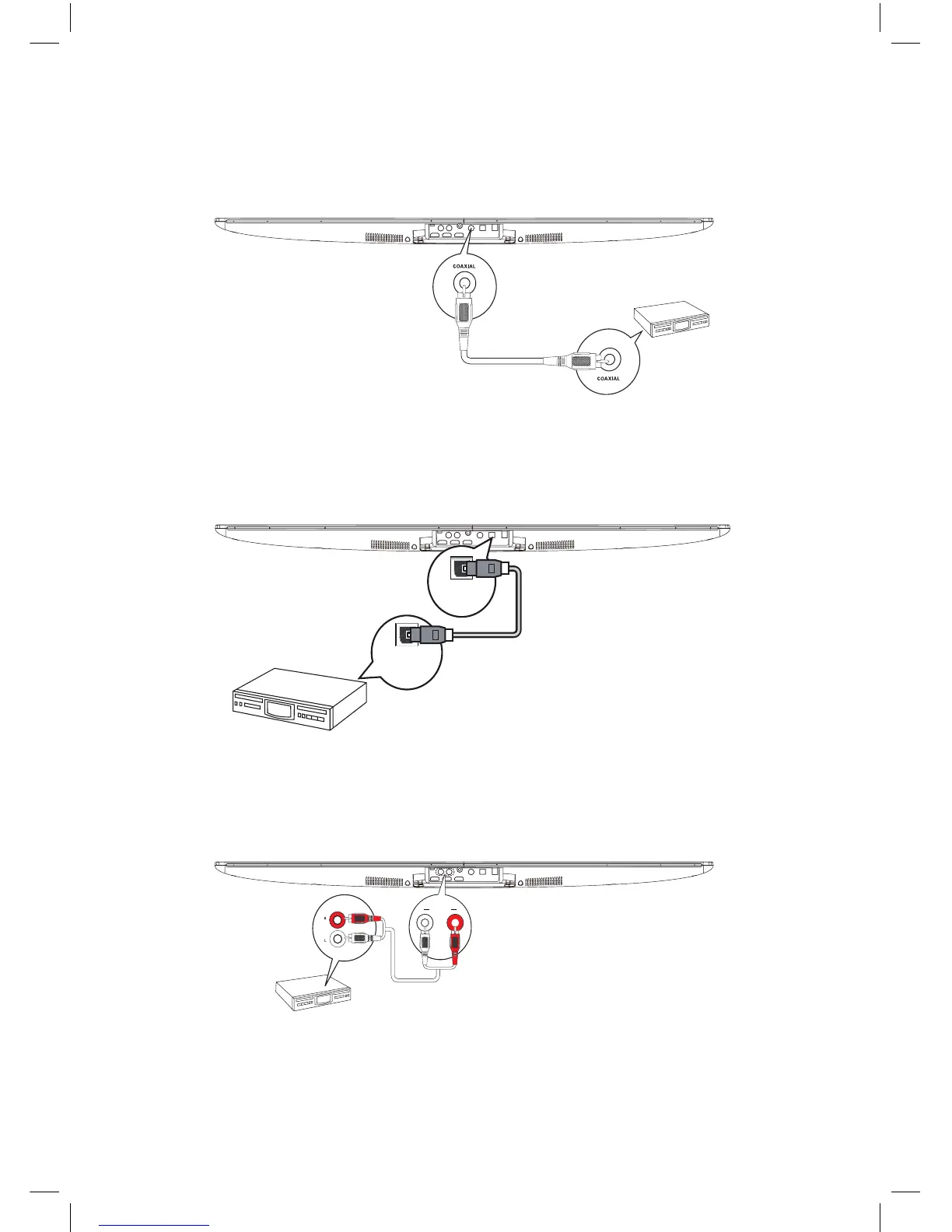
Connecting the COAXIAL jack
Connect a coaxial cable (not supplied) to the COAXIAL in jack on the unit and the COAXIAL output
jack on the other device.
Connecting the OPTICAL jack
Connect an optical cable (not supplied) to the OPTICAL in jack on the unit and the OPTICAL output
jack on the other device.
Connecting Auxiliary Equipment
Connect the AUDIO Input terminals on the rear of the unit to the line output terminals on the
auxiliary equipment with an audio cable as illustrated.
The Unit
Auxiliary equipment
Audio Cable
AUDIO IN RL
DIGITAL IN
OPTICAL
DIGITAL OUT
OPTICAL
The Unit
The Unit
Note: In receiving OPTICAL signals, the
setting menu of TV or other connected
devices, please changed Digital Audio
Output into PCM.
NE8006HW(SBS-200)_GB_41014751_20140604.indd 13 2014-6-4 16:15:06


 To Next Page