GB-8
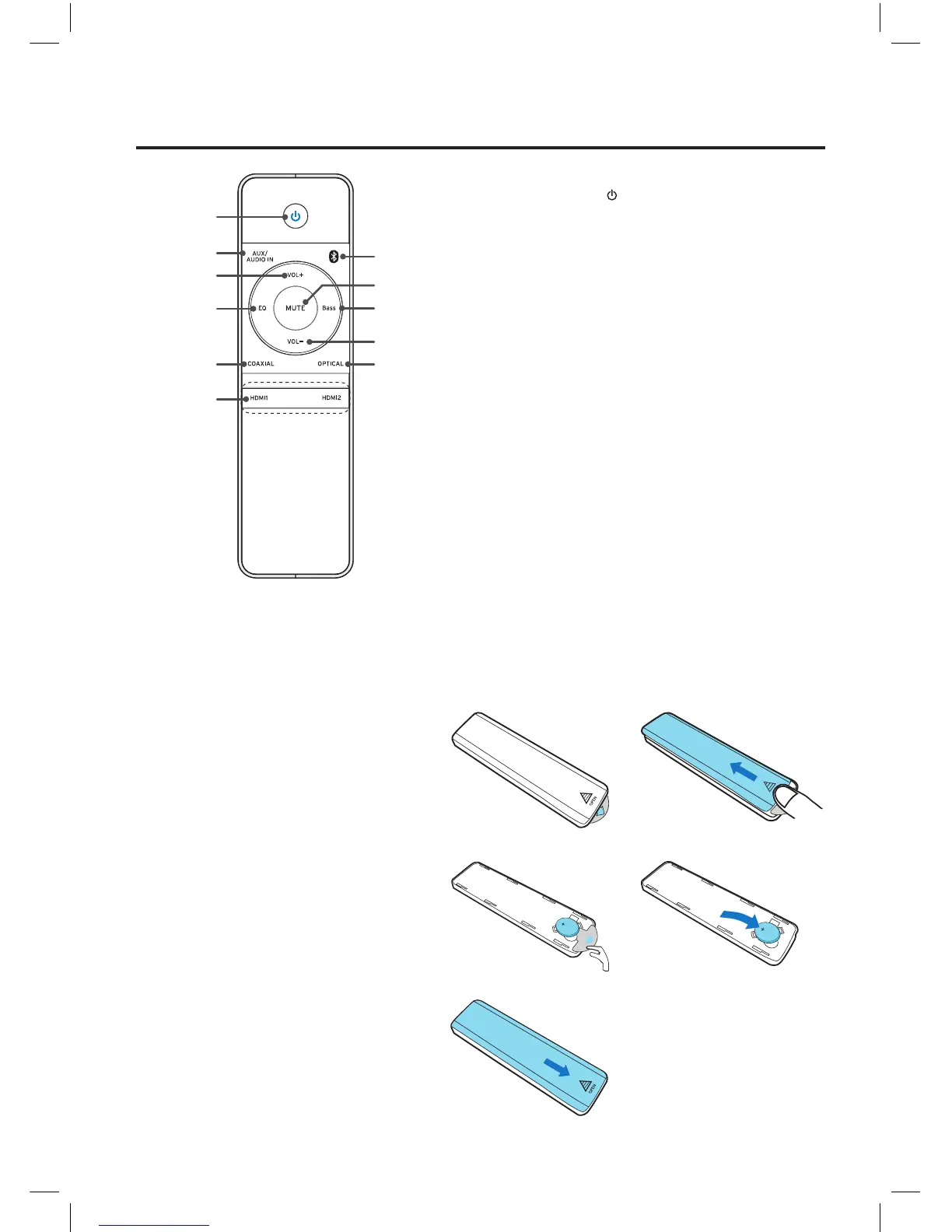
Remote Control Overview
1. Standby Button
2. AUX/Audio In Button
3. Volume Up Button
(VOL+)
4. Preset Equalizer Button
(EQ)
5. Coaxial Button
6. HDMI1/HDMI2 Button
7. Bluetooth Button
8. Mute Button
9. BASS Button
(BASS)
10. Volume Down Button
(VOL-)
11. Optical Button
Battery installation
1. Remove the compartment cover.
2. Remove the insulating mylar strip from
the battery. It is inside of the remote
control. Put the lithium-ion battery
(CR2032, 3V) in with the “+” side up.
3. Close the cover.
①
②
⑦
⑨
⑧
⑪
⑩
⑤
⑥
④
③
CR2032
CR2032
CR2032
CR2032
NE8006HW(SBS-200)_GB_41014751_20140604.indd 8 2014-6-4 16:15:04


 To Next Page