EN - 19SE-DV57-1
ADVANCED MENU CONTROLS
With the device on, press the “Next” or “Previous” buttons on the keypad to scroll through the items on the display.
PREVIOUS ITEM
k
Pressing this button displays the previous menu option.
NEXT ITEM
j
Pressing this button displays the next menu option.
SETTING CHANGE
h�
i
Thesebuttonsallowyoutoadjustthesettingthatisshownonthedisplay.
Please note that the values displayed are examples only.
CPAP Mode
NOTE: There are 5 levels of SmartCode.
Use up or down key to change
between levels.
Heater setting shown if DV5HH is
attached, FLX shown if SmartFlex
feature is turned on.
Auto-ON
Enabled
Auto-OFF
Disabled
Exit Menu
Press
Mask Fit Check
Enabled
Low Backlight
Enabled
SmartFlex Mode
Full-Time
SmartFlex
3
Exit Menu
Press
SmartFlex IRnd
3
SmartFlex ERnd
3
UP () BUTTON
DOWN () BUTTON
RIGHT () LEFT () BUTTONS
DOWN () BUTTON
UP () BUTTON
RIGHT () LEFT () BUTTONS
P:10.0 FLX CPAP
Heat:5
Set Pressure
10.0 cmH2O
Delay Pressure
4.0 cmH2O
Compliance Meter
123456.7 hours
Serial Number
MD000005
Firmware Version
V0.01 30/11/2010
LCD Contrast Adj
50%
Delay Time
20 minutes
Enable Menu
Press
SmartCode 1-Day
B6CD-37F-35M2
Tubing Length
1.8 m (6 ft)
Adherence Score
83% (25/30)
P:10.0 S–T RR:15
I/E: 1:1.0 (50%)
LK:123 S–S EV:AS
MV:123.4 VT:1234
SmartFlex Menu
Press
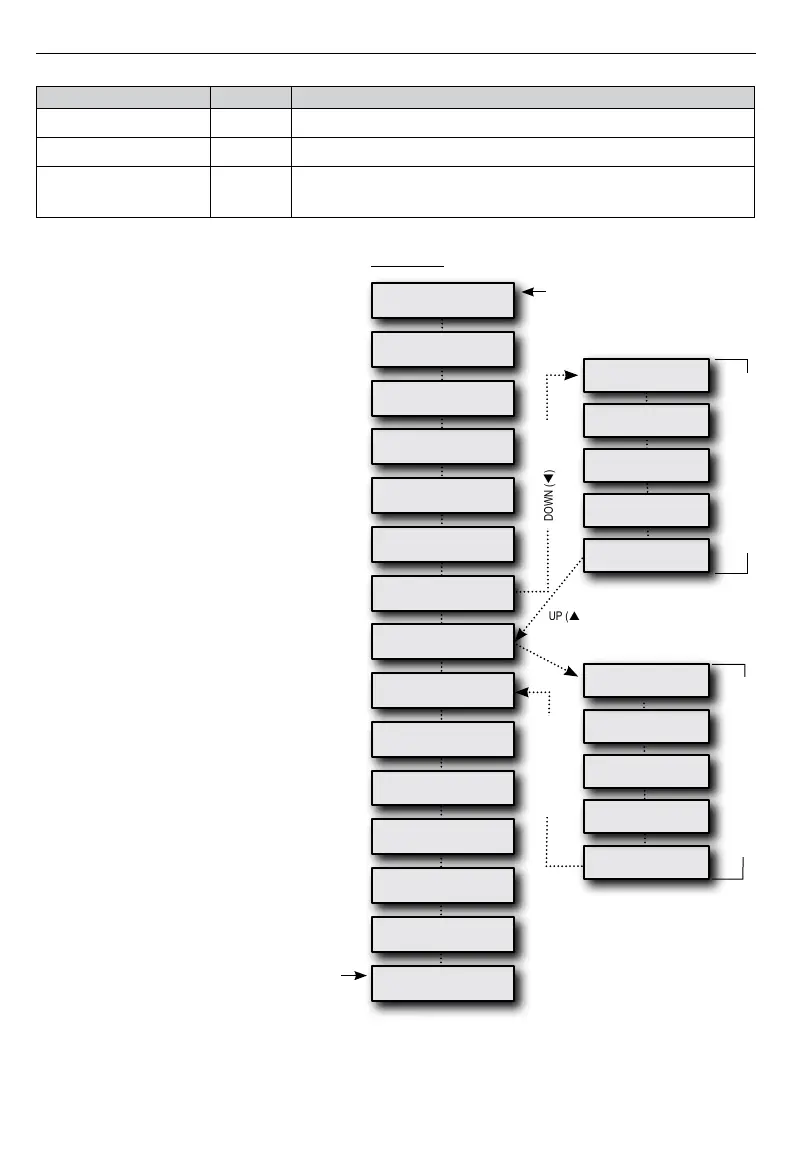
Patient Menu Layout
The following charts show, by Mode, each Display
you will scroll through using the Next or Previous
buttons on the keypad. Pressing the Down key at
the Enable Menu Display will allow you to enter
this submenu. Then use Next or Previous buttons
to scroll through it and press the Up button to
returntomainmenu.OncethenalDisplayis
reached, pressing the Next button will return you to
therstDisplay.
NOTE-If the unlocked symbol is shown, you are
able to adjust this setting. If the locked symbol is
shown, this setting can only be adjusted by your
provider.


 To Next Page