EN - 6 SE-DV57-1
KEY FEATURES (Page 2, Figures A-F)
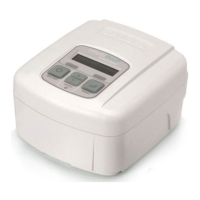
DeVilbiss SleepCube Device
(Figures A and B)
1. Keypad/LCD Display (see Figure C)
2. Air Supply Port on Back
3. AirSupplyPortonBottom(foroptionalhumidier)
4. Air Supply Port Plug
5. HeaterPowerConnector(foroptionalhumidier)
6. AC Power Connector
7. DC Power Connector
8. Data Port
9. Power Cord (appropriate to your wall outlet) (not
shown)
10. Air Inlet Filter Opening
11 Connector Cover (not shown)
Keypad
(Figure C)
1. On/Off
2. Previous Item
3. Next Item
4. Delay
5. Decrease Value
6. Increase Value
7. HeaterPowerLED(foroptionalhumidier)
Ask your equipment provider for information about other
DeVilbiss masks, equipment and accessories.
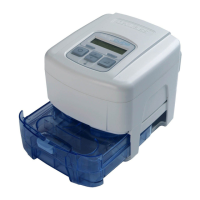
Humidifier Cradle
(Figure D)
1. Heater plate
2. Heater power connector
3. Storage compartment for connector cover (on
bottom)
4. Air supply port inlet
5. Air supply port outlet
6. Flow generator release button
7. Flow generator locking tabs
Water Chamber
(Figure E)
1. Chamber lid
2. Chamber base
3. Heat transfer plate (on bottom)
4. Sealing gasket
5. Water level indicators (front and sides)
6. Chamber release latch
7. Chamber disassembly lever
Therapy Management System
(Figure F)
1. SmartLink
®
(optional)
SYSTEM ASSEMBLY
Without Heated Humidification
1. Locate the air supply port and heater power connector on the bottom of the SleepCube device. Ensure that each
opening has the appropriate soft cover securely attached.
2. Place the SleepCube on a stable surface such as a nightstand or table. If you wish, you may also place the device
ontheooratthebedside,beingcarefultoplacetheunitwhereitwon’tbekickedorsteppedon.Ensurethattheair
inlet in the back of the device is not blocked by anything such as curtains or bedding.
NOTE
–Never place the SleepCube system on a soft surface such as a bed or couch during operation.
With Heated Humidification
CAUTION–The height of the SleepCube must be lower than the mask when using a humidier to prevent water from
getting into mask.
1. Ifyoursystemincludesahumidier,pleasefollowstepsinFigures1-7.
a. Locate the heater power connector on the bottom of the device. Remove the connector cover and insert it into
thestorageopeninginthebottomofthehumidiercradle.
b. Locate the air supply port at the bottom of the device. Remove the port plug and insert it into the air supply
port in the back of the device.
c. Placedeviceontohumidiercradleandclickintoplace.
d. Fillcleanchambertolllinewithdistilledwaterandinsertintocradle.
NOTE-Always use distilled water to avoid mineral buildup inside the chamber. Do not overll.
KEYPAD AND DISPLAY
Basic CPAP Controls
Name Symbol Function
ON/OFF
TheON/OFFbuttonstartsandstopstheowofairfromthedevice.
HEATER
IfyourSleepCubehasaheater/humidierattached,thesebuttonsadjusttheheatersetting.
Increase the setting for more humidity and decrease the setting for less humidity.
DELAY
The Delay button activates the comfort delay feature and only functions if this feature has been
enabled. To understand how to set the parameters of this feature, please refer to the Using the
Comfort Delay Feature found on page EN - 8.
NOTE– The left and right arrow keys on the control panel provide access to menus for specic settings. Ask your
homecare provider for more information.


 To Next Page