12 Initial use
devolo Vianect AIR TV
3.1 Package contents
Please ensure that the delivery is complete before
beginning with the installation of your Vianect AIR TV.
쎲 devolo Vianect AIR TV consisting of
쑗 devolo Vianect AIR computer adapter and
쑗 devolo Vianect AIR TV station (with adapter)
쎲 Mains adapter, including country-specific adapter
쎲 Hard copy of installation guide
쎲 CD containing software and online documenta-
tion
devolo AG reserves the right to change the package
contents without prior notice.
3.2 System requirements
쎲 Operating systems: Windows XP (32-bit), Win-
dows Vista Home Premium (32-bit/64-bit), Win-
dows 7 Home Premium (32-bit/64-bit), Mac OS X
(10.5 or higher) (Leopard)
쎲 Computer: USB connection
쎲 TV set or projector:
쑗 HDMI connection or
쑗 VGA connection
쎲 HDMI cable
쎲 VGA cable
3.3 Functions
The Vianect AIR TV enables you to transmit audio and
video data wirelessly from a computer to your TV set or
projector. The individual components – Vianect AIR
computer adapter and Vianect AIR TV station with
adapter are preconfigured ("paired") at the factory
and are ready to use immediately.
Should you ever lose the preconfiguration
("pairing") of the devices, it can be restored
easily. For more information, refer to Chap-
ter 3.7 Restoring the pairing.
3.3.1 Vianect AIR computer adapter
Connections and LEDs of the computer adapter
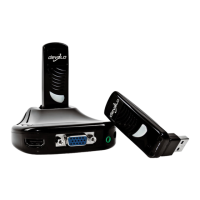
The computer adapter is used for connection to the
desktop or laptop computer. It has a rotating USB
connector (depending on the placement of the USB
socket on the computer) and an integrated antenna.
The Power LED is illuminated in blue when the
computer adapter is ready to operate; it flashes during
data transmission.













 To Next Page