ENGLISH
8
3
Fig. D
Wet Pick Up Applications (Fig. H)
The dust extractor is designed to perform as a wet/dry unit.
• Use seperate filters for wet and dry pick up applications
to avoid filter clogging.
• Water sense probes
27
will automatically shut off the
dust extractor when the maximum fill level has been
reached. Move the two position switch to the Off (O)
position, remove the battery pack, and empty the tank
before turning the dust extractor back on.
• It is recommended that the tank be emptied of any dry
contents prior to being used for wet pick up to facilitate
tankcleaning.
• When finished with a wet pick application, remove the
filters and allow them to dry completely. This will avoid
mildew gathering on the filters.
• Make sure the dust extractor is completely dry before
switching back to dry pick up applications.
To Empty Tank (Fig.A,F, G)
WARNING: Before emptying the dust extractor,
ALWAYS make sure the two position switch is in the
off position amd remove the battery pack.
CAUTION: Remove the dust extractor hose from any
liquid before emptying the dust extractor.
1. Press the two position switch
3
to the Off (O) position
and remove thebattery.
NOTE: During wet pick up applications it is normal for
a small amount of liquid to flow from the dust extractor
hose when the dust extractor is shutoff.
2. Unlatch tank latches
4
and remove dust extractor
head
6
.
3. Empty contents of tank
16
into a suitable container
ordrain.
Connecting to Power Tools (Fig.A,E)
1. Choose the correct power tool adapter
26
to fit the
power tool connection on the tool to be used, refer to
Optional Accessories under Maintenance. Attach
power tool adapter
26
to powertool.
2. Your DeWALT construction dust extractor is fitted
with the DeWALT AirLock® connection system. The
AirLock® allows for a fast, secure connection between
the dust extractor hose
2
and power tool. The
AirLock® connector
25
connects directly to DeWALT
Attaching the Hose to the Dust Extractor
(Fig. A)
To attach the hose to the dust extractor, press the hose
release latch
15
and insert the proper end of the hose into
the hose inlet. The hose must be inserted fully before the
hose release latch isreleased.
To remove the hose, press the hose release latch and
remove the hose. The hose must be fully removed before
releasing the hose releaselatch.
The hose inlet plug
9
may be used to cover the hose inlet if
the hose is removed for transportation, cleaning,etc.
OPERATION
WARNING: To reduce the risk of serious personal
injury, turn unit off and remove the battery pack
before making any adjustments or removing/
installing attachments or accessories. An
accidental start-up can causeinjury.
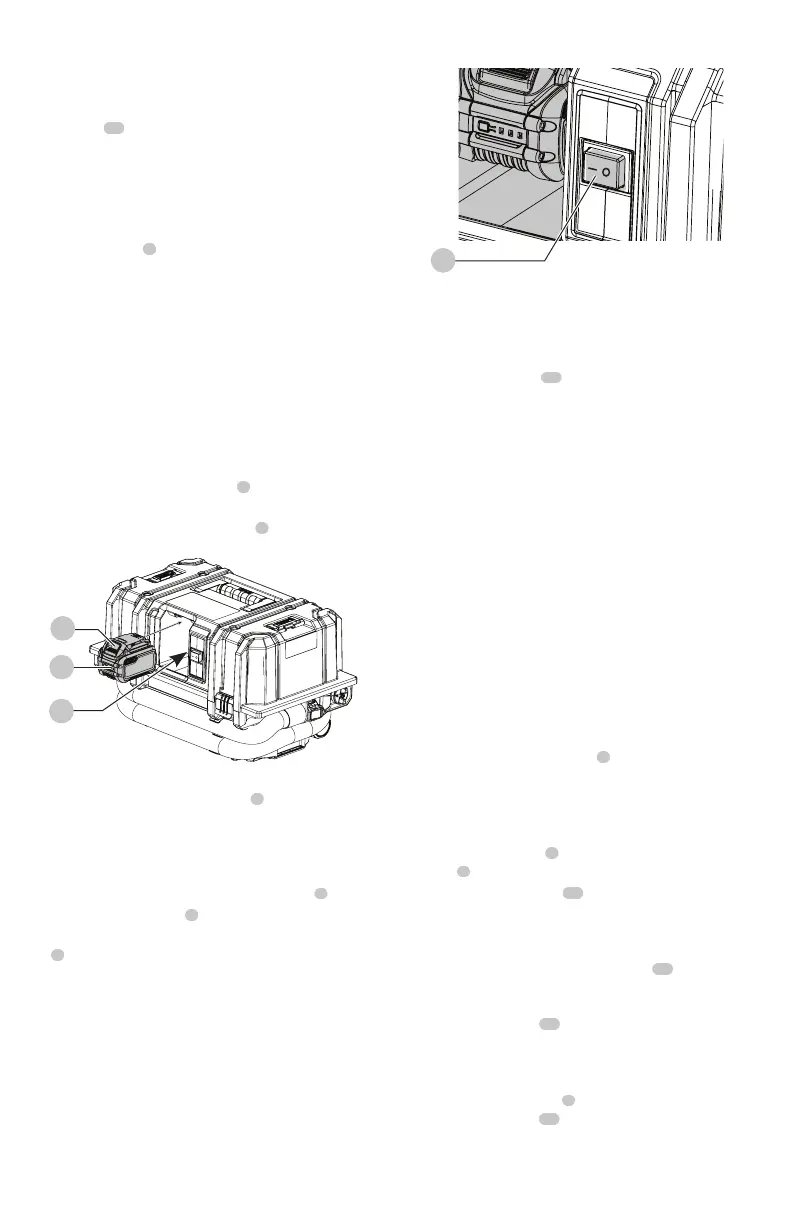
Installing and Removing the Battery Pack
(Fig.C)
NOTE: Make sure your battery pack
7
is fullycharged.
1. To install the battery pack into the dust extractor, insert/
slide battery pack into battery port
1
. Make sure the
battery pack is fullyseated.
Fig. C
1
7
8
2. To remove the battery pack from the dust extractor,
press and hold the battery release
8
on the battery
pack and remove. To charge the pack, insert it into your
DeWALTcharger.
Using the Dust Extractor (Fig.A,D)
1. Attach the appropriate accessory to the hose
2
.
2. Insert the battery pack
7
.
3. To turn dust extractor on, press the two position switch
3
to the On(
–
) position.
4. When finished, turn the dust extractor off by pressing
the two position switch to the Off(O) position.


 To Next Page