11
ENGLISH
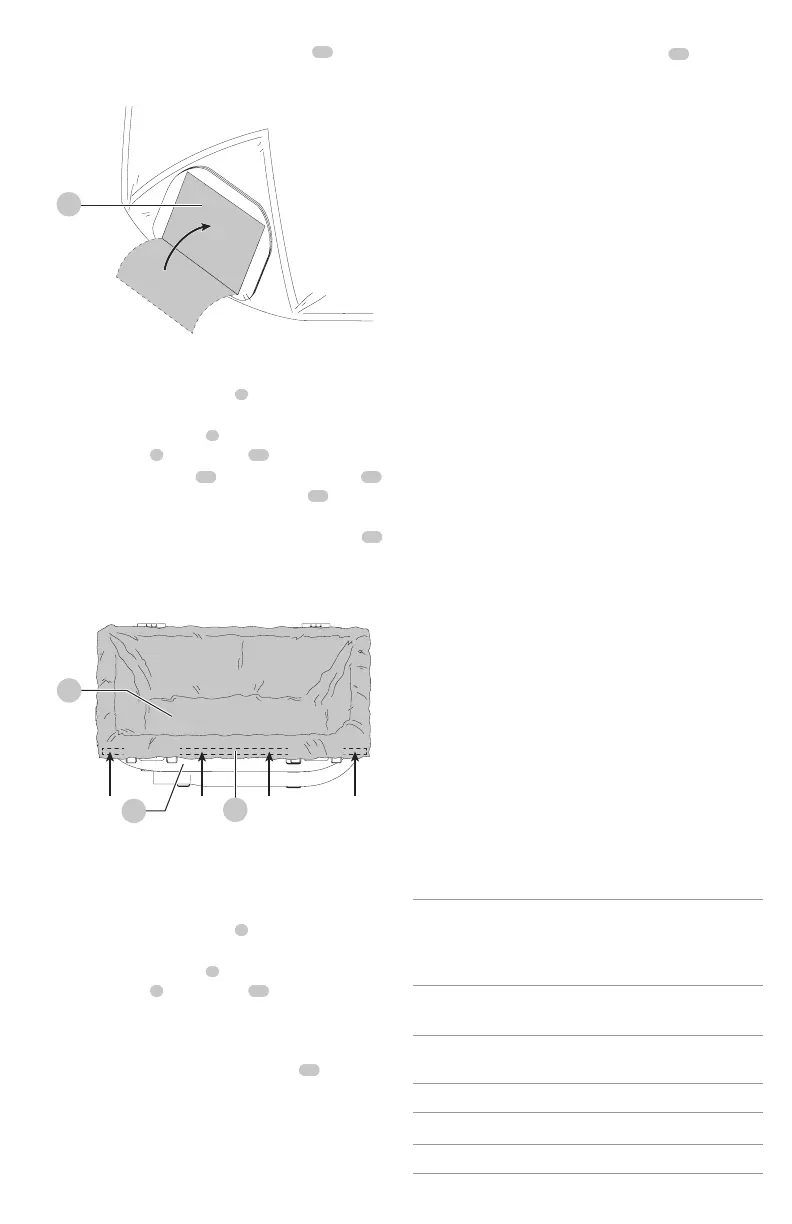
a. Peel the backing from the adhesive seal
24
.
b. Press the adhesive seal over the opening and
properly dispose of the bag. DO NOT reuse thebag.
Fig. J
24
Installing the Plastic Liner (Fig.A,I, K)
1. Press the two position switch
3
to the Off (O) position
and remove thebattery.
2. Unlatch the tank latches
4
and remove the dust
extractor head
6
from thetank
16
.
3. Attach the plastic liner
28
by passing the two tabs
21
on the bag opening past the two notches
22
on
thedust extractor as shown in Fig. I.
4. Rotate the bag a quarter turn until the square edge
23
is facingupward.
5. Fold the plastic liner over the top edge of the tank.
Fig. K
28
29
16
6. Replace dust extractor head onto the tank and
latchsecurely.
Removing and Disposing the Plastic
Liner (Fig. A, I, K)
1. Press the two position switch
3
to the Off (O) position
and remove thebattery.
2. Unlatch the tank latches
4
and remove the dust
extractor head
6
from thetank
16
.
NOTE: It is normal for there to be a small amount
of dust in the tank even with the the plastic liner
properlyinstalled.
3. Peel the backing from the adhesive tape
29
along the
top edge the plastic liner and seal the liner.
4. Rotate the plastic liner until the two tabs align with the
two notches on the dust extractor and remove the liner.
5. Peel the backing from the adhesive seal
24
. as shown
in Fig. J.
6. Press the adhesive seal over the opening and properly
dispose of the bag. DO NOT reuse thebag.Maintenance
WARNING: To reduce the risk of serious personal
injury, turn unit off and remove the battery pack
before making any adjustments or removing/
installing attachments or accessories. An
accidental start-up can causeinjury.Cleaning
WARNING: Using a damp cloth, clean dust
from air vents at least once a week. Wear proper
ANSIZ87.1 (CAN/CSA Z94.3) eye protection and
proper respiratory protection as required by OSHA or
other governmental/provincial institutions for the
application beingperformed.
WARNING: Never use solvents or other harsh
chemicals for cleaning the non-metallic parts of
the tool. These chemicals may weaken the plastic
materials used in these parts. Use a cloth dampened
only with water and mild soap.Accessories
WARNING: Since accessories, other than those
offered by DeWALT, have not been tested with this
product, use of such accessories with this tool could be
hazardous. To reduce the risk of injury, only DeWALT
recommended accessories should be used with
thisproduct.
Recommended accessories for use with your tool are
available at extra cost from your local dealer or authorized
service center. If you need assistance in locating any
accessory, please contact DeWALT, call 1-800-4-DeWALT
(1-800-433-9258).
Replacement filters are available at extra cost at your local
DeWALT servicecenter.
Dust Collector
In the vacuum mode, the appliance can also function as a
dust collector for power tool applications producing dust
ordebris.
IMPORTANT! The DWV9000 dust extraction adapter is
designed to work with AirLock® Compatible DeWALT
power tools. An additional adapter will be needed with
non-compatible DeWALTtools.
Optional Accessories
DC5151H
HEPA filter: Captures 99.97% of all particles
greater than or equal to 0.3microns.
Required when picking up lead
paintdebris.
DWE46100
5"–6" (127–152 mm)
Cutting/tuckpointing shroud
DWE46101
5"–6" (127–152 mm)
Cutting/tuckpointing shroud kit
D25301D Dust extraction adapter
DWE46150 5" (127 mm) Cutting/tuckpointing shroud
DWE46152 5" (127 mm) Surfacing shroud


 To Next Page