Home
Dexcom
Blood Glucose Meter
G6
Start Here
Page 13
Dexcom G6 - Page 13
20 pages
Manual
Save Page as PDF
To Next Page
To Next Page
To Previous Page
To Previous Page
Loading...
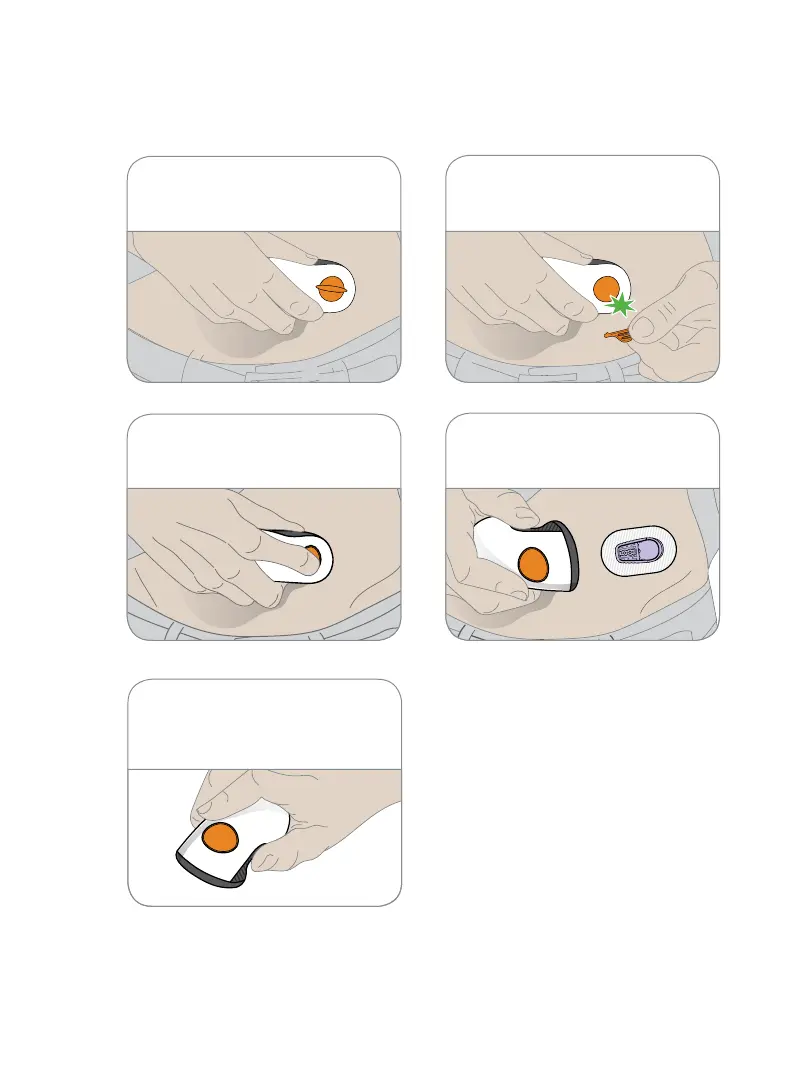
4
F
old and break of
f s
afet
y
guard
.
6
Remove applicat
or fr
om skin
leaving patch and holder on.
3
Plac
e applicator
on skin.
5
P
ress but
ton to inser
t sens
or
.
7
T
hrow away applicator
.
Follow local guidelines for
blood-contacting co
mpone
nts.
12
14
Table of Contents
Main Page
What It Does
3
Set up App
5
Set up Receiver
9
Step 3: Attach Transmitter
14
Other manuals for Dexcom G6
User Guide
360 pages
Instructions For Use
104 pages
Manual
20 pages
Related product manuals
Dexcom g4
156 pages
Dexcom G5
410 pages
Dexcom G7
180 pages
Dexcom G6 Pro
172 pages
Dexcom NZMS G7
2 pages
Dexcom G5 Mobile
392 pages
Dexcom Share
124 pages
Dexcom one
92 pages
Dexcom ONE+
92 pages
Dexcom SEVEN PLUS
144 pages
Dexcom SEVEN
144 pages
Dexcom stelo
122 pages



 To Next Page