OPENCHOICE CALIBRATION
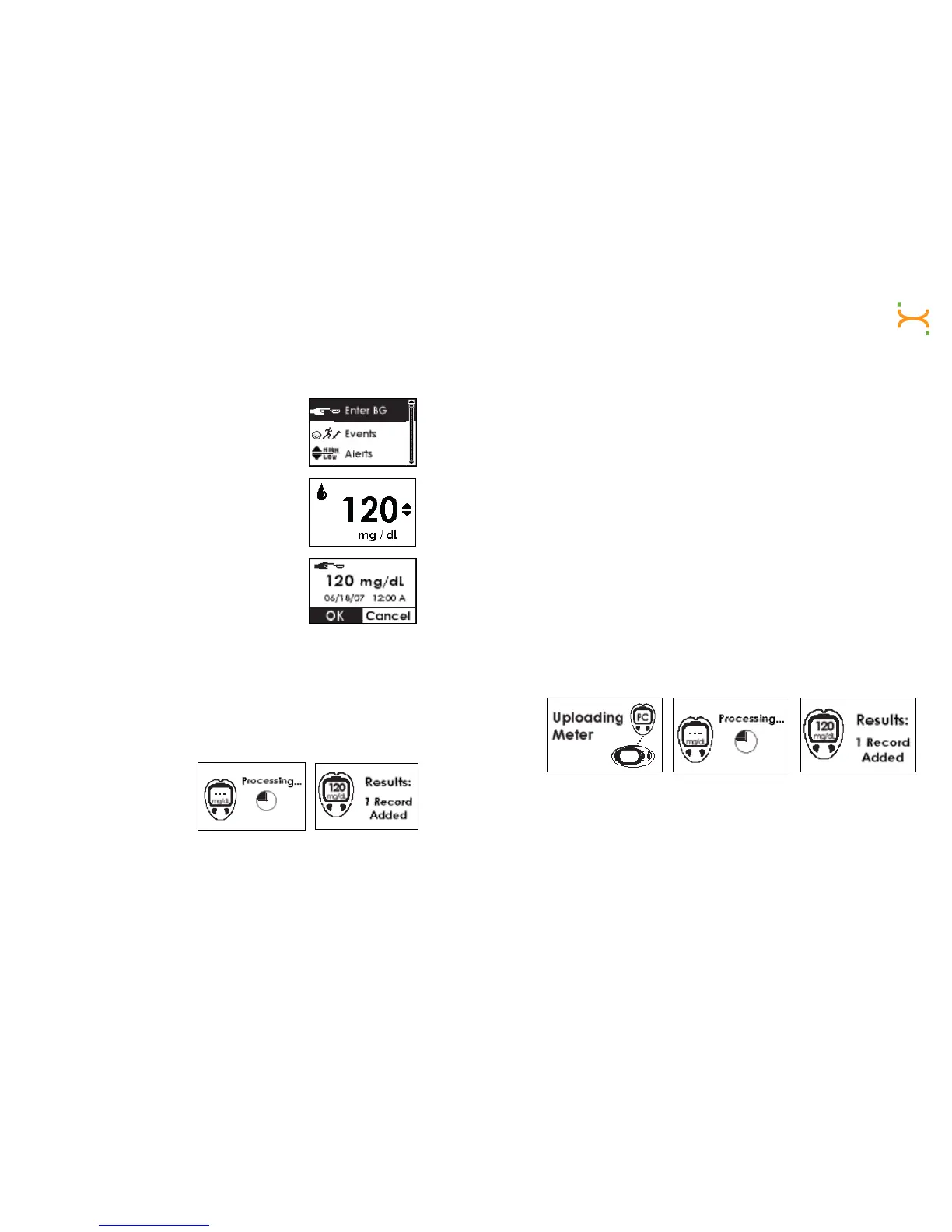
a. Press the OK button to reach the Menu screens.
b. Use the Up p and Down q Arrows to scroll
until you highlight “Enter BG.”
c. Press the OK button to select this option. You
will see a number in mg/dL units.
NOTE: The default setting is 120 mg/dL.
d.Toenterthengerstickreadingtakenfromyour
meter, press the Up p and Down q Arrows until
you arrive at the correct reading. Enter a reading
between 40-400 mg/dL taken within the past
5 minutes. Press the OK button to enter
the reading.
i) Press the OKbuttonagaintoconrmthereadingiscorrect.
ii)Ifthengerstickreadingdisplayedisincorrect,presstheC button
and enter in the correct reading for calibration.
iii) If you do not press any button, the Receiver will “time out” and no
ngerstickreadinginformationwillbeentered.
e. The Glucose Readings
Processing screen will
appear, followed by the
Results Added screen.
f. For Start-Up Calibration, repeat these steps for the second
ngerstickreading.
g. Your continuous glucose readings will be updated every 5 minutes, but
you will not see them displayed in the Status Box.
NOTE: OpenChoice calibration BG readings must be entered into the
Receiver within 5 minutes of being taken. If greater than 5 minutes has
passed,takenewngerstickreadings.
AUTO UPLOAD CALIBRATION
a. Make sure the OneTouch Ultra Meter display is off (blank screen)
before connecting. To turn the display off, press the “M” button once.
b. UsetheConnectionCabletorstplugthecableintotheconnection
port at the bottom of the OneTouch Ultra Meter.
c. Then connect the wide end of the cable into the Receiver. Make sure
the raised “Push” button on the cable is facing down. After a few
seconds “PC” will appear on the OneTouch screen.
d. ThreeReceiverscreenswillappearinthisorder:ConnectionScreeng
Processing Screen g Results Screen
e. Once you see the Results Screen, then press the Push button on the
Connection Cable to disconnect the cable from the OneTouch Ultra
Meter and the Receiver (the order that you disconnect the cable does
not matter).



 To Next Page