10
Basic System Setup
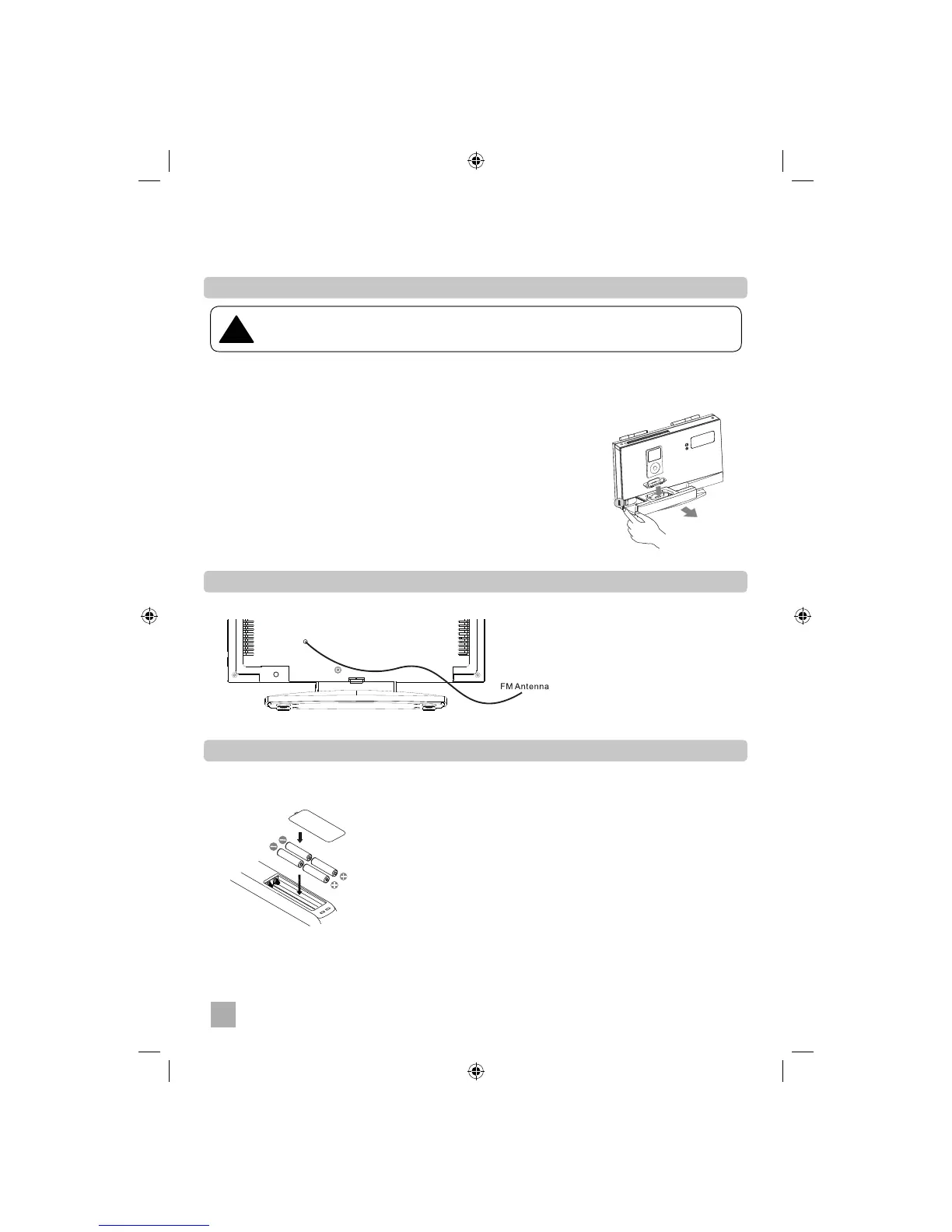
4. Select the Correct iPod Dock Adapter
This iPod Dock comes with 8 removable dock adapters. Using the connect adapter ensure the proper
fi t for your iPod and helps to reduce the stress on the connector when operating the iPod.
To place a dock adapter:
1. Press the OPEN button on the side of the wireless main unit to extend
the iPod dock drawer.
2. Refer to the compatibility table on page 20 and select the correct dock
adapter for the iPod.
3. Place the proper adapter into the dock and press it into position. The
adapter will only go in one way. The iPod dock connector should fi t
through the opening at the bottom of the adapter.
4. Carefully align and then gently insert the iPod into the dock. Remove
any case or skin from the iPod before attempting to dock.
5. Extend FM Antenna
6. Install Batteries
• Insert four AAA batteries into the remote control while observing the correct (+) and (-) polarities
as shown.
• If you wish to add additional speakers to this system, refer to page 31 for pairing speakers.
When connecting an iPod to this iPod Dock, please ensure that the correct adapter plate
is used. FAILURE TO DO SO MAY RESULT IN DAMAGE TO THE iPod.
!


 To Next Page