30
Other Functions
To set the alarm mode:
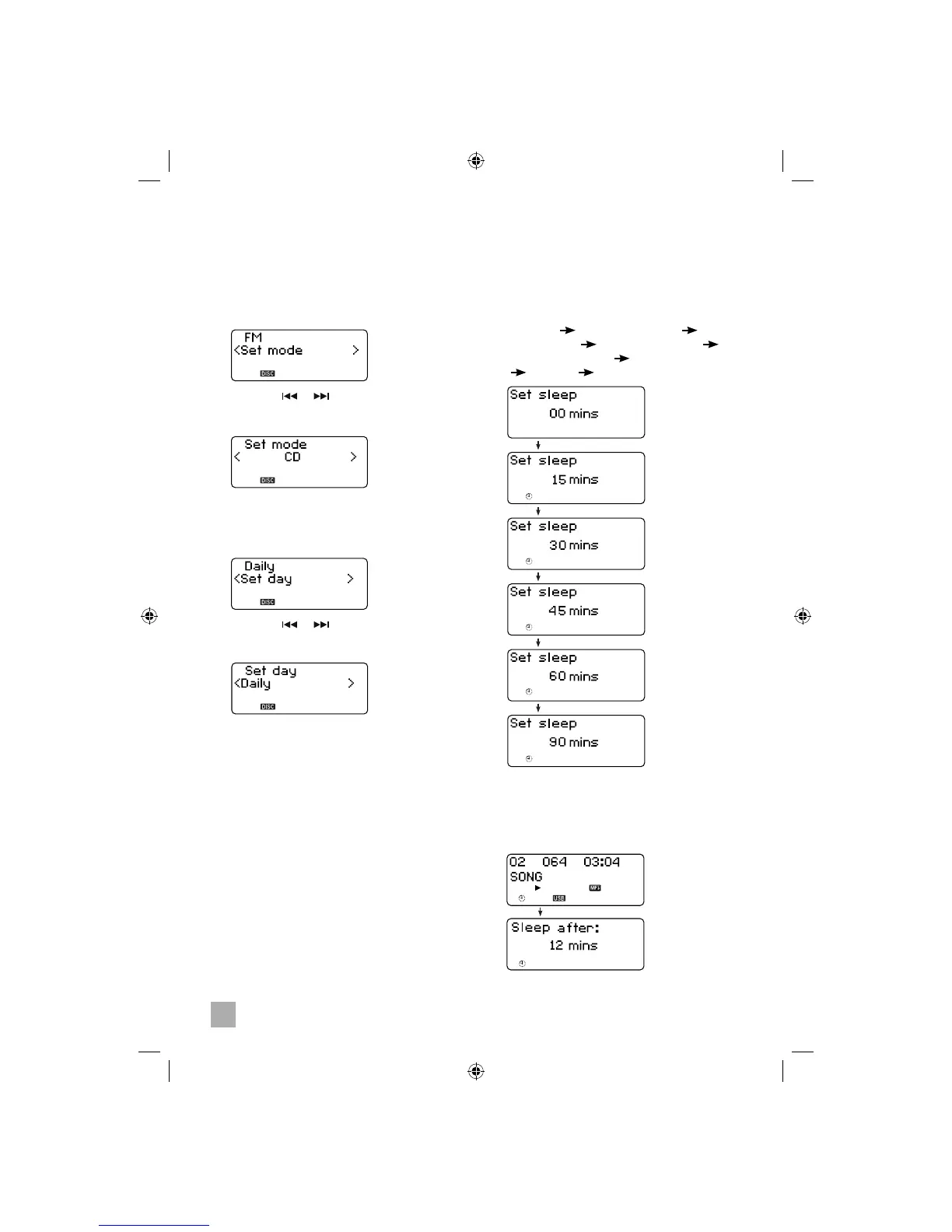
7. Press the ENTER button when you see “Set
mode ”.
8. Press the or button to select the alarm
wake up mode (FM, CD, USB, Card, iPod or
Buzzer) and then press the ENTER button.
To set the alarm day (frequency):
9. Press the ENTER button when you see “Set
day”.
10. Press the or button to select the alarm
day (frequency: once, daily, weekday or
weekend) and then press the ENTER button.
• The alarm is now set.
Sleep Timer (remote control only)
This system includes a programmable Sleep
Timer that shuts the power off automatically after
between 15 and 90 minutes.
To set the sleep timer:
• Press the SLEEP key repeatedly. The
system cycles through different sleep settings
in the following order:
Sleep off Sleep timer 15mins Sleep
timer 30mins Sleep timer 45mins
Sleep timer 60mins Sleep timer 90 mins
Sleep off …
To preview the remaining sleep time while
SLEEP is active:
• Press SLEEP key. The display shows the
remaining sleep time.
Setting Snooze
Press to activate the SNOOZE function
during ALARM 1 or ALARM 2 is activating,
the ALARM 1 or ALARM 2 will activate
again 5 minutes later. To cancel, press
ALARM 1 or ALARM 2 accordingly.


 To Next Page