19
iPod Operation
Using the iPod Dock you can play music from the iPod through the unit’s speakers and operate with
the remote control. The unit comes with eight removable dock adapters to ensure the proper fi t for
your iPod and to help reduce stress on the connector when operating the iPod.
Docking your iPod
1. Refer to the compatibility table on the next page and select the correct dock adapter for your iPod.
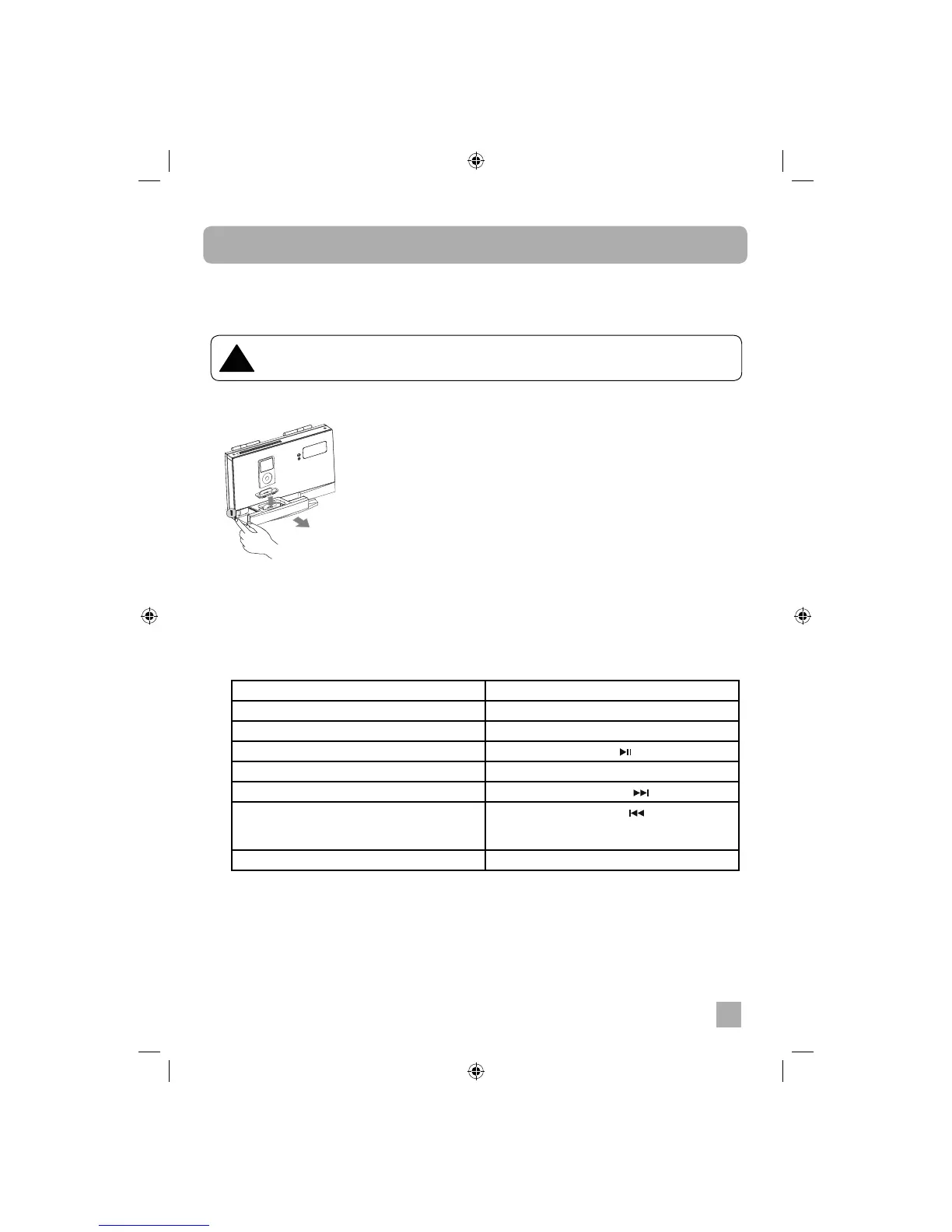
2. Place the dock adapter in the dock and press into position. The adapter will only go in one way.
3. Carefully align and gently insert the iPod into the dock. Remove any case or skin from the iPod
before attempting to dock.
4. Press the function button on the wireless main unit or on remote control to switch to iPod mode.
5. Use the remote control to operate the iPod as follows:
To enter main menu Press the MENU button
To scroll Press the SCROLL UP/DN button
To choose an item Press the ENTER button
Play or pause a song Press the PLAY/PAUSE
button
Change the volume Press the VOL + or VOL – button
Skip to the next song Press the next/fast forward button
Start a song over or play a previous song Press the previous/rewind button once to
start a song over, and press it twice to play the
previous song
To go back to the previous menu Press the MENU button
!
When connecting an iPod to this iPod Dock, please ensure that the correct adapter plate
is used. FAILURE TO DO SO MAY RESULT IN DAMAGE TO THE iPod.


 To Next Page