After Sales Support TEL:1800 189 941 5
ASSEMBLY AND PARTS LIST
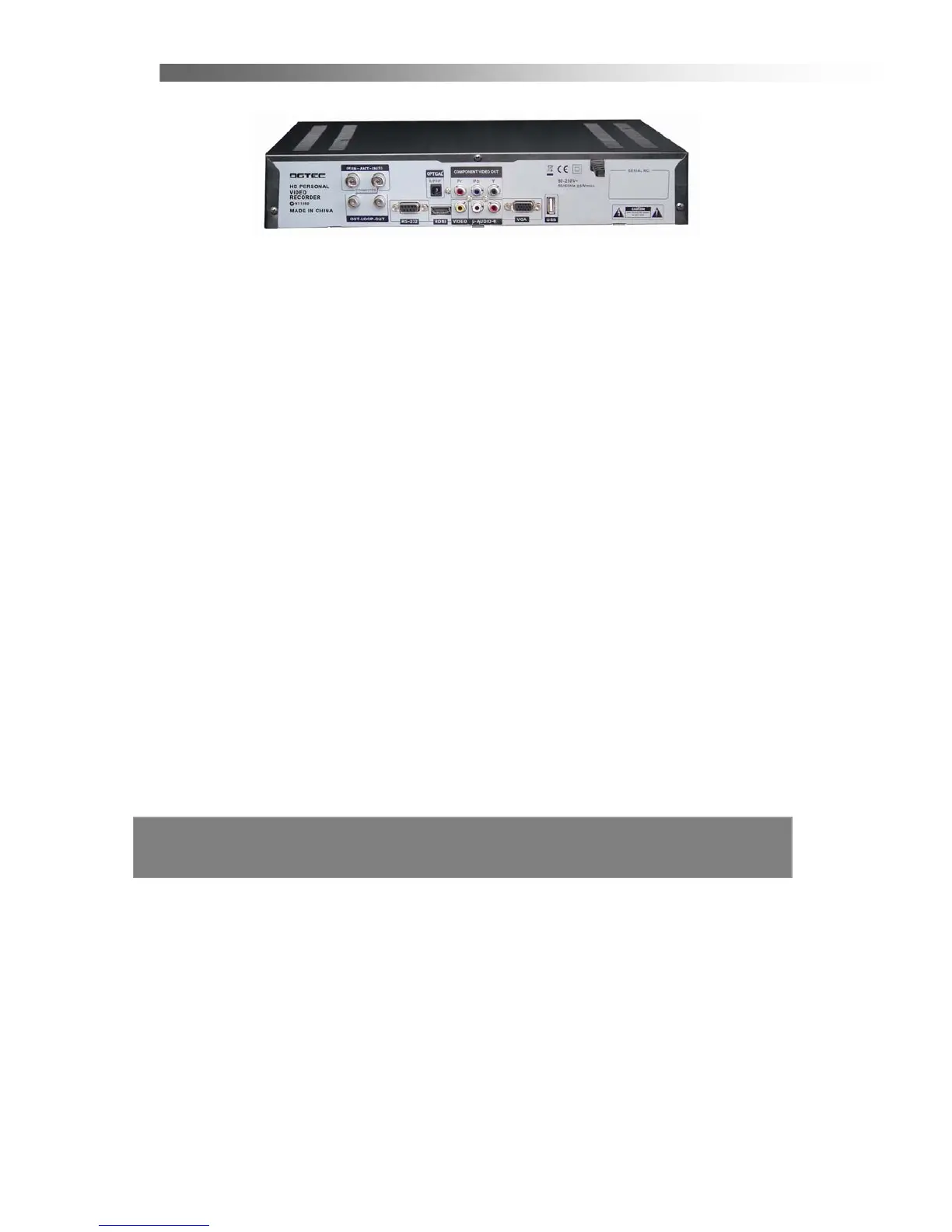
1.3 Rear Panel
1. ANT IN
Used to connect an antenna.
2. ANT OUT (LOOP OUT)
Used to connect an extra analogue or digital STB.
Please connect LOOP OUT (M) with ANT IN (S) correctly.
3. RS232 Serial Port
For firmware update, serial communication port (RS-232).
4. DIGITAL AUDIO (S/PDIF / Optical)
Connect to an External Audio Amplifier with S/PDIF / Optical Digital Audio.
5. HDMI Connector
Connect
High-Definition Multimedia output to HD Monitors (HDMI Type).
6. YPbPr
Connect component video to HD Monitors (YPbPr Type).
7. VIDEO (Yellow RCA)
Connect to a TV with video input.
8. AUDIO L/R (White / Red RCA)
Connect to a TV audio input, HD Monitors audio input or an External Audio Amplifier.
9. VGA Connector
Connect component video to HD Monitors (VGA Type).
10. USB
USB port is used for viewing external files on a memory stick, and for possible
software upgrades. (to be advised by DGTEC technician)



 To Next Page