6
ASSEMBLY AND PARTS LIST
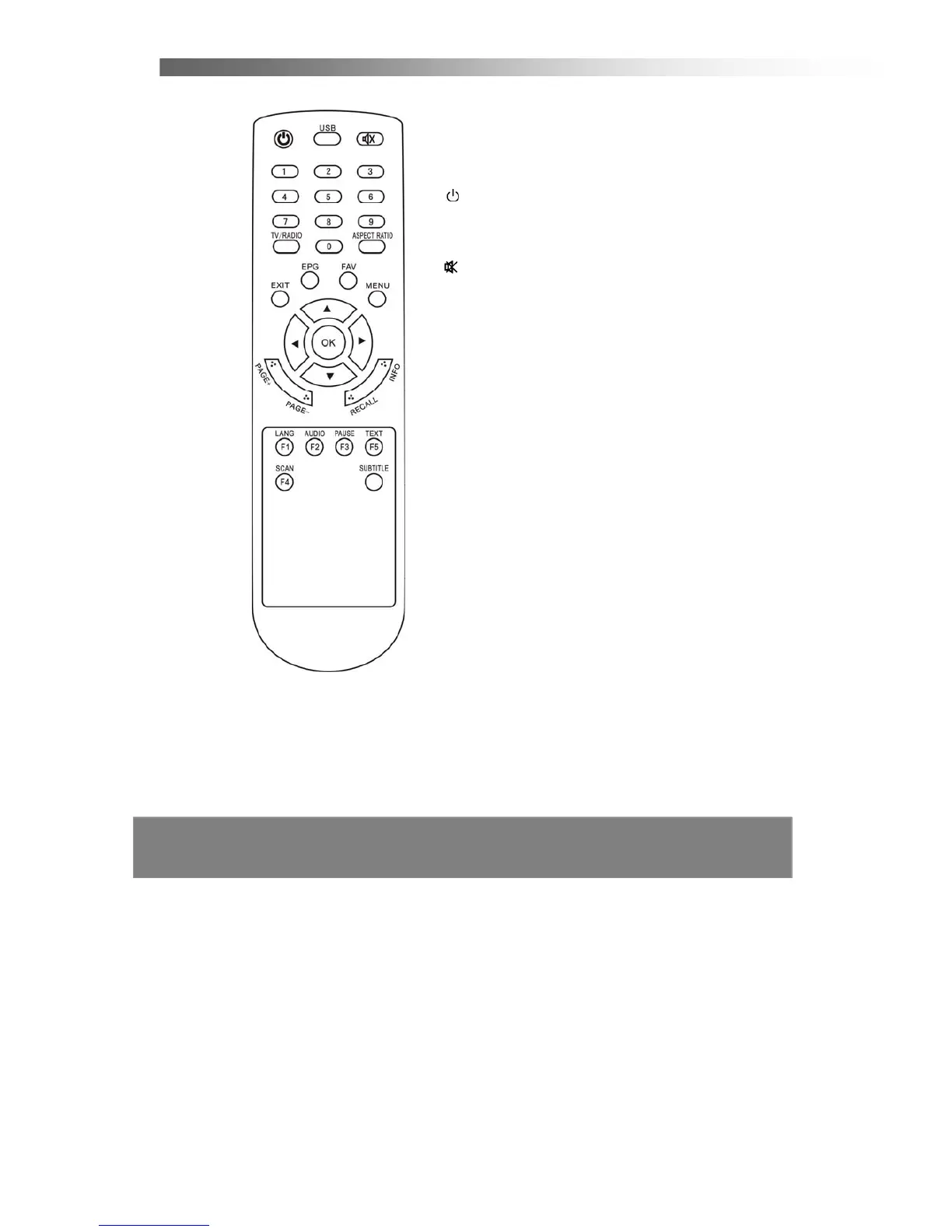
1.4 Remote Control Unit
All features of the STB can be controlled with the
remote control.
1.
POWER:
Press to switch between operation
and standby mode.
2. USB:
Press to see the files on a USB storage device
and upgrade the system through th port.
3. MUTE:
Press to mute the sound.
4. NUMERIC KEYS:
Press to input Channels’
Number, Passwords or Letters.
5. TV/RADIO:
Switch between TV or RADIO mode.
6. ASPECT RATIO:
Press to select
4:3 or 16:9
aspect ratio mode.
7. EXIT:
Press to return to the previous menu or to
escape from the current mode.
8. EPG:
Display the Electronic Program Guide.
9. FAV:
Press to display Favorite Channels’ List.
10. MENU:
Press to display the Main Menu.
11. Up▲/ Down▼: Change the channel or move
cursor in the menu.
12. Left◄/ Right►: Adjust volume or move cursor
in the menu.
13. OK: Press to select the item in the menu or to
list the TV/Radio channels.
14. PAGE +/ PAGE–:Press to page up/down in the
channel list.
15. RECALL: Press to return the previous channel.
16. INFO: Display the information of the current
program.
17. LANG: Press to select the item in the sound
mode.
18. AUDIO: Select the item in the audio mode.
19. PAUSE: Stop the video output of the STB.
20. TEXT: Display the Teletext information.
21. SCAN:
Press to search program automatically.
22. SUBTTLE: Press to directly enter the SUBTITLE mode.



 To Next Page