Troubleshooting
Performance problems often result from little things that you can fix yourself. Please read through this table for a
_ossible solution if a problem occurs.
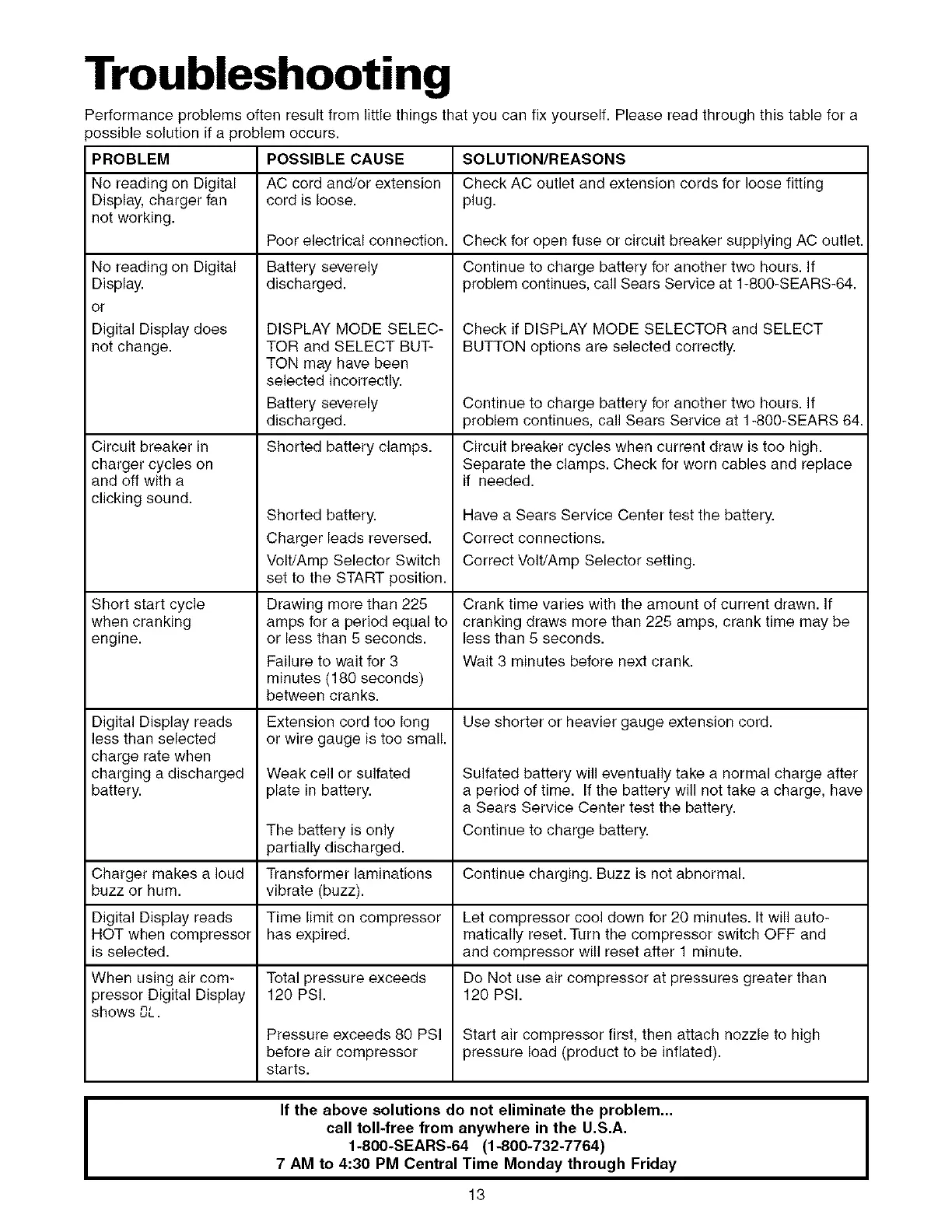
PROBLEM POSSIBLE CAUSE SOLUTION/REASONS
No reading on Digital AC cord and/or extension Check AC outlet and extension cords for loose fitting
Display, charger fan cord is loose, plug.
not working.
No reading on Digital
Display.
or
Digital Display does
not change.
Circuit breaker in
charger cycles on
and off with a
clicking sound.
Short start cycle
when cranking
engine.
Digital Display reads
less than selected
charge rate when
charging a discharged
battery.
Poor electrical connection.
Battery severely
discharged.
DISPLAY MODE SELEC-
TOR and SELECT BUT-
TON may have been
selected incorrectly.
Battery severely
discharged.
Shorted battery clamps.
Shorted battery.
Charger leads reversed.
Volt/Amp Selector Switch
set to the START position.
Drawing more than 225
amps for a period equal to
or less than 5 seconds.
Failure to wait for 3
minutes (180 seconds)
between cranks.
Extension cord too long
or wire gauge is too small.
Weak cell or sulfated
plate in battery.
Check for open fuse or circuit breaker supplying AC outlet.
Continue to charge battery for another two hours. If
problem continues, call Sears Service at 1-800-SEARS-64.
Check if DISPLAY MODE SELECTOR and SELECT
BUTTON options are selected correctly.
Continue to charge battery for another two hours. If
problem continues, call Sears Service at 1-800-SEARS 64.
Circuit breaker cycles when current draw is too high.
Separate the clamps. Check for worn cables and replace
if needed.
Have a Sears Service Center test the battery.
Correct connections.
Correct Volt/Amp Selector setting.
Crank time varies with the amount of current drawn. If
cranking draws more than 225 amps, crank time may be
less than 5 seconds.
Wait 3 minutes before next crank.
Use shorter or heavier gauge extension cord.
The battery is only
partially discharged.
Charger makes a loud Transformer laminations Continue charging. Buzz is not abnormal.
buzz or hum. vibrate (buzz).
Digital Display reads Time limit on compressor Let compressor cool down for 20 minutes. It will auto-
ROT when compressor has expired, matically reset.Turn the compressor switch OFF and
is selected, and compressor will reset after 1 minute.
When using air com- Total pressure exceeds Do Not use air compressor at pressures greater than
3ressor Digital Display 120 PSI. 120 PSI.
shows OL.
Pressure exceeds 80 PSI Start air compressor first, then attach nozzle to high
before air compressor pressure load (product to be inflated).
starts.
Sulfated battery will eventually take a normal charge after
a period of time. If the battery will not take a charge, have
a Sears Service Center test the battery.
Continue to charge battery.
I
If the above solutions do not eliminate the problem...
call toll-free from anywhere in the U.S.A.
1-800=SEARS=64 (1-800-732-7764)
7 AM to 4:30 PM Central Time Monday through Friday
13



 To Next Page