Digi-Pas
®
© 2021 Digipas Technologies Inc. All Rights Reserved.
www.digipas.com
DWL-3000XY & DWL-3500XY Instruction Manual
17
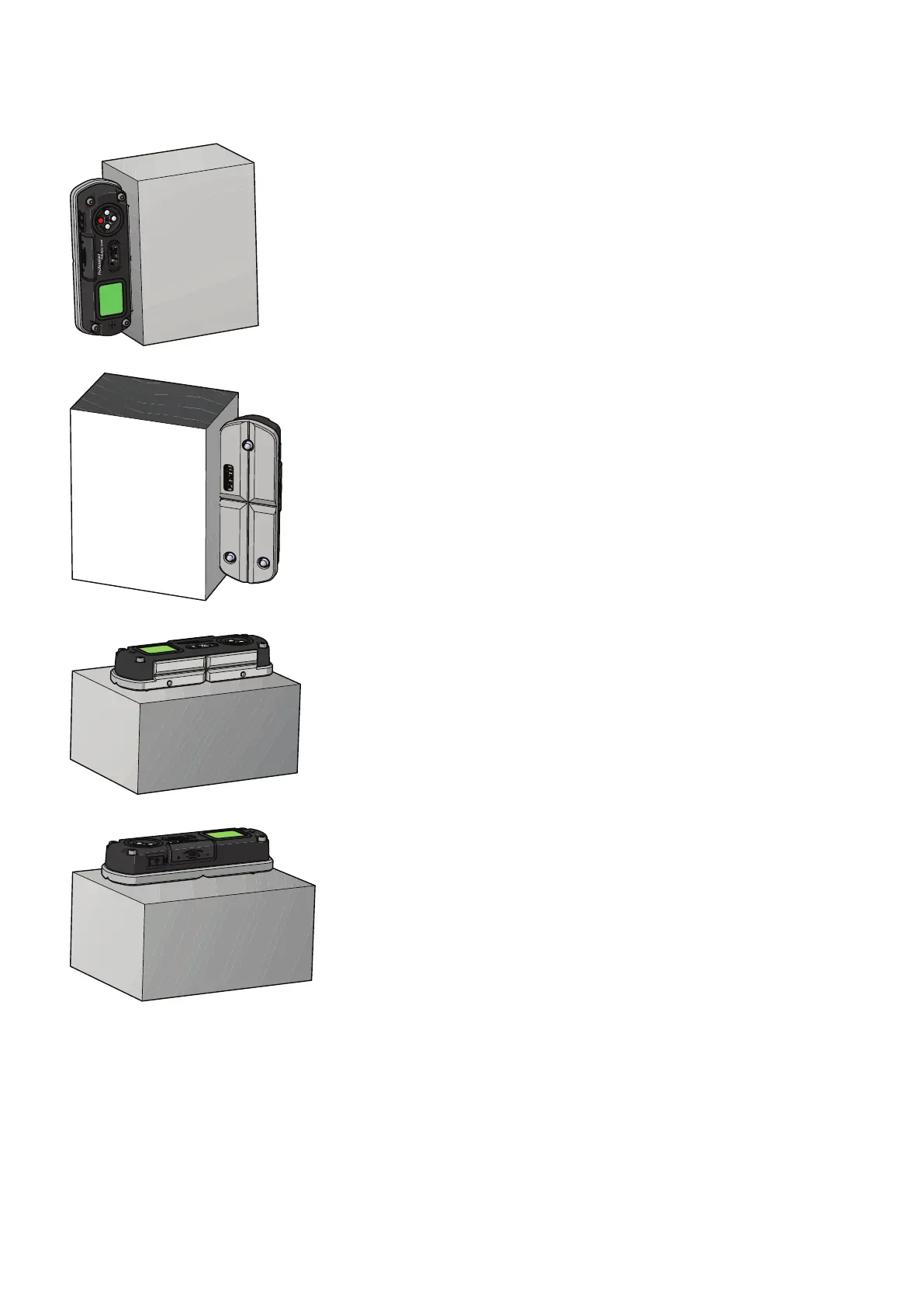
5. Rotate the device 180° as shown Position 5. Hold
the device rmly and do not move the device
during each count down period. Press the MODE
button again to start the calibration and wait until
the countdown reach “0”, the LCD screen displays
“Calibration 6”.
6. Turn the device 180° and place on the opposite
side of the master square as shown in Position 6.
Hold the device rmly and do not move the device
during each count down period. Press the MODE
button again to start the calibration and wait until
the countdown reach “0”, the LCD screen displays
“Calibration 7”.
7. Place the device to Position 7. Press the MODE but-
ton once and wait until the countdown reach “0”,
the LCD screen displays “Calibration 8”.
8. Turn the device 180° to Position 8. Press the MODE
button again and wait until the countdown reach
“0”, the LCD screen will switch to measuring mode
once calibration is completed.


 To Next Page
 Loading...