Calibration ; continued
1 : ZERO
3: GROSS
4: INSUFFICIENT
S/No.
OPERATION DISPLAY
INDICATORS
REMARKS
WEIGHT
WEIGHT
QUANTITY
2
4
S 6
7
1
0
1
1
2
1
3
1
4
5
6
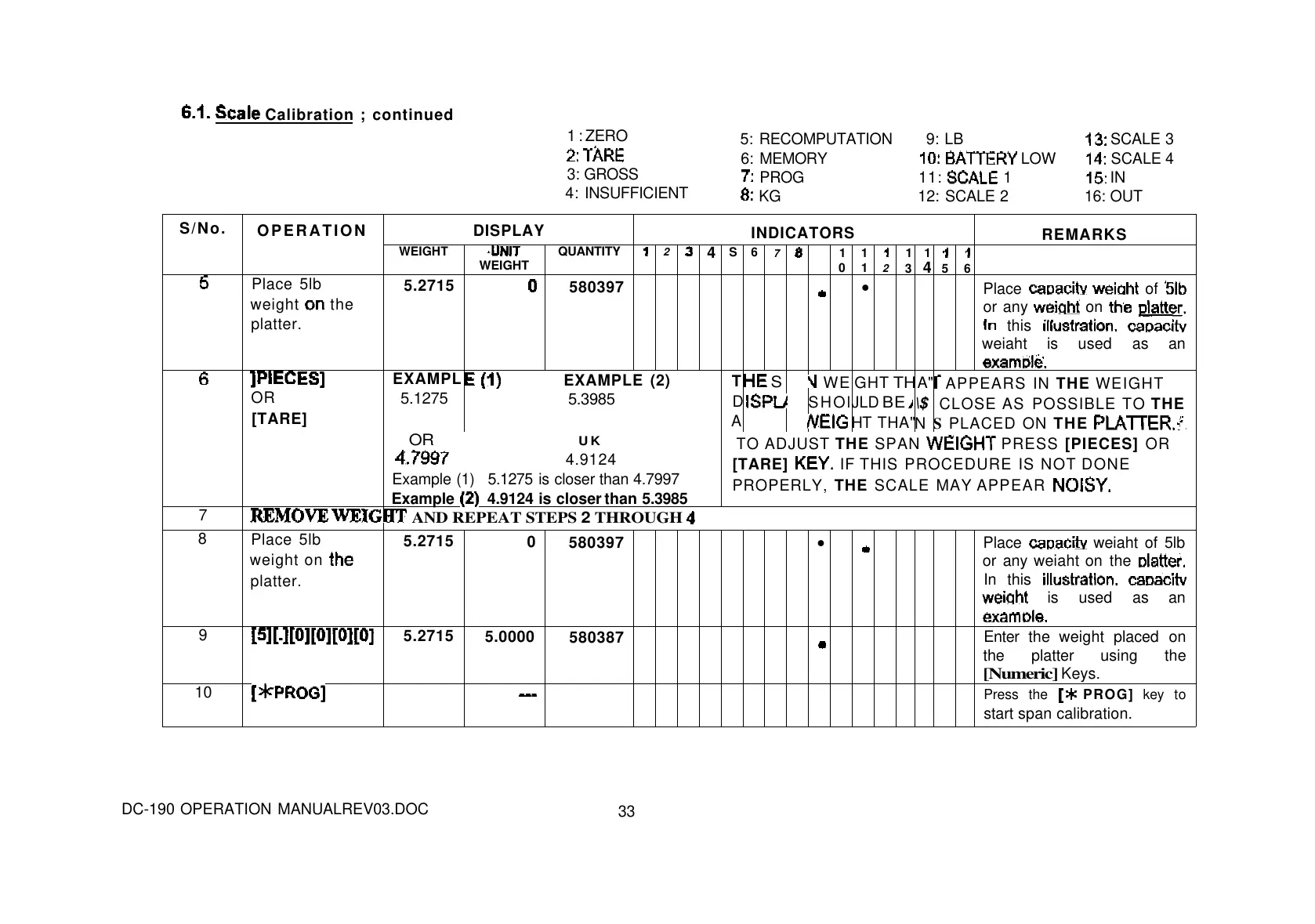
Place 5lb
weight
the
platter.
5.2715
580397
•
Place
of
or any
on
this
weiaht is used as an
OR
[TARE]
EXAMPL
5.1275
EXAMPLE (2)
5.3985
T
D
A
S
WE
SHOl
GHT
TH
JLD
BE
HT THA"
A"
\$
N
APPEARS IN THE WEIGHT
CLOSE AS POSSIBLE TO THE
S PLACED ON THE
OR UK
4.9124
Example (1) 5.1275 is closer than 4.7997
Example
4.9124 is closer than 5.3985
TO ADJUST THE SPAN
PRESS [PIECES] OR
[TARE]
IF THIS PROCEDURE IS NOT DONE
PROPERLY, THE SCALE MAY APPEAR
7
AND REPEAT STEPS 2 THROUGH
8
Place 5lb
weight on
platter.
5.2715
0
580397
•
Place
weiaht of 5lb
or any weiaht on the
In this
is used as an
9
5.2715
5.0000
580387
Enter the weight placed on
the platter using the
[Numeric]
Keys.
10
Press the
PROG] key to
start span calibration.
5: RECOMPUTATION 9: LB
SCALE 3
6: MEMORY
LOW
SCALE 4
PROG 11:
1
IN
KG 12: SCALE 2 16: OUT
DC-190 OPERATION MANUALREV03.DOC
33



 To Next Page