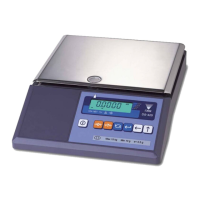
The DC-530 is a counting scale designed for accurate and efficient weighing and counting operations. It offers a high-precision counting resolution of 1/1,000,000, utilizing a UniBloc one-piece force cell design for quick response, stability against temperature change, and outstanding durability. The scale features a top-mounted LCD display that shows weight, unit weight, and quantity, and it can store up to 200 item codes, parts, or items in memory. The DC-530 is equipped with RS-232 ports to connect to a printer, PC, or barcode scanner, and an optional remote scale channel allows for connection to an additional weighing platform.
Function Description
The DC-530 operates in several modes to accommodate various counting and weighing tasks:
- Counting Mode: This is the primary mode for counting items. It allows for sampling to determine unit weight, accumulation of quantities, and subtraction of items.
- Program Mode: Used for setting up and managing item information, including storing unit weights and tare values for up to 200 items.
- Date & Time Setting: Allows users to set the current date and time, which can be printed on labels and reports.
- Set Point Setting: Configures general set points for various operations.
- Teraoka Error Prediction (TEP) Function: This advanced feature detects weight variances in sample quantities and calculates the maximum quantity of that piece that can be counted without introducing error. It helps ensure maximum safe quantity and provides a visual indication (green to yellow or red) of the scale's display to show when the maximum safe quantity has been exceeded. This function works by performing a series of sampling operations, which the scale uses to plot the weight variances of the pieces being weighed. By then accumulating counting results within the calculated safe quantity, the counting operation can be completed without a counting error.
Important Technical Specifications
- Operating Conditions:
- Operating Temperature: -10°C to +40°C (OIML)
- Operating Humidity: 15% to 85% RH
- Electrical Specifications:
- Power Source: AC117/100V
- Charge Current: 800 mA
- Main Board Backup Battery: Lithium rechargeable battery for data protection
- Clock: Built-In Real-Time Clock
- Memory: 200 Items
- UniBloc Force Cell Specifications:
- Input Sensitivity: 0.5mV/V to 4mV/V
- Minimum Impedance: 4 x 350 ohm
- Resolution Specifications:
- Display Device: Dot Matrix Three Color LCD Backlit Display
- Internal Resolution: 1/1,000,000
- Display Resolution: 25,000/50,000/100,000
- Communications/External Devices Specifications:
- Number of Scales: 1 internal and 2 external
- RS-232C Interface: RS232C-1 for connection to a laser barcode scanner, RS232C-2 for connection to a printer, RS232C-3 for connection to a personal computer
- 14 pin female amphenol for external loadcells
- Capacities and Resolutions:
- 10 lb capacity: 0.0001 lb minimum graduation, 13" x 9.3" platter size
- 20 lb capacity: 0.0002 lb minimum graduation, 13" x 9.3" platter size
- External Platforms (Optional):
- 100.00 lbs: 13" x 17" (DIGI S-SL Platform)
- 250.00 lbs: 17" x 21" (DIGI S-TL Platform)
- 500.00 lbs: 17" x 21" (DIGI S-UL Platform)
- 1500.0 lbs: 24" x 28" (DIGI S-UL Platform)
- 2500.0 lbs: 36" x 36" or 48" x 48" (DIGI Summit 3000 Platform)
- 5000.0 lbs: 48" x 48" (DIGI Summit 3000 Platform)
- 10000.0 lbs: 48" x 48" or 60" x 84" (DIGI Summit 3000 Platform)
- 20000.0 lbs: 60" x 84" (DIGI Summit 3000 Platform)
- 40000.0 lbs: 60" x 84" (DIGI Summit 3000 Platform)
Usage Features
- Keyboard and Display: The DC-530 features a numeric keypad and other function keys for easy operation. The LCD display shows item code, weight, unit weight, and quantity, with indicator lamps for ZERO, STABLE, NET, INSUFF, ACCUM, and RECOM.
- Key Functions:
- ON/OFF: Turns the scale display on or off.
- REZERO: Resets the weight display to zero.
- SCALE: Selects between Scale 1 and Scale 2 if an external scale is connected.
- TEP: Toggles between "Normal Counting Mode" and "Teraoka Error Prediction (TEP) Counting Mode".
- + (Plus): Accumulates quantity data, prints a label if an external printer is connected, and navigates to the next editable data in all modes except Normal and TEP counting modes.
- - (Minus): Subtracts a quantity during accumulation, and navigates to the previous editable data in all modes except Normal and TEP counting modes.
- * PRINT: Outputs data to print a label when an external printer is connected, shows and clears accumulated TOTAL data, saves changes in data in all mode operations except Normal and TEP Counting modes.
- MODE: Accesses the menu for Program Mode, Date & Time Setting, and Set Point Setting.
- Numeric keys (0-9): Enters numeric values.
- . (Decimal): Sets the decimal point.
- PCS: Used for computing Unit Weight by sampling.
- TARE: Sets or clears the tare value, stores SPEC changes, and escapes to the Weighing Mode when programming specifications.
- UNIT WEIGHT: Sets the Unit Weight, registers an item code into memory.
- # POUND: Calls up or recalls an item code from memory.
- Unpacking and Setup: The manual provides detailed instructions for unpacking, inspecting for damage, and setting up the scale, including leveling the scale using its adjustable feet. It also covers connecting the AC power cord and turning on the scale.
- Date and Time Setting: Users can easily set the date and time through the MODE menu, using the numeric keypad to enter values.
- Customer Specifications: The scale allows for extensive configuration of customer specifications, including printer model, connection type, baud rate, parity bit, stop bit, data length, insufficient range for load cell, unit weight sampling times, gross weight output, and more.
- Weight and Measurement Specifications: Detailed settings for minimum display, display resolution, internal count span, weight decimal point position, weight stable condition, and tare settings are available for both internal and external scales.
- Calibration: The DC-530 features a high-precision instrument that requires calibration after every month or so of normal usage. The calibration process involves placing a known weight on the platter and verifying the displayed weight.
- Scale Operations: The manual outlines procedures for normal counting mode (unit weight operation by sampling, part accumulation, part subtraction, clearing accumulated data, negative counting) and TEP mode (unit weight operation by sampling, key entry, parts counting, part accumulation, part subtraction, negative counting, clearing accumulated data).
- Item Registration and Update: Users can program new item codes, update existing item information (unit weight, tare, set points), and delete individual or all item codes from memory.
- External Device Connectivity: The DC-530 supports connection to various external devices such as printers (Zebra LP2824, Epson TM-U220, TM-U295), barcode scanners, and PCs via RS-232C ports. Pin assignments and data formats are provided for seamless integration.
- Setpoint Connector: The scale can be connected to external control equipment for setpoint operations, with detailed pin assignments provided.
- Remote Scale Channel: An optional remote scale platform can be connected to the right-hand side of the scale, expanding its weighing capabilities.
Maintenance Features
- Troubleshooting Guide: The manual includes a comprehensive troubleshooting section that lists common error messages, possible causes, and corrective actions for issues such as the scale not powering on, unstable readings, or errors during sampling operations.
- Error Message List: A dedicated section explains various error messages displayed by the alphanumeric display, offering possible causes and corrective actions.
- Warranty: Rice Lake Weighing Systems (RLWS) warrants that all equipment and systems are free from defects in materials and workmanship for one year. The warranty covers repair or replacement of defective components, provided the damage is not due to misuse, neglect, alteration, improper installation, or repair.
The DC-530 is a robust and versatile counting scale designed for industrial and commercial applications requiring high accuracy and efficiency in counting and weighing tasks. Its extensive features, connectivity options, and user-friendly interface make it a valuable tool for inventory management and production control.

 Need help?

 To Next Page
 General