12 DC-530 Operation Manual
09
RS232C2
Baud Rate
000: 19200
001: 9600 [DEFAULT]
010: 4800
011: 2400
100: 1200
10
RS232C2
Parity Bit
00: Even
01: Odd
10: None [DEFAULT]
11: None
Stop Bit
0: 1 [DEFAULT]
1: 2
Data Length
0: 7
1: 8 [DEFAULT]
11
RS232C3
Baud Rate
000: 19200
001: 9600 [DEFAULT]
010: 4800
011: 2400
100: 1200
12
RS232C3
Parity Bit
00: Even
01: Odd
10: None [DEFAULT]
11: None
Stop Bit
0: 1 [DEFAULT]
1: 2
Data Length
0: 7
1: 8 [DEFAULT]
13 - 19 not currently in use
51 Insufficient Range for Load Cell
00: 0.1% of Full Scale [DEFAULT]
01: 0.2% of Full Scale
10: None
11: None
Insufficient Sample
0: Disable
1: Enable [DEFAULT]
Insufficient Range for
Force Balance
0: 0.01% of Full Scale
[DEFAULT]
1: 0.1% of Full Scale
52 Unit Weight Sampling
Times
0: 5 times [DEFAULT]
1: 10 times
Change Scale When
Weight Stable
0: No [DEFAULT]
1: Yes
Negative Counting
0: No
1: Yes [DEFAULT]
Sampling Times
0: 5 times
1: 10 times [DEFAULT]
53 Gross Weight Output
0: Display [DEFAULT]
1: Internal
Normal Counting Mode
Auto Re-Computing
0: Manual
1: Automatic [DEFAULT]
Exit the Total Mode
0: Manual
1: Automatic [DEFAULT]
TEP Sampling Method
0: Manual
1: Automatic [DEFAULT]
54 Wait for Stable Weight
During Unit Weight
Calculating
0: No [DEFAULT]
1: Yes
Work Filter Function
0: No
1: Yes [DEFAULT]
Uni Bloc Average Sample (filter function)
00: 16 samples
01: 32 samples
10: 64 samples [DEFAULT]
11: 128 samples
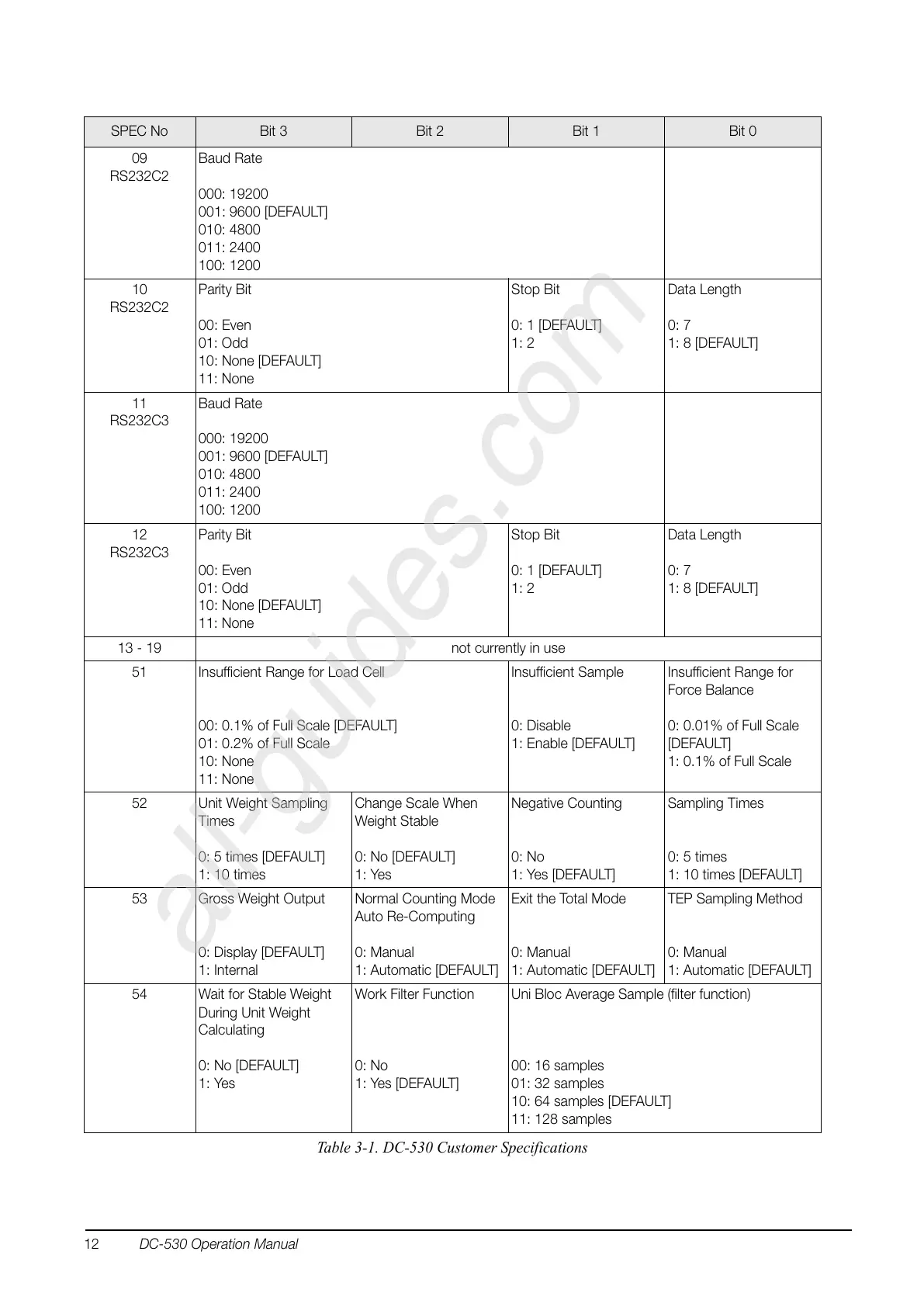
SPEC No Bit 3 Bit 2 Bit 1 Bit 0
Table 3-1. DC-530 Customer Specifications


 To Next Page