20
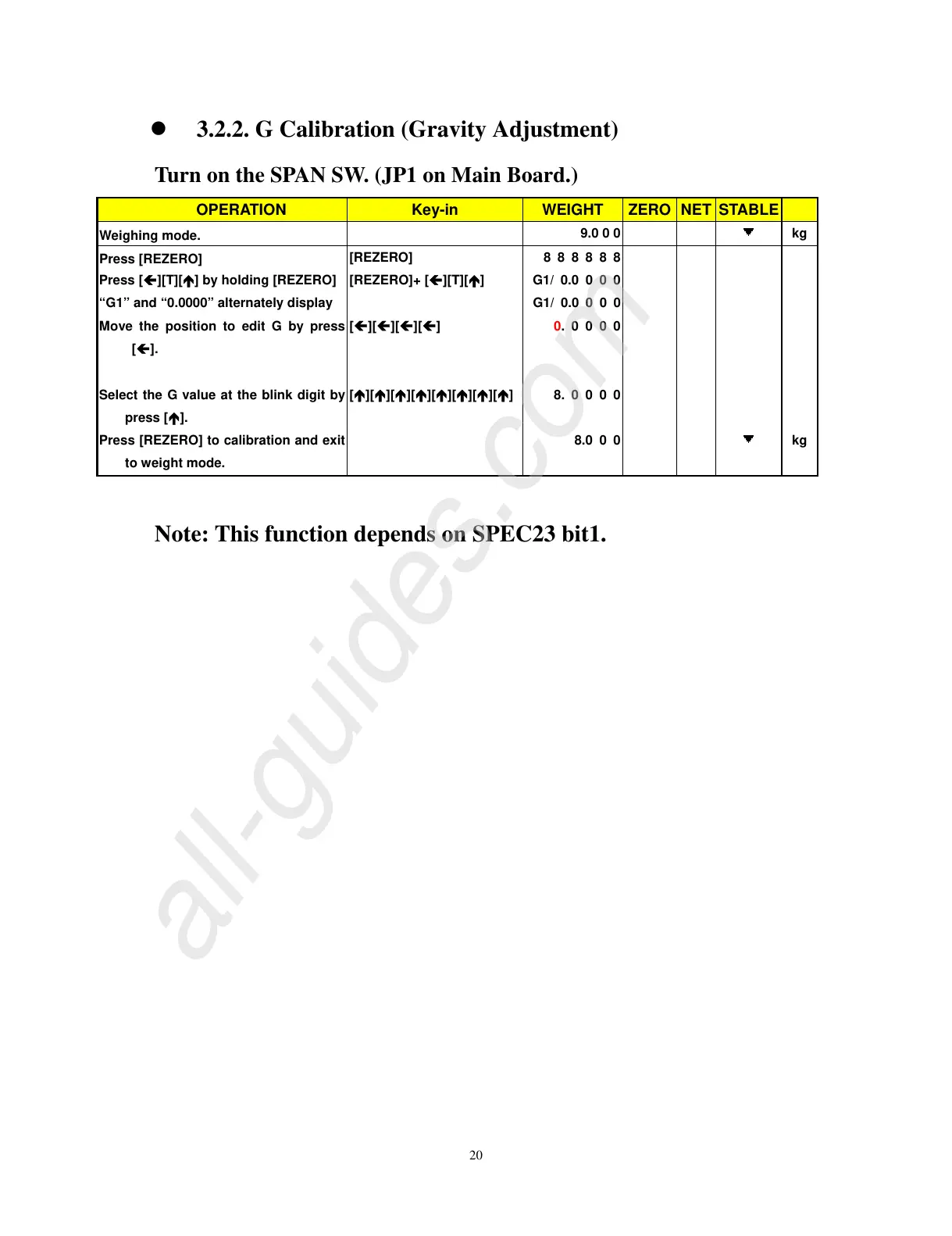
z 3.2.2. G Calibration (Gravity Adjustment)
Turn on the SPAN SW. (JP1 on Main Board.)
OPERATION Key-in WEIGHT ZERO NET STABLE
Weighing mode.
9.0 0 0
kg
Press [REZERO]
[REZERO] 8 8 8 8 8 8
Press [
Í
][T][
Ï
] by holding [REZERO] [REZERO]+ [
Í
][T][
Ï
] G1/ 0.0 0 0 0
“G1” and “0.0000” alternately display G1/ 0.0 0 0 0
Move the position to edit G by press
[
Í
].
[
Í
][
Í
][
Í
][
Í
] 0. 0 0 0 0
Select the G value at the blink digit by
press [
Ï
].
[
Ï
][
Ï
][
Ï
][
Ï
][
Ï
][
Ï
][
Ï
][
Ï
] 8. 0 0 0 0
Press [REZERO] to calibration and exit
to weight mode.
8.0 0 0
kg
Note: This function depends on SPEC23 bit1.


 To Next Page
 Loading...