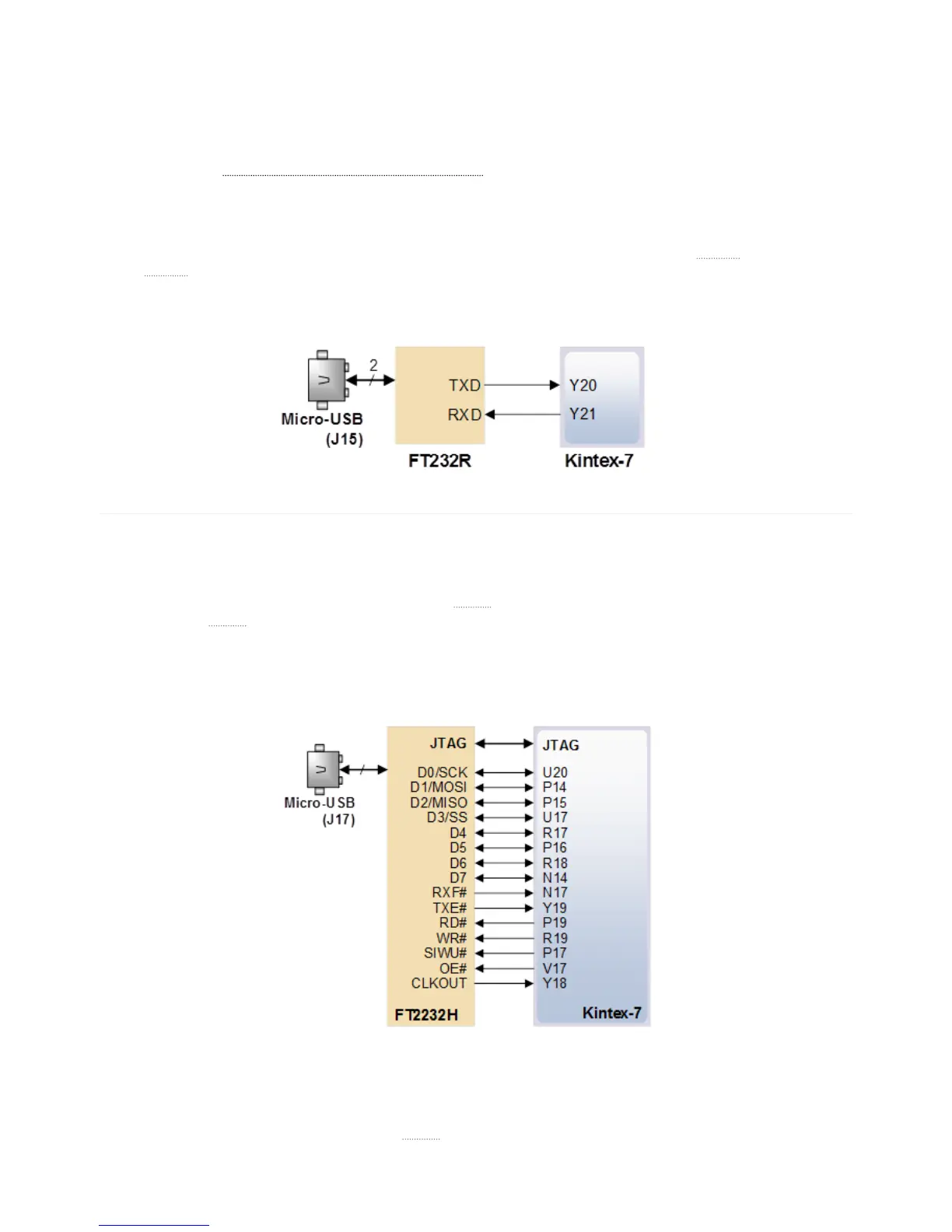
The Genesys 2 includes an FTDI FT232R USB-UART bridge (attached to connector J15) that lets you use PC applications to
communicate with the board using standard Windows COM port commands. Free USB-COM port drivers, available from
Windows Update or
www.ftdichip.com (http://www.ftdichip.com) under the “Virtual Com Port” or VCP heading, convert USB
packets to UART/serial port data. Serial port data is exchanged with the FPGA using a two-wire serial port (TXD/RXD) with
no handshake signals. After the drivers are installed, I/O commands can be used from the PC directed to the COM port to
produce serial data traffic on the Y20 and Y23 FPGA pins.
Two on-board status LEDs provide visual feedback on traffic flowing through the port: the transmit
LED () (LD13) and the
receive
LED () (LD12). Signal names that imply direction are from the point-of-view of the DTE (Data Terminal
Equipment), in this case the PC.
The connections between the FT232R and the FPGA are shown in Figure 8.
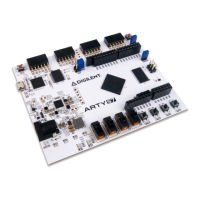
The Genesys 2 provides two interface types that can be used to transfer user data between a PC and an FPGA design. Both of
the interfaces have a software component, a Digilent Adept
API () and a physical interface between the FPGA and the USB
controller. Calling
API () functions on the PC will either present or request data on the FPGA pins according to the chosen
protocol. The functionality is implemented using the on-board dual-port FT2232 USB controller. One port is used exclusively
for JTAG, while the other either DPTI or DSPI. Since the interfaces share pins, DPTI and DSPI cannot be used
simultaneously.
DPTI is an 8-bit wide parallel FIFO-style data interface. It offers higher bandwidth than DSPI. In FTDI-terminology, DPTI is
equivalent to “FT245-style Asynchronous or Synchronous FIFO Interface”. It is available in both synchronous and
asynchronous modes, configurable from the DPTI
API (). In synchronous mode, data transfer is timed by the clock provided
9. USB UART Bridge (Serial Port)
10. PC - FPGA Data Transfer (DPTI/DSPI)
10.1. Parallel Transfer Interface (DPTI)
Page 1
of 3


 To Next Page