PRODUCT GUIDE
Keypad | Basic & Advanced
4
Each lock can be set for either shared or assigned use functionality. Press
=
to check functionality. If in shared use, LED is red. If in
assigned use, LED is green.
Note: For assigned use functionality only
Make sure that the lock is set for assigned use functionality (a green LED will flash when
=
is pressed). Up to 20 user credentials (User
Codes and/or User Keys) may be assigned to each lock. Repeat the steps below for each credential that needs to be assigned to the
lock(s).
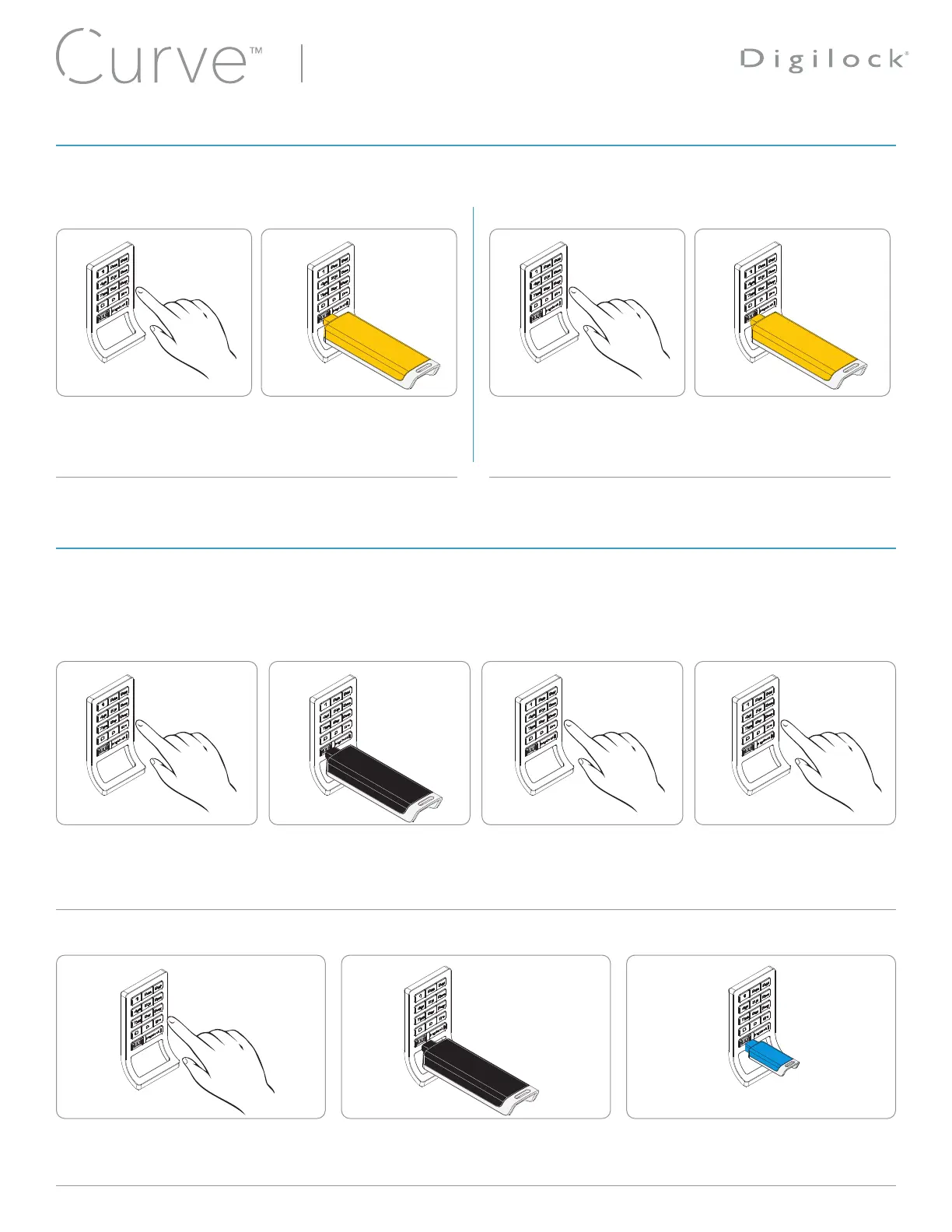
Assign User Keys
Assign User Codes
Press
= ` 55 `
.
The LED will turn on.
Insert a valid Manager Key.
A two-tone beep will be heard.
Press
=
[new 4-7 digit code]
`
.
A two-tone beep will be heard.
Press
=
[same 4-7 digit code]
`
.
Two sets of two-tone beeps will
be heard and the LED will turn
off.
Press
= ` 55 `
.
The LED will turn on.
Insert a valid Manager Key.
A two-tone beep will be heard.
Insert a User Key.
Two sets of two-tone beeps will be heard
and the LED will turn off.
To Set for Assigned Use To Set for Shared Use
Press
= ` 65 `
.
The red LED will turn on
Insert the Programming Key.
A two-tone beep will be heard
and the green LED will flash
once..
Press
= ` 56 `
.
The green LED will turn on.
Insert the Programming Key.
A two-tone beep will be heard
and the red LED will flash once.
1 2 3
31 2
4
11 2
2
PROGRAMMING INSTRUCTIONS - SET LOCK FUNCTIONALITY
PROGRAMMING INSTRUCTIONS - ASSIGN USER CREDENTIALS










 To Next Page