42
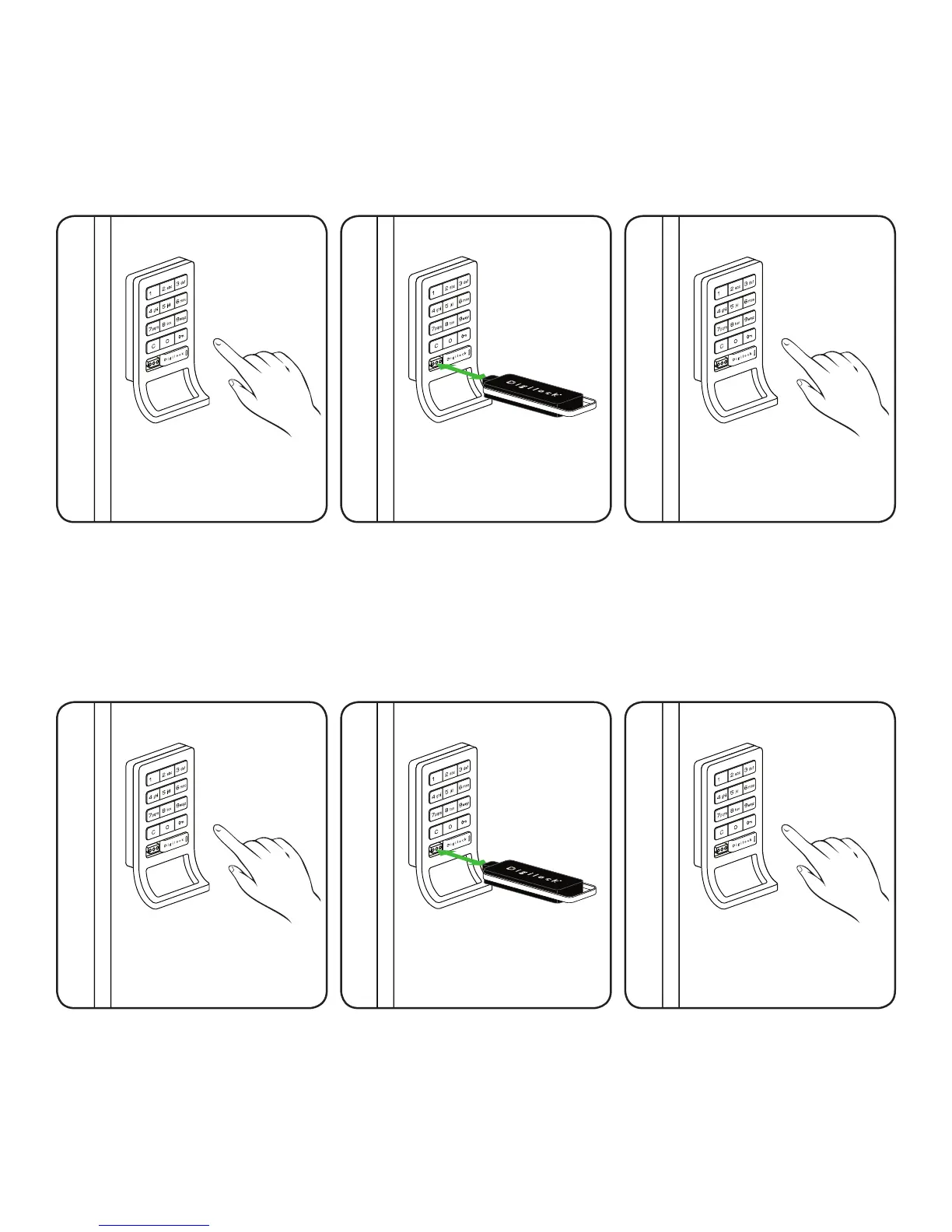
LED light Function
The purpose of the LED light is to provide a usage indicator for when the locks are being used in a
shared use environment. In the event that the lock(s) are assigned to one user (converted to assigned
use) it is advisable to disable the LED light with a registered Manager Bypass Key in order to extend
the battery life.
Press: = then `
1
Press the 0 to disable the Flashing
LED light feature
then press: `*.
A two tone beep will be heard and
the LED light will turn off.
3
Press the 9 to enable the Flashing
LED light feature then press: `*.
A two tone beep will be heard and
the LED light will turn off. Enabling
the LED light will also disable the
Automatic Unlock (see page 41).
3
Press: = then `
1
Touch a registered Manager Bypass
Key (Black) to the key slot of the lock
for one full second.
A two tone beep will be heard and the
LED light will turn solid.
2
Touch the Manager Key (Black) to
the key slot of the lock for one full
second.
A two tone beep will be heard and
the LED light will turn solid.
2
To Disable the Flashing LED light
To Enable the Flashing LED light
*
Advanced Security locks do not require the ` to be pressed.


 To Next Page