Key Managed
Bolt Mechanism
Product Guide
Phone: 707 766 6000
www.digilock.com | sales@digilock.com
121615
PG-NXT-UKK-ADS-DEN
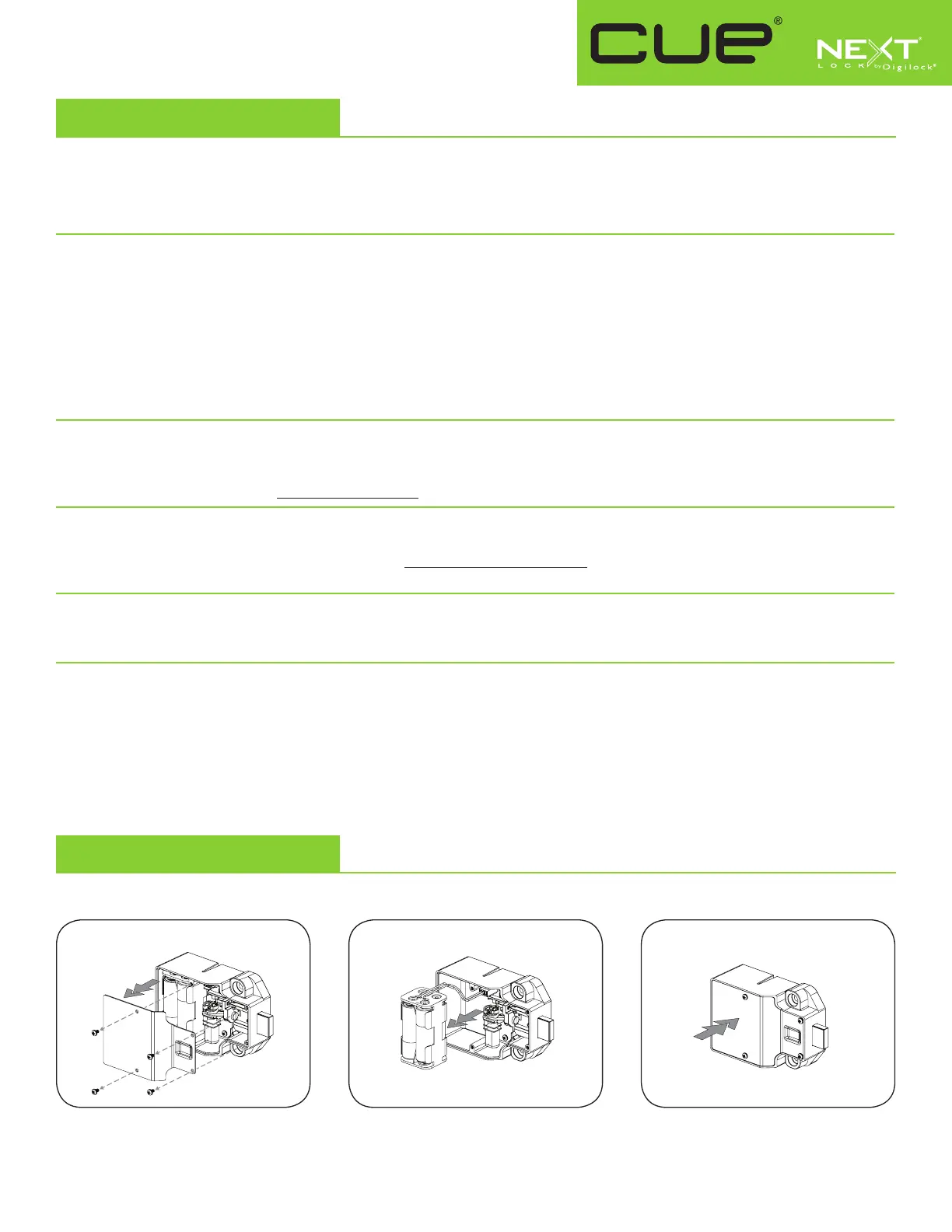
Battery Replacement
Support
It is not necessary to uninstall the lock from the door.
Remove the screws and the cover plate. Pull the battery pack from the rear
housing. Replace with four premium
alkaline AA batteries.
Place the battery pack back into the rear
housing and screw cover plate in place.
Sleep Mode
After▪three▪consecutive▪incorrect▪User▪Code▪entries▪to▪unlock,▪the▪lock▪will▪go▪into▪“Sleep▪Mode”▪for▪one▪minute▪and▪
for▪an▪additional▪minute▪for▪each▪subsequent▪incorrect▪entry.▪The▪keypad▪is▪disabled▪while▪in▪“Sleep▪Mode”.
Error Condition Indicator
10 rapid beeps:
The▪lock▪is▪binding▪which▪means▪that▪either▪door▪alignment▪or▪items▪in▪the▪locker▪are▪preventing▪the▪lock▪from▪operating.▪
Press▪on▪the▪door▪while▪operating▪the▪lock.▪If▪error▪condition▪persists,▪contact▪Digilock▪support▪for▪assistance.
2 sets of three beeps:
The▪batteries▪are▪low.▪Replace▪the▪batteries.
1 beep:
The▪lock▪does▪not▪recognize▪the▪User▪Code,▪User▪Key,▪Programming▪Key,▪or▪Manager▪Key.
Does not Unlock with the User Code or User Key
The▪lock▪does▪not▪recognize▪the▪User▪Code▪or▪User▪Key.▪For▪immediate▪access,▪operate▪with▪a▪registered▪Manager▪Key.▪If▪in▪
assigned▪use▪functionality,▪follow▪Assign▪User▪Credential▪instructions▪to▪assign▪a▪new▪User▪Code▪or▪User▪Key▪to▪the▪lock.
Does not operate with a Manager Key
The▪lock▪does▪not▪recognize▪the▪Manager▪Key.▪Follow▪Register/Add▪Manager▪Key(s)▪instructions▪to▪register▪the▪Manager▪
Key▪to▪the▪lock.▪For▪immediate▪access,▪operate▪with▪another▪registered▪Manager▪Key▪or▪with▪the▪Programming▪Key.
Does not operate with the Programming Key
The▪lock▪does▪not▪recognize▪the▪Programming▪Key.▪Contact▪Digilock▪support.
No Audible Feedback when = is Pressed
▪ The lock may be in “Sleep Mode”. For immediate access, operate with a registered Manager Key.
▪ The batteries may need to be replaced. Operate with the Manager Key to unlock then replace the batteries.
▪ The front unit may not be properly connected to the rear unit. Remove the lock from the door and check the cable connection.
▪ If error condition persists, contact Digilock support.
1 2 3



 To Next Page