Produ
ct Guide
Keypad
Shared & Assigned Use Functionality
5
Programming Instructions
Express Register User Credentials and Manager Keys
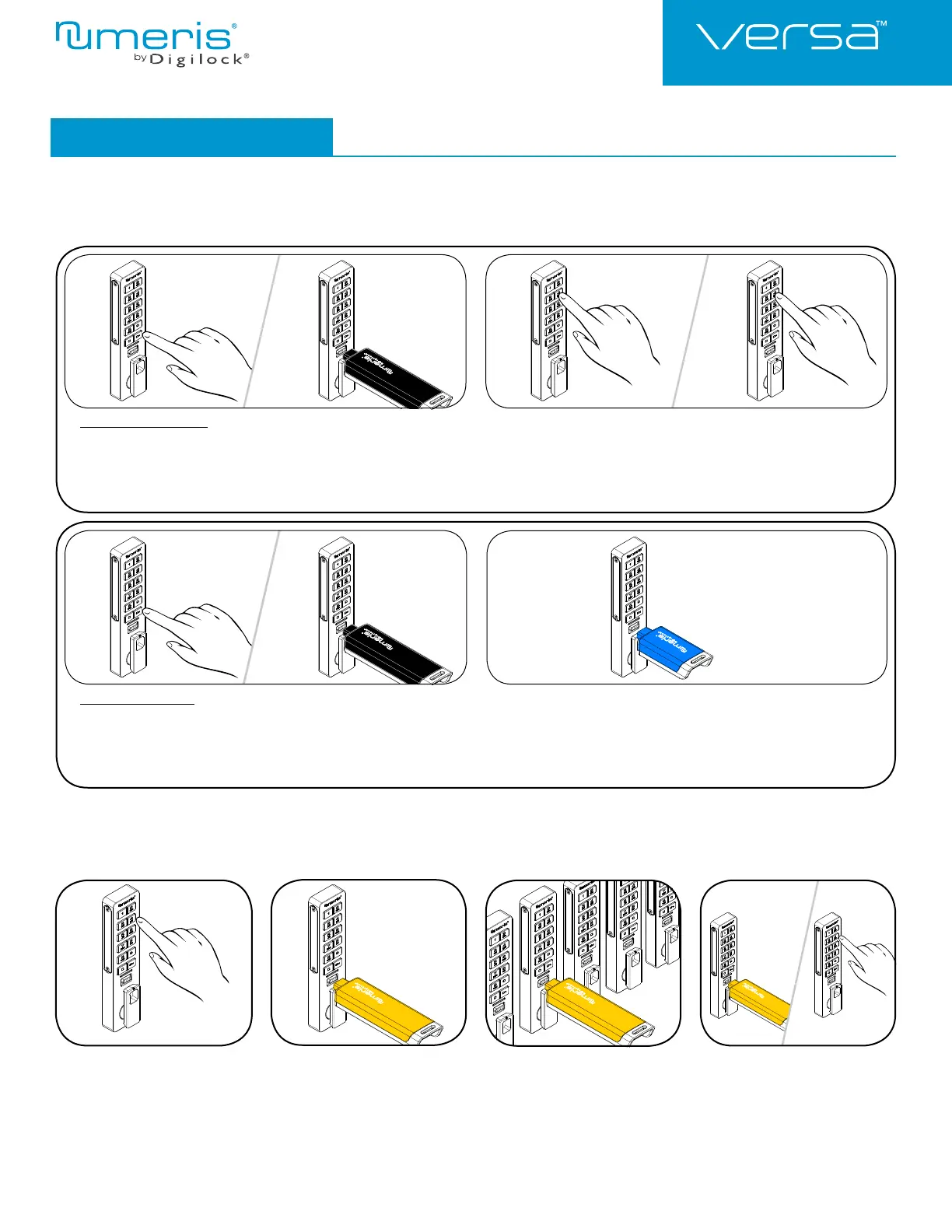
Make sure the lock is set for assigned use functionality (a green LED will fl ash when = is pressed). The Programming Key can quickly
program multiple locks to operate with the same user credentials and Manager Keys.
4a 4b3
Go to a lock already programmed
to operate with the user credentials
and Manager Keys.
Press = ` 66 `. The LED
will turn on.
Insert the Programming Key.
A two-tone beep will be heard and
the LED will turn off.
Insert the Programming Key to
program each lock to operate
with the same user credentials and
Manager Keys.
Two sets of two-tone beeps will be
heard and the LED will fl ash twice to
indicate successful programming.
End express registration mode.*
Go to any programmed lock.
Press = ` then insert the
Programming Key.
Press = ` then insert the
Programming Key again to return
the bolt to the original position.
*The Programming Key will continue to function in express registration mode until it is used to operate a lock.
1a
1a
2a
2
2b
1b
1b
Assign User Credentials (for assigned use functionality only)
Make sure that the lock is set for assigned use functionality (a green LED will fl ash when = is pressed). Up to 20 user credentials (User Codes and/or User
Keys) may be assigned to each lock.
Assign User Codes:
Press =` 55 `.
The LED will turn on.
Insert a valid Manager Key.
A two-tone beep will be heard.
Press =
[new 4-7 digit code]
`. A two-tone beep will be heard.
Press =
[the same 4-7 digit code]
`.
Two sets of two-tone beeps will be heard and the LED will turn off.
Assign User Keys:
Press =` 55 `.
The LED will turn on.
Insert a valid Manager Key.
A two-tone beep will be heard.
Insert a User Key.
Two sets of two-tone beeps will be heard and the LED will turn off.
12










 To Next Page