Produ
ct Guide
Keypad
Shared & Assigned Use Functionality
7
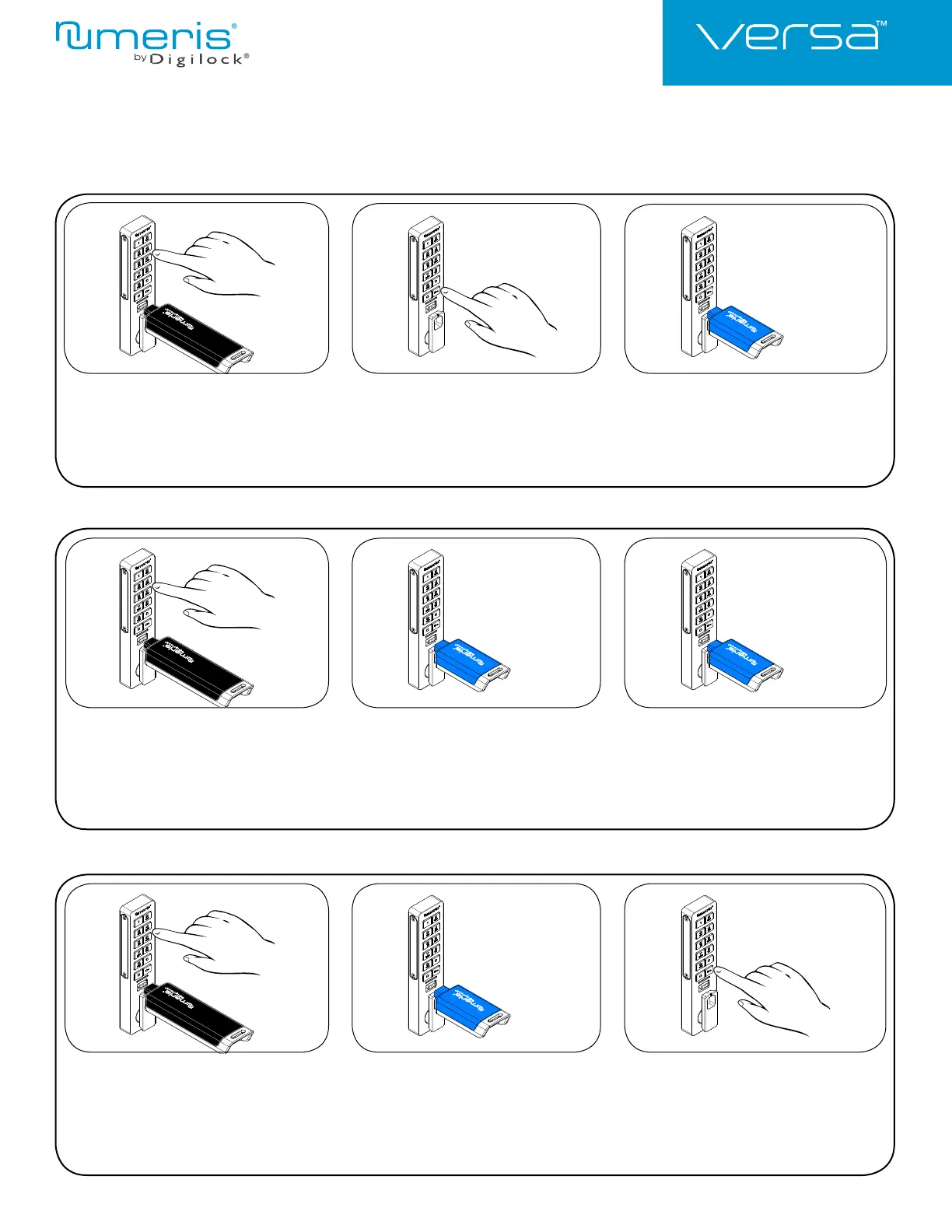
Replace a User Credential
123
Replace an Assigned User Code
with a New User Key:
Press = ` then insert a valid Manager Key.
A two-tone beep will be heard and the LED
will turn on.
Press
=
[assigned user code]
`.
A two-tone beep will be heard.
Insert a new User Key.
Two sets of two-tone beeps will be heard
and the LED will turn off.
Replace an Assigned User Key
with a New User Key:
Press = ` then insert a valid Manager Key.
A two-tone beep will be heard and the LED will
turn on.
Insert the assigned user Key.
A two-tone beep will be heard.
Insert a new User Key.
Two sets of two-tone beeps will be heard
and the LED will turn off.
123
Replace an Assigned User Key
with a New User Code:
Press = ` then insert a valid Manager Key.
A two-tone beep will be heard and the LED will
turn on.
Insert the assigned User Key.
A two-tone beep will be heard.
Press =
[new 4-7 digit user code]
`
=
[the same 4-7 digit user code]
`.
Two sets of two-tone beeps will be heard
and the LED will turn off.
123










 To Next Page