Produ
ct Guide
Keypad
Shared & Assigned Use Functionality
6
Programming Instructions - In Assigned Use Functionality
094361
28643
139567
811254
5379
6924
1
3
2a
4
2b
Remove User Credentials
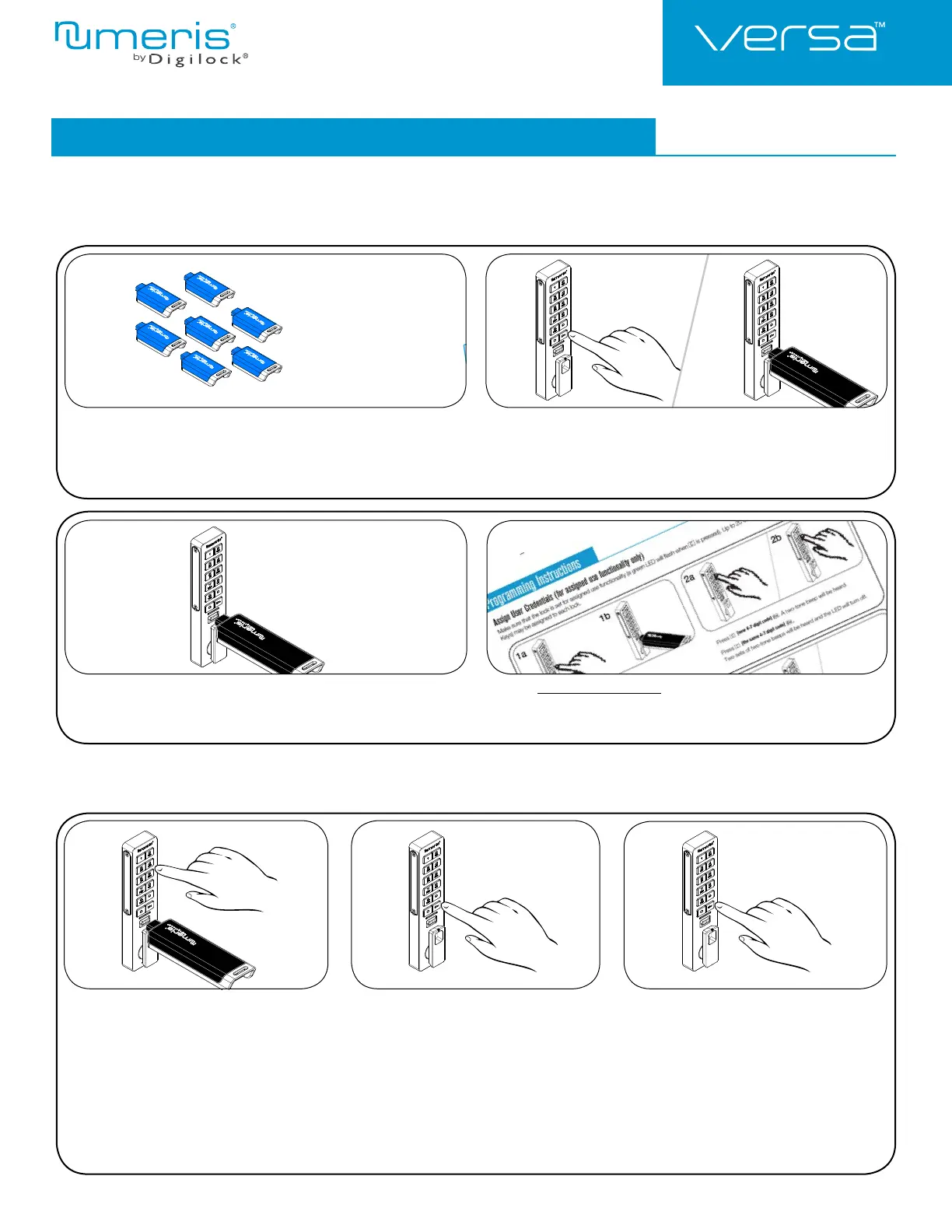
Make sure the lock is in assigned use functionality (a green LED will fl ash when = is pressed). The locks must be reprogrammed to remove
user credentials from operating a lock.
Collect all remaining and replacement user credentials
(User Codes and User Keys).
Press =` 55 `.
The LED will turn on.
Insert a valid Manager Key.
A two-tone beep will be heard.
Insert the Manager Key again.
Three sets of two-tone beeps will be heard and the LED will turn off. All
previously assigned user credentials will be removed.
Follow Assign User Credentials instructions to assign the remaining and
replacement user credentials to the locks.
123
Replace an Assigned User Code
with a New User Code:
Press = ` then insert a valid Manager Key.
A two-tone beep will be heard and the LED will
turn on.
Press =
[assigned user code]
`.
A two-tone beep will be heard.
Press
=
[new 4-7 digit user code]
`
=
[the same 4-7 digit user code]
`.
Two sets of two-tone beeps will be heard
and the LED will turn off.
Replace a User Credential










 To Next Page