81 | Chapter 2: ACS Client Software User Manual
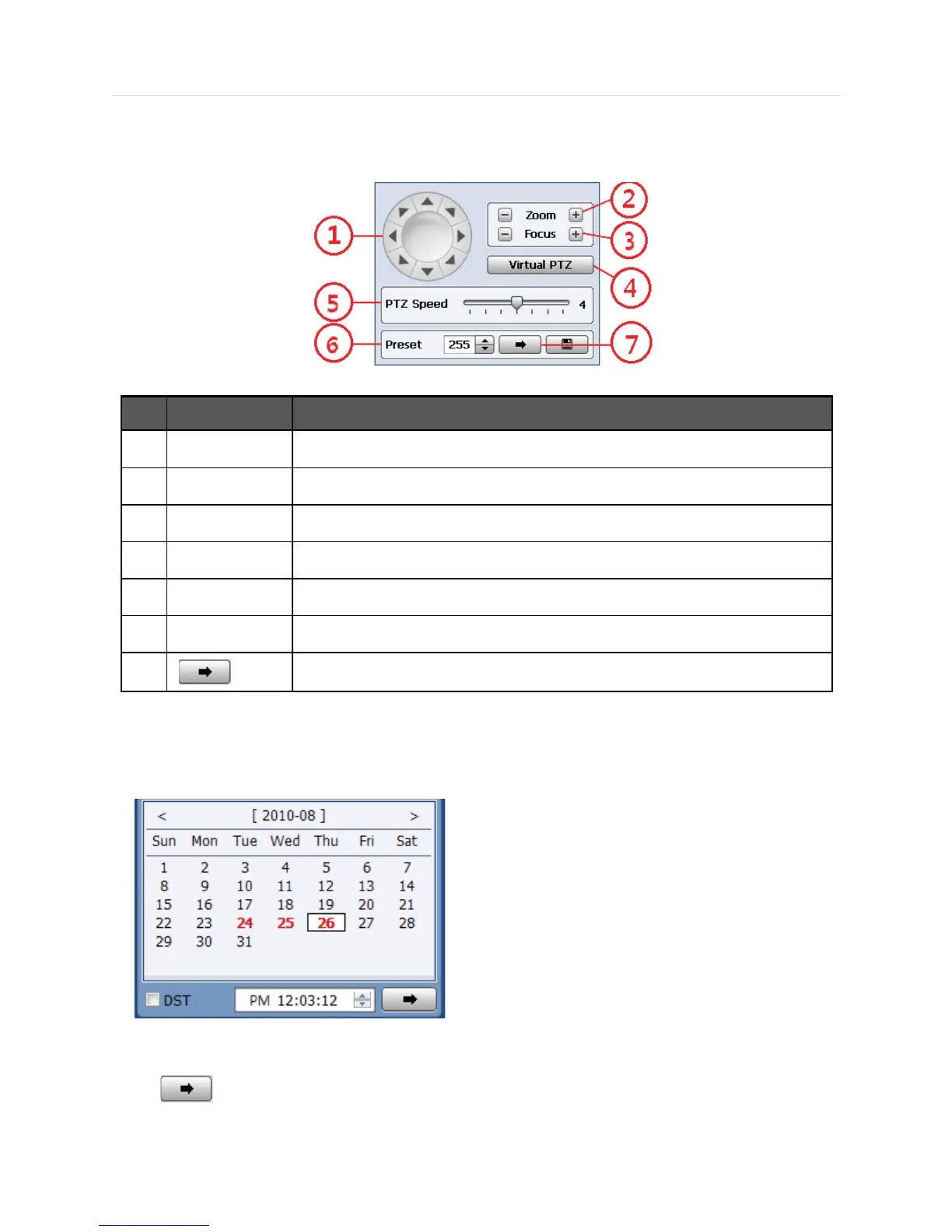
5.4.5 PTZ Control Panel
PTZ Camera Control in Live Mode
No. Button
Description
1 Directional Arrows Move PTZ Cameras in 8 directions.
2 ZOOM Zoom In (+) & Zoom Out (-)
3 FOCUS Focus In (+) & Focus Out (-)
4 Virtual PTZ Click button to use mouse to control PTZ cameras.
5 PTZ Speed PTZ moving speed can be operated by the control bar.
6 PRESET Select Preset
7
Go to the Preset location.
5.4.6 Calendar Panel
Calendar Panel is only available in search mode.
x The date is emphasized in red if record data exist.
x Should be pressed to start playback from the selected time.
x If DST is enabled, the earlier of the overlapped video will play first.



 To Next Page