Ascari MA12 -p. 22 -
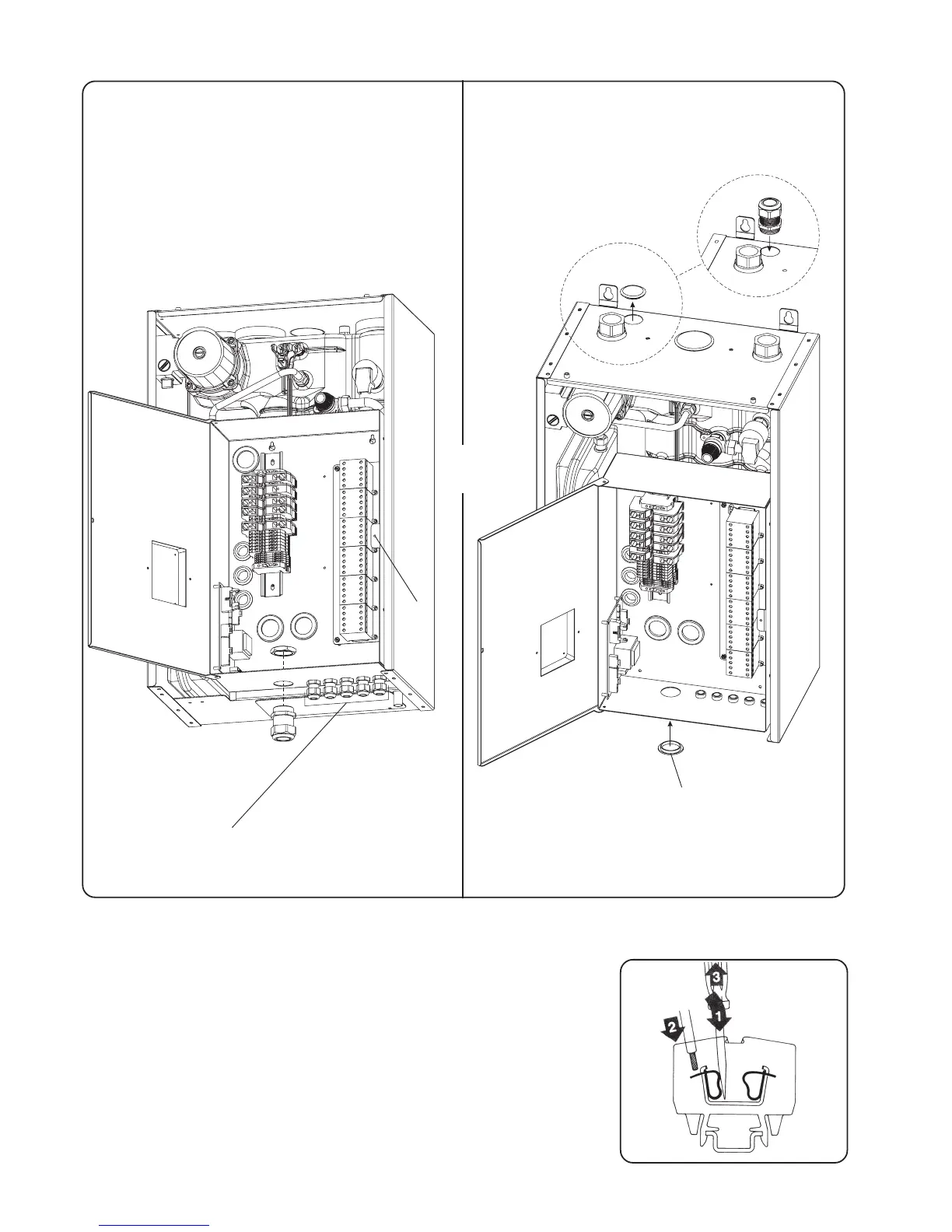
1:Introduce the blade of the driver into the opening located just
above or bellow the mark with a slight pivoting move to center.
2:Introduce the connector's terminal inside the cage.
3:Remove the screwdriver
2.14 - Power terminal
Connections are cage-clamp terminals, to be used as to follow :
- For accessories terminals use a 2,5 x 0,4mm blade screwdriver
- For power terminal use a 3,5 x 0,5mm or 5,5 x 0,8mm blade
screwdriver.
Screw A
5 self-sealing nuts for accessories connections
(Ambience thermostat, outside and/or Domestic Hot
Water sensor and remote cut-out)
Put the self-sealing nut (supplied with the boiler) for
connection to mains from the bottom of the casing.
or
Put the self-sealing nut (supplied with the boiler) for
connection to mains from the top of the casing. In
this case remove the plastic cap and close the hole
below casing using same.
Plastic cap moved from top
to bottom


 To Next Page