9
TROUBLESHOOTING
The product has been designed to highlight particular errors by ashing the on board LED lights. The lights will ash
a number of times corresponding to the error that is occurring. Please see the table below for the explanation of the
errors.
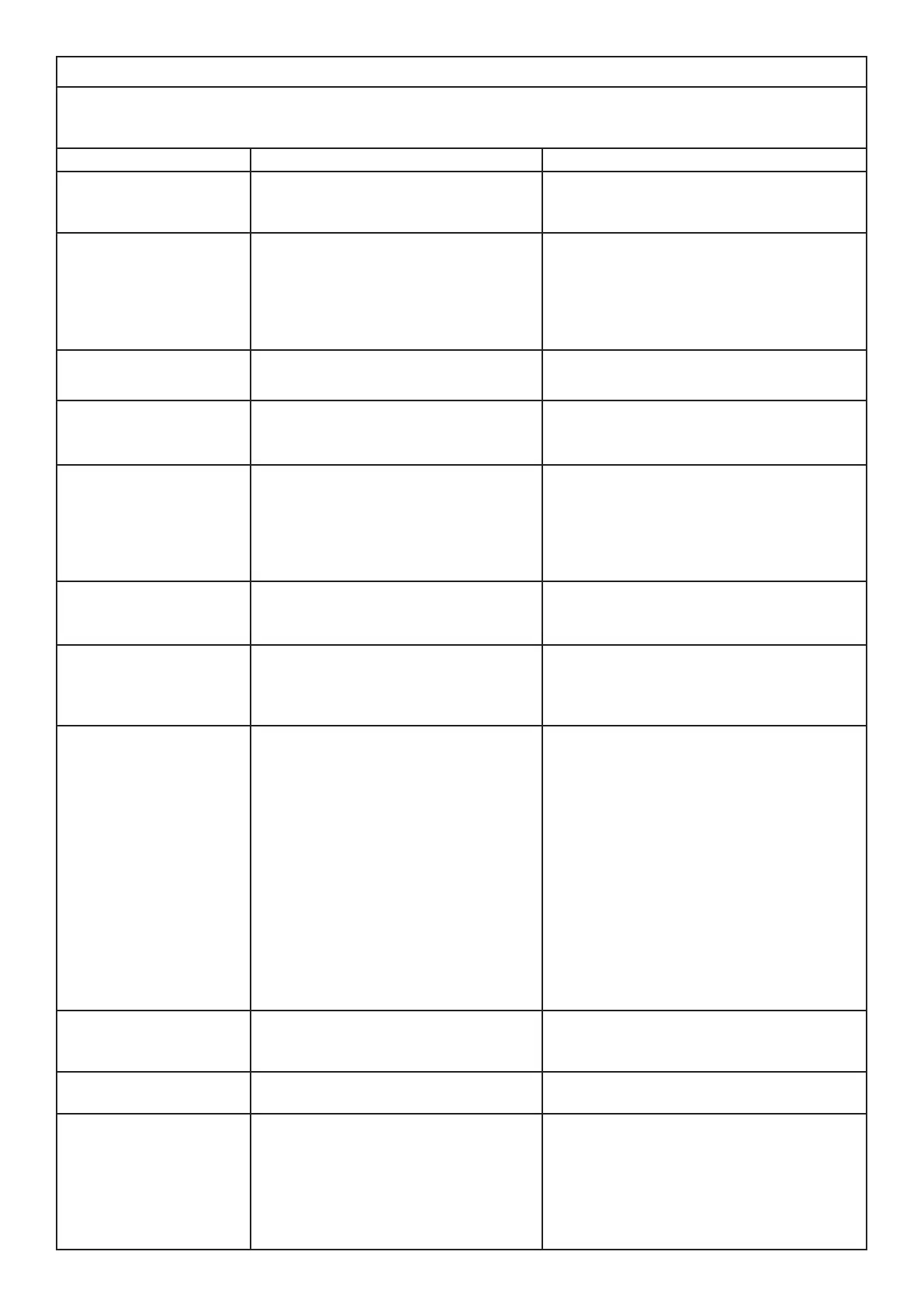
Symptom Cause Corrective Action
Product will not operate. Electrical connection issue
Product not switched on
Ensure product has working electrical con-
nection.
Ensure mains rocker switch on (Fig 10A)
Product will not operate.
The LED fuel bed only op-
erates.
Low water reading
Product is not level
Rell the water tank(s) of the product. See
“Filling the Water Tanks” above.
Ensure the product is level by checking the
on-board level.
LEDs blink twice and prod-
uct beeps twice
Product is approaching low water Rell the water tank(s) of the product. See
“Filling the Water Tanks” above.
Product will not operate.
LEDs continuously blink
twice on one side
Low water reading on side that is blinking Rell the water tank(s) of the product. See
“Filling the Water Tanks” above.
Product will not operate.
LEDs continuously blink
three times
Time from max level to min level is too
short.
Conicting water level readings (min and
max level being read at the same time.)
Ensure there are no leaks in the sump.
Ensure that the oats are moving freely within
the sump.
Ensure the product is level.
Product will not operate.
LEDs continuously blink
four times
Fill time from min to max level has been
exceeded
Rell the water tank(s) of the product. See
“Filling the Water Tanks” above.
Product will not operate.
LEDs continuously blink
once every 8 seconds on
one side
Overow Detection on side that is blink-
ing
Switch o the product and the water supply.
Contact your dealer for assistance.
Little or No Mist Genera-
tion
Transducer not operating correctly
Transducer is dirty
Transducer is not sitting correctly in sump
Fan is obstructed or blocked
Nozzle is not on sump correctly
Nozzle is blocked
Check operation of transducer
Clean sump and transducer thoroughly
Switch o product, take nozzle o sump and
ensure transducer is tted in sump correctly
Remove air lter and clean. Ensure it is placed
back in product correctly.
Ensure Nozzle is sitting on sump correctly
Clean sump, transducer and nozzle thorough-
ly
The ame eect has too
much smoke.
Flame eect setting is too high Turn down the ame eect. Give the product
time to adjust to the new setting
Bluetooth Receiver stops
working
Loose connection Check connection to the receiver (Fig 7)
Remote Control stops
working
Bluetooth range issue
Bluetooth Receiver connection is loose
Remote control batteries need replacing
Check positioning of Bluetooth Receiver. En-
sure it is not encased in metal or concrete.
Check connection to the receiver (Fig 7)
Replace with new batteries of same type.







 To Next Page