19
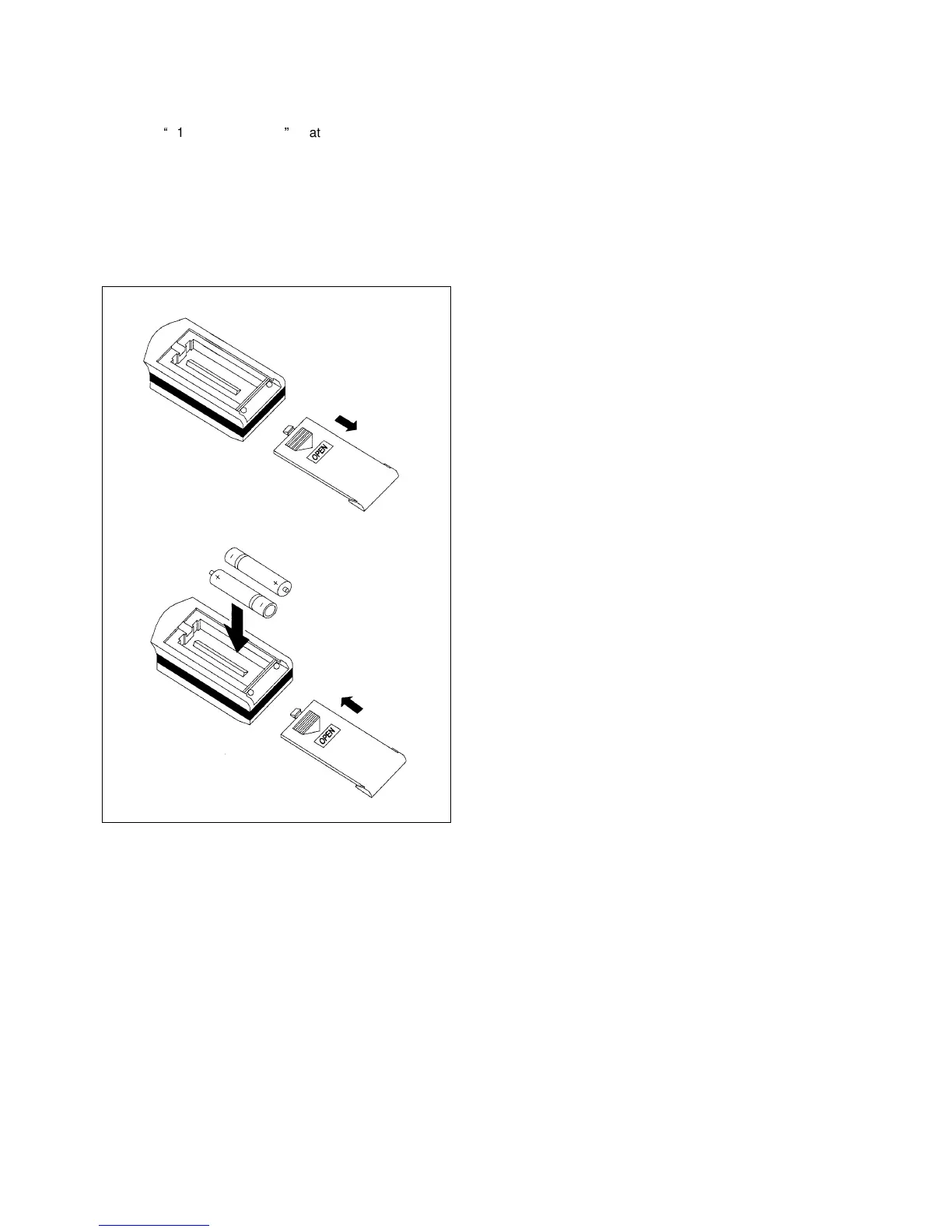
Inserting the batteries in the remote control
Remove the cover of the battery compartment.
Insert two
“
1.5 V MICRO AAA
”
batteries in the battery
compartment.
Observe the polarity (+/-) in the housing.
Replace the cover of the battery compartment.
Note:
Insert new batteries if the display of the remote control is
weak or flickers or cannot be seen at all.
Setting the time
Press the CLOCK (5) button.
The display (26) AM (before noon) or PM (afternoon)
flashes.
Set the current time with the TIME + (7) or TIME - (9)
buttons.
Briefly touching the buttons causes a change in 1-minute
increments.
Prolonged touch of the buttons causes a change in 10-
minute increments.
Press the CLOCK (5) button to store the set time.
Setting the fan speed
The fan speed can be set at three levels. The fan speed is
set with the FAN (12) button.
The fan speed cannot be changed in the dehumidifying
operating mode.
Press the ON/OFF (15) button to switch on the device.
Press the FAN (12) button once or several times until the
desired fan speed (18) is set.
Cooling
Press the ON/OFF (15) button to switch on the device.
Press the MODE (3) button once or several times until the
Cooling (31) display appears.
The desired room temperature can be set with the TEMP+
(13) and TEMP- (14) buttons.
Setting range: 16-30 °C, setting increments: 1 °C.
Dehumidification
Press the ON/OFF (15) button to switch on the device.
Press the MODE (3) button once or several times until the
Dehumidification (20) display appears.
The desired room temperature can be set with the TEMP+
(13) and TEMP- (14) buttons.
Setting range: 16-30 °C, setting increments: 1 °C.
In the Dehumidification operating mode, the fan works only
at a low speed to achieve optimal dehumidification.
Circulation mode
Press the ON/OFF (15) button to switch on the device.
Press the MODE (3) button once or several times until the
Circulation mode (23) display appears.
The desired room temperature can be set with the TEMP+
(13) and TEMP- (14) buttons.
Setting range: 16-30 °C, setting increments: 1 °C.
Heating
Press the ON/OFF (15) button to switch on the device.
Press the MODE (3) button once or several times until the
Heating (21) display appears.
The desired room temperature can be set with the TEMP+
(13) and TEMP- (14) buttons.
Setting range: 16-30 °C, setting increments: 1 °C.


 To Next Page
 Loading...