18
Operation
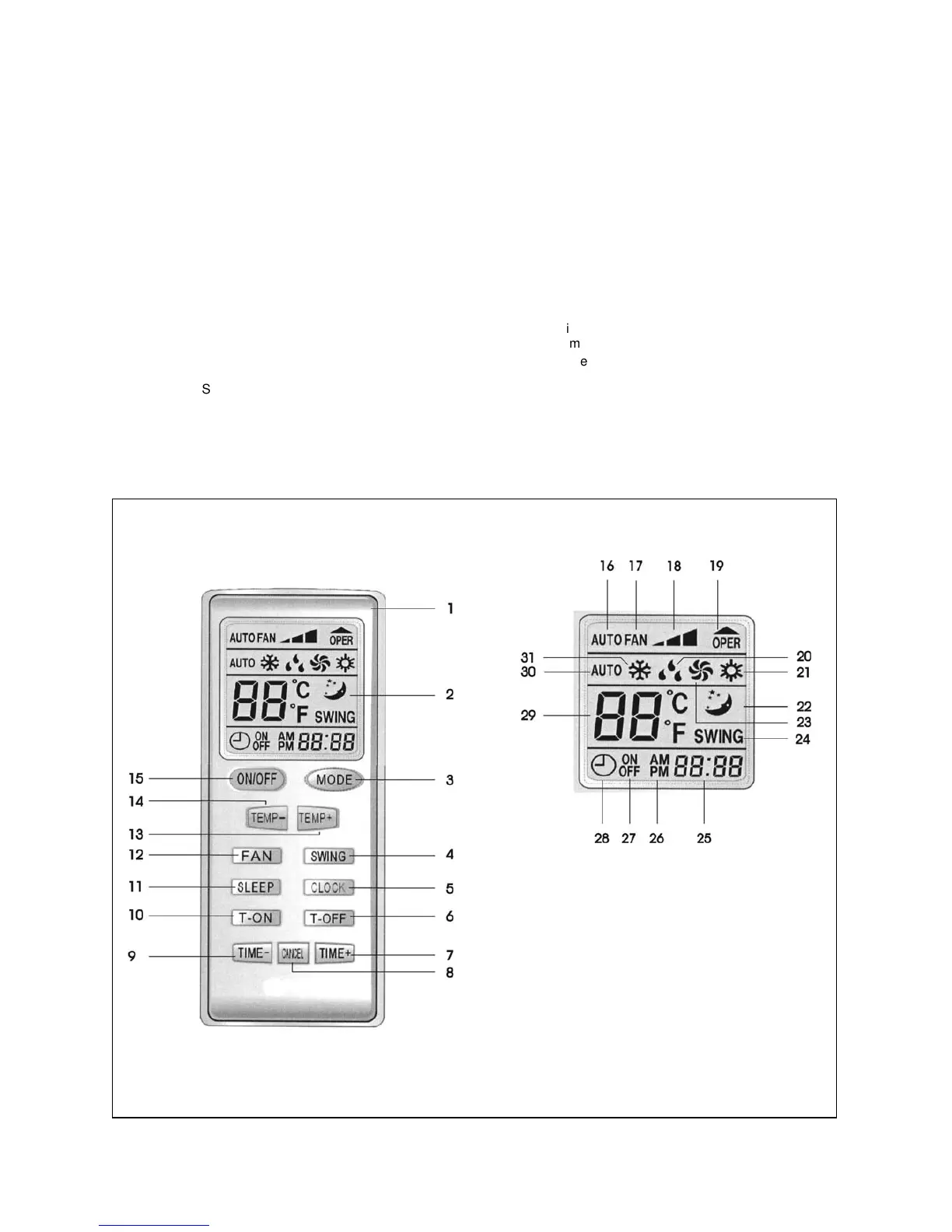
Function buttons of remote control
1 Remote control
2 Display window
3 Select operating mode
Automatic / Cooling / Dehumidifying / Circulation /
Heating
4 Swing operation On/Off
5 Setting the current time
6 Setting the timer function - switch-off time
7 Setting the time - increasing the time
8 Deactivating the timer function
9 Setting the time - reducing the time
10 Timer function - setting the switch-on time
11 Sleep function On/Off
12 Fan level –
Selecting the speed
13 Increasing the default room temperature
14 Decreasing the default room temperature
15 Operation On/Off
Operating display on the remote control
16 Fan speed is determined automatically
17 Fan on
18 Fan speed low / normal / high
19 Send - default is sent.
20 Dehumidifying operating mode
21 Heating operating mode
22 Sleep function set
23 Circulation operating mode
24 Swing operation ON display
25 Current time, set timer time
26 AM –
time before noon
PM –
time afternoon
27 ON –
time timer On
OFF –
time timer Off
28 Timer function activated
29 Room temperature default
30 Automatic operating mode
31 Cooling operating mode



 To Next Page