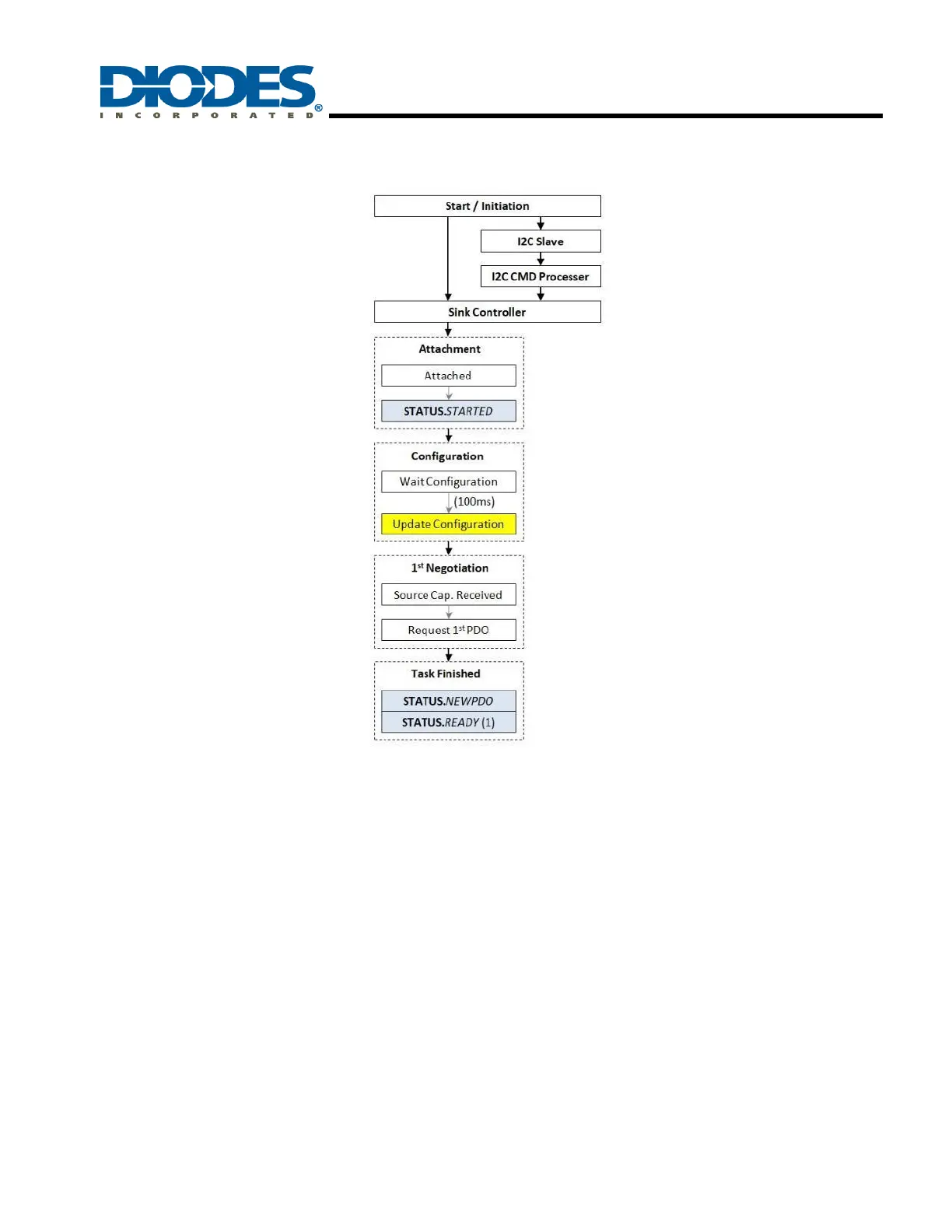
8.2 Firmware Startup Process
After the AP33772S is powered on, the firmware begins to initialize the sink controller and I2C slave state machine. When the sink controller
detects that the VBUS and Rp are attached, the STATUS.STARTED flag is set to 1 and the interrupt signal is triggered through INT pin to the
host MCU.
Once the AP33772S is started (STATUS.STARTED = 1), the host MCU can disable/enable specific modules based on the TCD requirements by
writing the configurable registers. Then 100ms after the AP33772S starts, the initial configuration is updated accordingly and the 1st negotiation
with the PD source begins.
After the 1st negotiation is completed, the source capabilities are stored in the SRC_SPR_PDO registers. If the PD source supports EPR mode,
the EPR source capabilities are stored in the SRC_EPR_PDO registers. Then the STATUS.NEWPDO flag is set to 1, indicating that the new
source capabilities have been received. The host MCU should read the SRCPDO register and generate a request message (PD_REQMSG)
based on the TCD requirements.
Finally, the STATUS.READY flag is set to 1, indicating that the startup process is completed and the host MCU can send requests thereafter.



 To Next Page