Chapter 4. EVB Quick Setup and Function Description
The AP33772S EVB provides users a convenient and flexible way to use power profile settings, as well as various status monitoring functions by
the host MCU in the TCD through simple I2C interface pins (SCL and SDA).
4.1 Quick Setup Guide
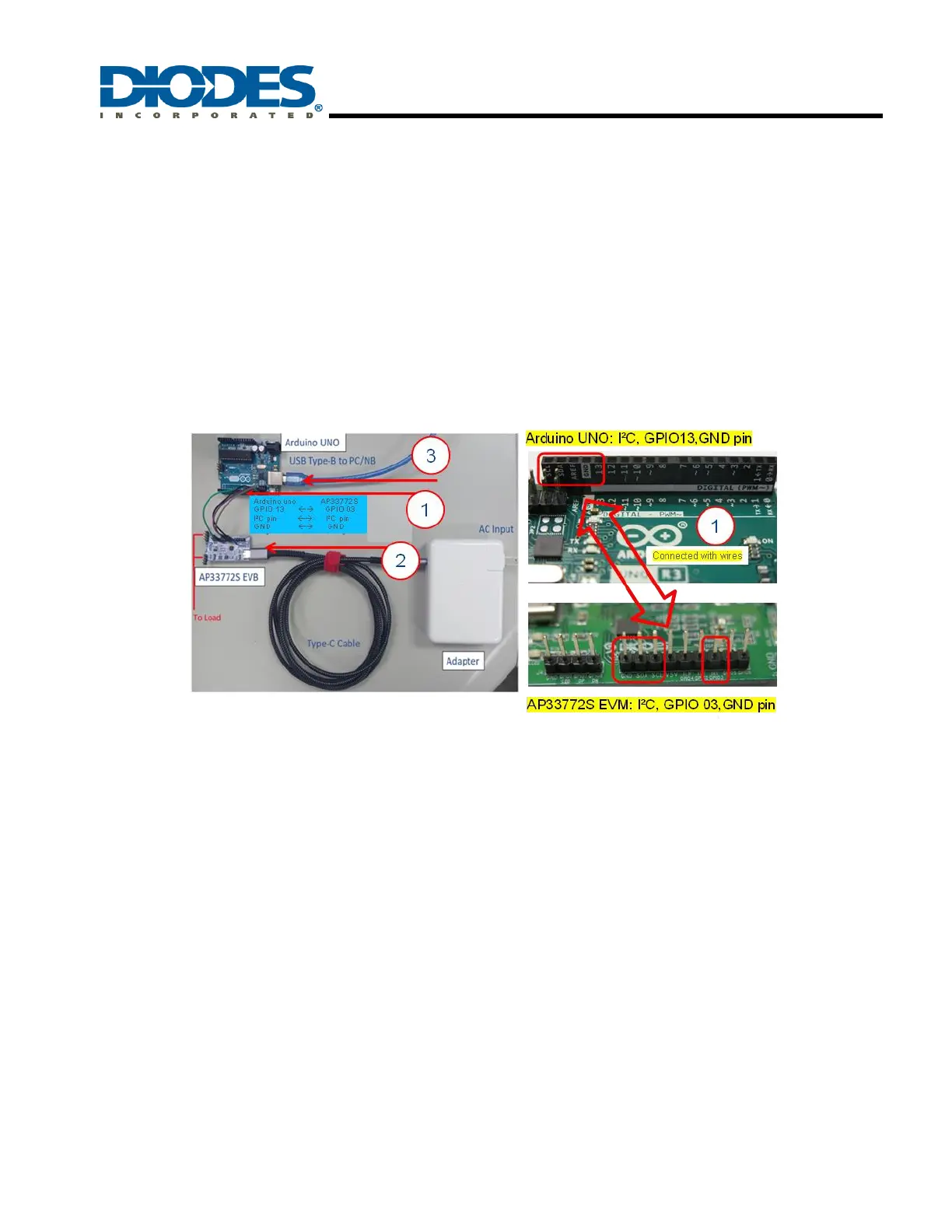
Hardware setup steps are shown in Figure 7.
Step1: Connect a Host System (using Arduino UNO for example) to the AP33772S EVB with the below pins.
Step 2: Connect the AP33772S EVB to a USB PD adaptor with a Type-C cable, and power on the AP33772S EVB.
Step 3: Connect the Arduino UNO board to a PC/NB with a Type-B cable, and power on the Arduino UNO board.
Figure 7 – AP33772S EVB Hardware Setup sequence
When using a Host System (single board computer or MCU-based system) with I2C interface pins (SDA, SCL) to connect to the AP33772S
EVB, please make sure to power the AP33772S EVB board first before applying power to the Host System. The AP33772S EVB’s power-
sequencing requirement (being powered up first) is necessary due to the I2C design for the SDA and SCL pins.
Arduino uno board AP33772S EVB
GPIO 13 pin → GPIO 03 pin
I²C pin (SDA, SCL) → I²C pin (SDA, SCL)
GND pin → GND pin



 To Next Page