AP33772S I2C USB PD Sink Controller
EVB User Guide
AP33772S EVB User Guide
Rev. 2.0
July 2024
© 2024 Copyright Diodes Incorporated. All Rights Reserved.
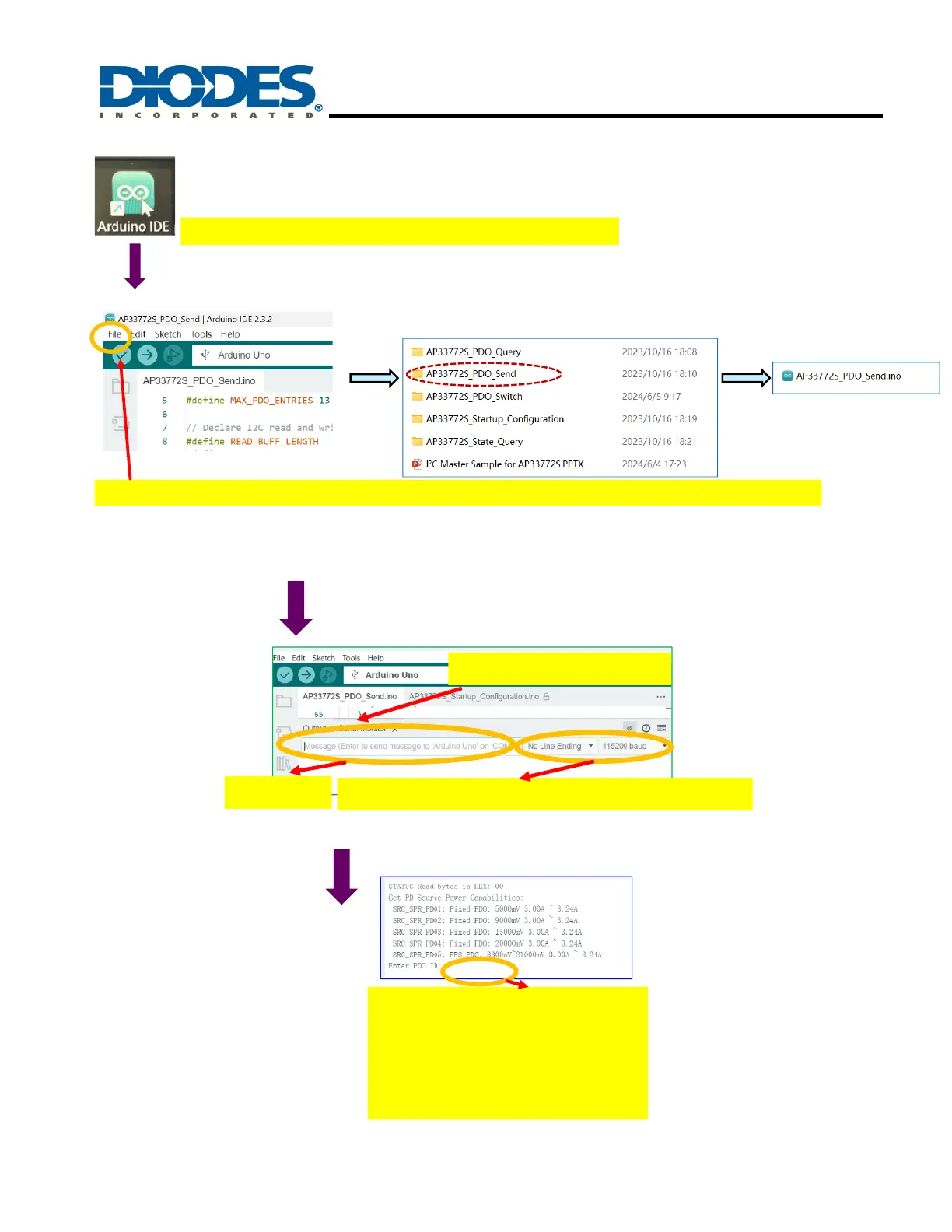
Click “ File”-> click “Open”-> click fold “AP33772S_PDO_Send”->select file ““AP33772S_PDO_Send.ino”
double-click the icon of Arduino on computer’s desktop
Step 1: Startup the GUI
Step 2: load the AP33772S PDO file
1. Click “Serial Monitor”
2.Select “No Line Ending” and “115200 Baud”
Step 3
3.Enter “r”
After Entering “r”, PD Source
Power Capabilities can be
selected as above, if you want to
choose PDO:
20000mV/3.00A~3.24A, You only
need to Enter PDO ID “4”
Step 4: select PDO



 To Next Page